Most DevSecOps implementations follow a predictable pattern: SAST scans during the PR review, dependency checks run in CI, DAST fires against a staging environment before the release. The pipeline turns green, the build goes out, and the security team breathes a sigh of relief.
Then, three weeks later, something gets exploited in production.
Not because nobody ran the scans. The scans ran fine. But the attack surface that matters in production is not the same as the attack surface that existed during the build. Zero-day vulnerabilities, business logic flaws that only appear under real traffic, third-party integrations that change behavior at scale. None of this shows up in a static analysis report. It shows up in your logs, if you’re lucky enough to detect it at all.
This article is for engineers who’ve already implemented shift-left practices and want to understand what comes next. Specifically: why runtime security is not a replacement for what you’ve built in CI/CD, but the layer that makes the whole pipeline coherent.
What DevSecOps Actually Means in 2026
DevSecOps is the practice of embedding security controls, testing, and accountability into every phase of the software development lifecycle not just at the end before a release. The original insight behind the movement was simple: security bugs are dramatically cheaper to fix when they’re caught at commit time than when they’re caught post-deployment.
That insight drove a decade of tooling improvements. SAST (Static Application Security Testing) tools now integrate directly with IDEs and pull request workflows. Software Composition Analysis (SCA) catches vulnerable dependencies before they’re shipped. Secret detection prevents credentials from ever reaching a repository. Dynamic testing runs automatically against ephemeral environments. The shift-left philosophy produced real results.
But it also produced a subtle blind spot. By optimizing so heavily for the CI/CD phase, teams started treating security as a pre-deployment concern. The mental model became: if the pipeline is green, the application is secure. That’s not a statement anyone would defend explicitly. It’s baked into how most pipelines are designed.
The production environment is not a static snapshot of what the build scanned. It’s a living system.
The Gap DevSecOps Left Open
Consider what SAST can and cannot detect. A static analysis tool reads your source code, models potential data flows, and flags patterns that could indicate a vulnerability. It’s genuinely useful. SAST can catch SQL injection patterns before they’re deployed, flag deprecated cryptographic functions, and identify obvious path traversal issues.
What it cannot do: observe what happens when an attacker sends a crafted payload to your /api/v1/users endpoint at 2 AM on a Tuesday. It cannot see that a new third-party library your team added in a hotfix last week changed the behavior of an ORM in a way that introduces injection risk under a specific query pattern. It cannot know that a logic bug in your authentication flow only manifests when session tokens expire under concurrent load.
DAST gets closer to real-world conditions by sending actual requests against a running application. But DAST typically runs against staging environments, with sanitized data, within an authorized testing window. Attackers don’t operate within authorized testing windows.
The gap is not a failure of tooling. It’s a structural problem: the pipeline ends at deployment, and everything that happens afterward is treated as an operations concern rather than a security concern. In practice, most “operations” teams don’t have the context to distinguish an anomalous API call from normal traffic.
Production is where exploits happen. And production has historically been the least-instrumented part of the pipeline from a security standpoint.
Shift-Everywhere: Adding the Runtime Layer
The response to this gap has generated a lot of terminology: “shift-right,” “shift-everywhere,” “continuous security monitoring.” The concepts vary in nuance, but they share a common observation: the pipeline needs a security layer that operates in production, not just pre-deployment.
When teams start looking for runtime security tools, they typically encounter two different categories that are often conflated.
The first is infrastructure-level runtime security: tools like Falco, Sysdig, or Tetragon that operate at the kernel or container orchestration layer. These tools watch system calls, monitor process behavior, and detect anomalies in how containers and nodes behave. They’re useful for detecting threats to your infrastructure: unexpected privilege escalations, suspicious network connections, container breakouts.
But they don’t see inside your application. They can tell you that a process made an unusual system call. They cannot tell you that a specific SQL query in your application layer was modified by an injection attack, or that a request to your API included a payload that exploited a parameter the WAF didn’t catch.
The second category is application-level runtime security, specifically Runtime Application Self-Protection (RASP). A RASP agent operates from inside the application itself, at the instrumentation layer. It intercepts function calls, database queries, and system operations at the exact moment they execute not at the network perimeter, not at the kernel level, but inside the application code.
RASP security doesn’t pattern-match against incoming HTTP requests. It intercepts the actual SQL statement before it executes, the actual command before Process.Start() runs, the actual file path before the filesystem access happens. The result is two things that matter operationally: dramatically fewer false positives (because the tool knows exactly where and how an input impacts code), and complete forensic context (line of code, method, payload, confidence level) rather than just a logged IP address.
These two categories solve different problems. Infrastructure runtime security protects your cluster. Application runtime security protects your code.
Most DevSecOps pipelines have some version of the former. Very few have the latter.
How Runtime Protection Fits in the DevSecOps Pipeline
A complete DevSecOps pipeline, treated as a continuous loop rather than a linear sequence, has roughly three security phases:
CI stage (code analysis). SAST runs against every commit and pull request, catching vulnerabilities in your own code. SCA identifies risks in dependencies. Secret detection prevents credential leakage. This is the shift-left foundation.
CD stage (pre-deployment verification). DAST scans a running instance of the application, IAST instruments test runs to observe runtime behavior in a controlled environment, and infrastructure-as-code scanners verify that deployment configurations don’t introduce misconfigurations.
Production stage (runtime protection). This is where most pipelines have a gap. The application is running, serving real users, exposed to real attackers. The SAST findings from the CI stage are now sitting in a backlog, prioritized by severity scores that were calculated without any information about whether those vulnerabilities are actually being targeted in the wild.
RASP fills the production stage. But the more interesting value is what happens when you close the loop between the production stage and the CI stage.
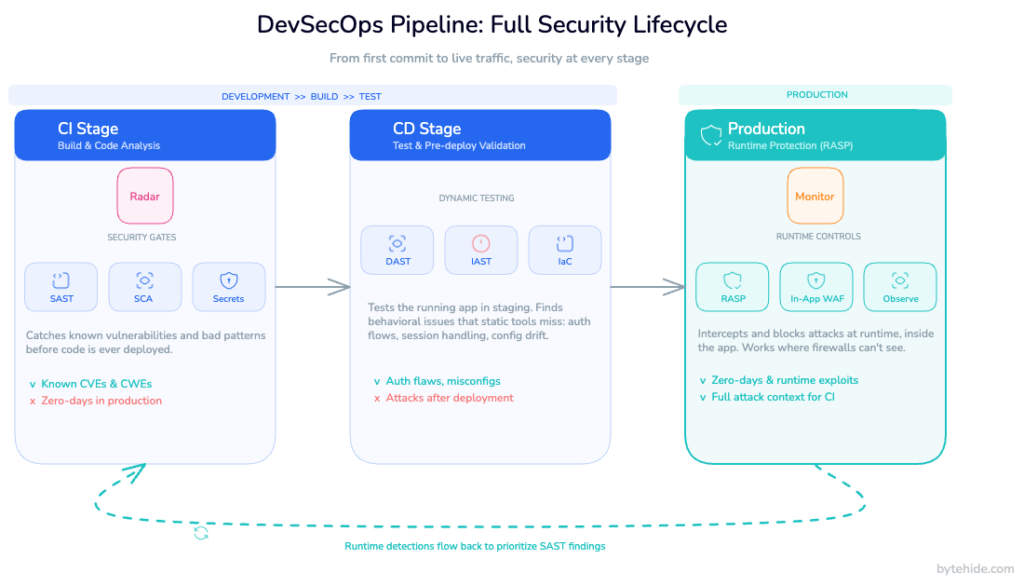
Imagine this scenario: Radar (SAST) scans your codebase and flags a SQL injection risk in a user-facing endpoint. The team assesses the finding, assigns it a “medium” severity, and adds it to the backlog. Two weeks later, Monitor (RASP) detects an actual exploitation attempt targeting exactly that endpoint in production. The injection didn’t succeed because Monitor intercepted it at the database layer. But now you have something SAST didn’t give you: evidence that this specific vulnerability is being actively targeted.
That changes the calculus. A “medium” finding with no real-world exploitation pressure is a lower priority than a “medium” finding that an attacker probed twice last Thursday. The production data retroactively upgrades the backlog item from “fix when we have time” to “fix before the weekend.”
This feedback loop is what distinguishes a security program that keeps getting smarter from one that just keeps generating findings.
Implementing RASP in a DevSecOps Pipeline Without Breaking the Pipeline
One of the reasons RASP adoption has been slower than SAST adoption is the perception that it requires invasive instrumentation code changes, performance overhead, complex configuration. That perception is outdated, but it’s still common.
Modern RASP solutions are designed to be integrated at the build stage, not the development stage. The agent injects into the application binary during the build process. Developers don’t write security code. They don’t modify existing logic. The build pipeline produces a protected binary, and that binary goes through CD exactly as it would without RASP.
In terms of pipeline integration, this means adding RASP injection as a build step, configuring protections from a dashboard rather than in code, and relying on cloud-synced configuration updates to adjust protection rules without redeployment.
For teams using ByteHide Monitor, the workflow looks like this in practice: protections are configured in the cloud dashboard (which interceptors to enable, what actions to take on detection, which IP ranges or bot categories to block). Those settings sync to the application instance in real time. An update to your firewall rules doesn’t require a new build, a PR review, or a deployment window.
The performance overhead is a genuine consideration for latency-sensitive applications. The interceptors that matter most (SQL injection, command injection, SSRF) add sub-millisecond overhead per operation. For most API workloads, this is not measurable by end users. For very high-throughput systems where every microsecond matters, the tradeoff requires honest evaluation. Like any security control, RASP is not free.
For Docker and Kubernetes environments, the deployment model is the same: the agent is injected at build time, and protection configuration flows through the dashboard. Container restart cycles don’t affect protection continuity, and the agent operates independently of whether the container can reach the configuration endpoint (local cache ensures protection persists through network interruptions).
DevSecOps Runtime Security Checklist
For security engineers building or auditing a DevSecOps pipeline, these are the gaps that most commonly appear on the production side:
1. Verify you have application-level runtime visibility, not just infrastructure monitoring. Falco and similar tools are valuable but don’t see inside your application code. If your only runtime alerts come from network or kernel anomalies, you have a blind spot.
2. Confirm that your SAST findings include prioritization signals from production. A vulnerability backlog that’s sorted purely by CVSS score without runtime exposure data will systematically deprioritize things that are being actively targeted.
3. Check that your runtime protection covers both web and non-web attack surfaces. SQL injection in your API is the obvious case. Command injection via a background job, SSRF from a webhook handler, and NoSQL injection in a MongoDB-backed service are less obvious but equally real.
4. Audit your response actions. Logging a detected attack is not the same as blocking it. Review what your runtime tooling does when it detects an actual exploit attempt: does it log and alert, or does it block and log?
5. Test your detection coverage before you need it. Controlled red team exercises against your production application (with appropriate safeguards) reveal gaps in RASP configuration faster than any theoretical review.
6. Treat runtime configuration as code. Firewall rules, detection thresholds, and response actions should be version-controlled and reviewed like any other configuration change. Ad-hoc changes to production security controls are a risk in themselves.
7. Review coverage across platforms. If your organization has mobile apps, desktop clients, or IoT devices alongside web APIs, your runtime protection model needs to account for all of them. Application-level threats don’t stop at the browser.
8. Close the loop. Establish a process for runtime detections to feed back into your vulnerability management workflow. The signal from production is too valuable to stay siloed in an incident ticket.
Conclusion
The shift-left movement gave the industry something genuinely important: a shared understanding that security problems are cheaper to fix earlier. But “earlier” is not the same as “before deployment.” Production is part of the lifecycle, not a handoff point where security responsibility ends.
In my experience, the teams that struggle most with DevSecOps aren’t the ones that lack SAST coverage or dependency scanning. They’re the ones that have those tools working well and assume the problem is solved until something happens in production that the pipeline never saw coming.
Runtime security doesn’t replace what you’ve built in CI/CD. It completes it. The goal isn’t to move security left or right. It’s to have it everywhere: in the commit, in the build, in the deployment, and in the application while it’s running under real load and real adversarial pressure.
That’s what a complete DevSecOps program looks like. Everything else is part of the path toward it.
FAQ
What is the difference between DevSecOps and traditional security testing?
Traditional security testing is a phase that happens before or after development, typically as a separate activity run by a dedicated security team. DevSecOps integrates security controls throughout the software development lifecycle from code commit through production operation and distributes security responsibility across the entire engineering team rather than centralizing it in a separate function.
Does runtime security replace SAST and DAST in a DevSecOps pipeline?
No. SAST, DAST, and runtime security address different parts of the lifecycle and different categories of risk. SAST catches vulnerabilities in source code before deployment. DAST identifies issues in running applications under controlled conditions. Runtime security (RASP) protects the application in production against actual exploit attempts. A complete DevSecOps program needs all three layers working in coordination.
What is shift-right security?
Shift-right security refers to the practice of extending security controls into production and post-deployment phases of the software lifecycle, rather than focusing exclusively on pre-deployment scanning. It’s not a rejection of shift-left practices it’s the recognition that the production environment introduces risks that can’t be fully modeled before deployment. Runtime monitoring, RASP, and production red teaming are examples of shift-right security practices.
How does RASP differ from a Web Application Firewall (WAF)?
A traditional WAF sits at the network perimeter, inspecting incoming HTTP requests and blocking those that match known attack patterns. A RASP agent operates inside the application itself, intercepting operations at the code level: the actual SQL query, the actual system command, the actual file path. Because RASP has application context, it can distinguish a genuinely malicious operation from a legitimate one that happens to look suspicious at the network layer. This results in fewer false positives and more precise forensic data when an attack is detected.
Can RASP be added to an existing DevSecOps pipeline without significant changes?
Modern RASP solutions are designed to integrate at the build stage without requiring code changes. The agent injects into the application binary during the build process, and protection rules are managed through a cloud dashboard rather than through code modifications. For most pipelines, adding RASP is a matter of adding a build step and configuring protections in the dashboard not modifying application code or restructuring the deployment process.