Containers changed how we ship software. The deployment model is cleaner, environments are consistent, and scaling became a solved problem for most teams. But containers didn’t change one thing: the applications inside them still have vulnerabilities, and attackers still try to exploit them.
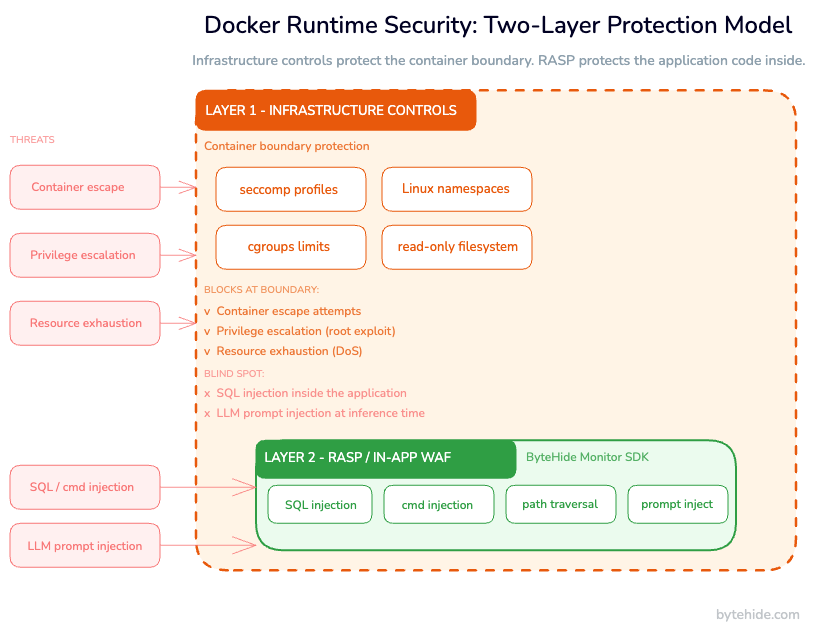
Most Docker security guides focus on hardening the container environment: running as non-root, dropping Linux capabilities, enabling seccomp profiles. That’s necessary work. But it only covers one layer of the problem. When a SQL injection hits your API, seccomp won’t stop it. When an attacker sends a crafted payload that exploits a path traversal bug, AppArmor won’t catch it. Those tools protect the host from the container, not the application inside the container from its own vulnerabilities.
This guide covers both layers: the infrastructure-level controls you need to harden your Docker environment, and the application-level runtime protection that catches attacks after they’ve already bypassed the perimeter. By the end, you’ll have a working security model for containers in production, not just a checklist of Docker flags.
What Is Docker Runtime Security?
Docker runtime security is the set of controls that protect containers and the applications running inside them while they are actively executing in production. The key word is “runtime”: this is not about scanning images before deployment or writing better Dockerfiles. It’s about what happens when your container is running and receiving real traffic.
There are two distinct phases of container security, and they’re often confused:
Build-time security covers the period before the container starts: base image selection, Dockerfile hardening, image scanning for known CVEs, and secrets management. These are important, but they’re static controls that can’t react to what happens at runtime.
Runtime security covers everything after the container starts. This splits into two sub-layers:
- Infrastructure runtime security: controls at the OS and container engine level (namespaces, cgroups, seccomp, AppArmor, read-only filesystems). These protect the host and the container isolation boundary.
- Application runtime security: controls inside the application code that detect and block attacks targeting the application logic (SQL injection, command injection, XSS, SSRF). These protect the business logic from exploitation, regardless of what container primitives do at the kernel level.
Most teams have partial coverage of build-time and infrastructure runtime. The application runtime layer is where production containers typically remain exposed.
Container Runtime Threats in Production
Before choosing your controls, it’s worth being precise about what you’re protecting against. The threats in production Docker environments fall into several distinct categories, each requiring different defenses.
Container Escape Attacks
A container escape occurs when an attacker compromises the application, then leverages a vulnerability in the container runtime, the kernel, or the container configuration to break out of the container’s isolation and reach the host system.
Notable examples: CVE-2019-5736 (a runc vulnerability that allowed container escape with root write access) and CVE-2024-21626 (runc WORKDIR escape via file descriptor leak). Privileged containers and those with --cap-add SYS_ADMIN significantly increase blast radius if the application is compromised.
Application-Level Attacks Inside Containers
This is the most common category, and the one infrastructure controls don’t address. SQL injection, command injection, XSS, SSRF, path traversal: these attacks target the application logic, not the container boundary. A container running as non-root with a strict seccomp profile will still execute a SQL injection payload if the application code doesn’t prevent it.
Teams often assume containerization adds a security layer that reduces the urgency of application-level controls. It doesn’t. The application is still the target.
Supply Chain Attacks via Compromised Base Images
The Log4Shell vulnerability in 2021 demonstrated the blast radius of a single compromised library across thousands of containerized applications. Base images from public registries can include vulnerable dependencies, and the development-to-production pipeline may not catch newly-disclosed CVEs before exploitation.
Privileged Container Abuse
Containers running with --privileged, excessive Linux capabilities, or with /var/run/docker.sock mounted have a much larger attack surface. A compromised application inside a privileged container can affect the host OS, other containers, or the container engine itself.
AI and LLM Container Threats
As teams containerize AI agents, inference servers (Ollama, vLLM), and LLM-backed APIs, a new attack vector appears: prompt injection. Unlike traditional injection attacks, prompt injection is semantic. An attacker sends crafted input designed to manipulate the LLM’s behavior. Container-level controls don’t detect this. It requires application-level awareness of what the model is being asked to do.
Infrastructure-Level Docker Runtime Security
This is the layer that most Docker security documentation covers thoroughly. The controls here are well-established, and for most teams they’re partially in place. The goal is to close the gaps.
Run Containers as Non-Root
By default, many containers run as root. If the application is compromised and there’s a container escape, root inside the container becomes root on the host. This is the most impactful single change for most production setups.
FROM mcr.microsoft.com/dotnet/aspnet:8.0 AS runtime

RUN groupadd --system appgroup && \\
    useradd --system --gid appgroup --no-create-home appuser

WORKDIR /app
COPY --chown=appuser:appgroup . .

USER appuser

ENTRYPOINT ["dotnet", "MyApp.dll"]For Node.js:
FROM node:20-alpine AS runtime

RUN addgroup -S appgroup && adduser -S appuser -G appgroup

WORKDIR /app
COPY --chown=appuser:appgroup package*.json ./
RUN npm ci --only=production
COPY --chown=appuser:appgroup . .

USER appuser
CMD ["node", "server.js"]If your application needs to bind to port 80 or 443, use CAP_NET_BIND_SERVICE rather than running as root, or configure a reverse proxy to handle port translation.
Use Read-Only Filesystems
Mounting the container’s root filesystem as read-only eliminates a common class of persistence attack: writing malicious files to disk. Applications that need to write temporary data can use tmpfs mounts for specific paths.
services:
  api:
    image: myapp:latest
    read_only: true
    tmpfs:
      - /tmp
      - /var/run
    volumes:
- uploads:/app/uploadsIn Kubernetes:
spec:
  containers:
    - name: api
      securityContext:
        readOnlyRootFilesystem: true
      volumeMounts:
        - mountPath: /tmp
          name: tmp-volume
  volumes:
    - name: tmp-volume
emptyDir: {}Drop Unnecessary Linux Capabilities
Docker grants a default set of Linux capabilities to containers. Most applications need far fewer. Dropping ALL capabilities and adding back only what’s required follows the principle of least privilege:
docker run \\
  --cap-drop ALL \\
  --cap-add NET_BIND_SERVICE \\
myapp:latestservices:
api:
cap_drop:
- ALL
cap_add:
- NET_BIND_SERVICECapabilities worth knowing: NET_BIND_SERVICE (bind to ports below 1024), CHOWN (change file ownership), SETUID/SETGID (change process UID/GID). Most web APIs need none of these.
Enable seccomp Profiles
Docker enables a default seccomp profile that blocks around 44 dangerous syscalls, including ptrace, reboot, and kexec_load. Active by default since Docker 1.10, it’s worth verifying it hasn’t been disabled in your runtime configuration.
For stricter protection, custom profiles can allowlist only the syscalls your application actually uses. The Docker seccomp documentation includes a reference profile to use as a starting point.
docker run --security-opt seccomp=custom-profile.json myapp:latest
Network Segmentation
Containers that don’t need to communicate with each other shouldn’t share a network. Docker’s default bridge network allows all containers on it to reach each other, which is rarely what production deployments need.
services:
  api:
    networks:
      - frontend
      - backend
  database:
    networks:
      - backend
networks:
  frontend:
  backend:
internal: trueOne critical rule: never mount /var/run/docker.sock into a container unless absolutely necessary. This gives the container full control over the Docker daemon, which means full control over the host.
Application-Level Runtime Security Inside Docker
Infrastructure controls protect the container boundary. They don’t protect the application code from attacks that arrive through legitimate channels: HTTP requests, API calls, user inputs.
This is the gap most Docker security guides leave open. And it’s where production containers remain vulnerable to the attacks that actually cause data breaches.
Why Container Hardening Doesn’t Stop Application Attacks
A container running as non-root with a strict seccomp profile and a read-only filesystem will still execute a SQL injection if the database query isn’t sanitized. seccomp doesn’t inspect the content of read() and write() syscalls. It can’t see the SQL statement being constructed. AppArmor can restrict file access patterns, but it has no understanding of HTTP parameters or query construction.
Application-level attacks operate inside the security boundary that infrastructure controls create. The attacker doesn’t need to escape the container. They just need the application to process their payload.
How RASP Protects Applications Inside Containers
Runtime Application Self-Protection (RASP) embeds directly into the application, monitoring execution from within. Unlike a perimeter WAF that inspects HTTP requests before they reach the application, RASP operates at the code level: it sees what the application is actually doing with the input it receives.
For SQL injection: instead of pattern-matching URLs for suspicious characters, RASP intercepts the actual SQL statement before it’s sent to the database. It knows whether the statement is a legitimate parameterized query or an injection attempt, because it sees the exact query being constructed.
For command injection: RASP intercepts the process execution call itself. Process.Start() in .NET, child_process.exec() in Node.js. If the argument contains an injection payload, it’s blocked before the OS receives it.
This precision matters in production. Fewer false positives. Complete attack context: the exact line of code, the method, the payload. No dependency on network-layer controls.
RASP Inside Docker: .NET Example
RASP integrates into the application code, not the infrastructure. No Dockerfile changes. No additional container layers. The application carries its own protection into whatever environment it’s deployed in.
// Program.cs
var builder = WebApplication.CreateBuilder(args);

builder.Services.AddBytehideMonitor(options =>
{
    options.ProjectId = Environment.GetEnvironmentVariable("BYTEHIDE_PROJECT_ID");
});

var app = builder.Build();
app.UseMonitorMiddleware();
app.Run();
services:
  api:
    image: myapp:latest
    read_only: true
    cap_drop:
      - ALL
    environment:
- BYTEHIDE_PROJECT_ID=${BYTEHIDE_PROJECT_ID}RASP Inside Docker: Node.js Example
const express = require('express');
const { BytehideMonitor } = require('@bytehide/monitor');

const app = express();

BytehideMonitor.init({ projectId: process.env.BYTEHIDE_PROJECT_ID });
app.use(BytehideMonitor.middleware());
app.use(express.json());

app.get('/users', async (req, res) => {
  // SQL injection in req.query.id is intercepted at the DB call level,
  // not by pattern-matching the URL parameter
  const users = await db.query('SELECT * FROM users WHERE id = ?', [req.query.id]);
  res.json(users);
});

app.listen(3000);What Gets Detected Inside the Container
With application-level runtime protection active, these attack types are intercepted at the code execution point, not at the network level:
- SQL Injection: intercepts
ExecuteReader,ExecuteScalar,ExecuteSqlRawand equivalent Node.js DB calls. Supports ADO.NET, EF Core, Dapper, MongoDB, and others. Sub-1ms overhead per request. - NoSQL Injection: detects operator injection (
$where,$ne), JavaScript injection, and type confusion attacks against MongoDB, Redis, and Cosmos DB. - Command Injection: intercepts
Process.Start()in .NET andchild_process.exec()/spawn()in Node.js before execution. - Path Traversal: catches
../sequences, encoded variants, null byte injection, and UNC path abuse. - SSRF: blocks requests to private IPs, localhost, and cloud metadata APIs including AWS
169.254.169.254. - XSS: detects stored, reflected, DOM-based, and mutation XSS at the point of output rendering.
- LLM Prompt Injection: covered in the next section.
Each event is logged with the exact line of code, method name, payload, attack type, and a confidence score. That context feeds back into static analysis to prioritize the vulnerabilities being actively exploited in production, not the ones that are theoretically risky.
Docker Runtime Security in Kubernetes
Kubernetes adds complexity to the container security model: pods span multiple nodes, service accounts grant API server access, and network policies require explicit configuration.
Pod Security Standards
Pod Security Standards (PSS) replaced Pod Security Policies in Kubernetes 1.25. Apply the baseline or restricted profile to production namespaces:
apiVersion: v1
kind: Namespace
metadata:
  name: production
  labels:
    pod-security.kubernetes.io/enforce: baseline
    pod-security.kubernetes.io/enforce-version: v1.29
    pod-security.kubernetes.io/warn: restricted
pod-security.kubernetes.io/warn-version: v1.29Deployment Security Context
apiVersion: apps/v1
kind: Deployment
metadata:
  name: api-deployment
spec:
  replicas: 3
  selector:
    matchLabels:
      app: api
  template:
    spec:
      securityContext:
        runAsNonRoot: true
        runAsUser: 1000
        fsGroup: 2000
        seccompProfile:
          type: RuntimeDefault
      containers:
        - name: api
          image: myapp:latest
          securityContext:
            allowPrivilegeEscalation: false
            readOnlyRootFilesystem: true
            capabilities:
              drop:
                - ALL
          env:
            - name: BYTEHIDE_PROJECT_ID
              valueFrom:
                secretKeyRef:
                  name: bytehide-secrets
                  key: project-id
          volumeMounts:
            - mountPath: /tmp
              name: tmp-volume
      volumes:
        - name: tmp-volume
emptyDir: {}No changes to this manifest are needed to enable RASP protection. It’s configured inside the application.
Falco and RASP: Different Layers, Both Needed
Falco monitors container behavior at the OS/kernel level via eBPF: unexpected process spawns, writes to sensitive file paths, unusual network connections. It’s the right tool for detecting infrastructure-level anomalies, such as a shell being spawned inside an API container.
What Falco can’t see: application-level attacks that use legitimate syscalls. A SQL injection sends normal network writes to the database socket. A path traversal calls open() on a file path. These are valid syscalls from the OS perspective. Falco won’t flag them as suspicious.
Use Falco for infrastructure behavior monitoring. Use RASP for application logic protection. They operate on different layers and protect against different threat categories.
Securing AI and LLM Containers at Runtime
Docker is increasingly the deployment unit for AI workloads: inference servers running Llama or Mistral, AI agents with tool access, and LLM-backed APIs in production. This creates a security surface that container-level controls weren’t built for.
Prompt injection is the primary threat. An attacker sends crafted input to manipulate the LLM’s behavior, not through a code vulnerability but through the semantics of the prompt itself. A read-only filesystem and a strict seccomp profile have no bearing on this. The attack happens in the model’s context window.
Runtime detection for prompt injection works at the application layer, intercepting the input before it reaches the model:
[HttpPost]
public async Task<IActionResult> Chat([FromBody] ChatRequest request)
{
    // Monitor intercepts at middleware level.
    // Detected: jailbreak prompts, system prompt exfiltration,
    // role manipulation, delimiter injection, encoded payloads.
    // On detection: blocked and logged with full context.
    var response = await _llmService.Complete(request.Message);
    return Ok(new { response });
}Among RASP solutions, this detection is currently specific to ByteHide Monitor. No other runtime protection tool specifically addresses prompt injection at the application layer.
Docker Runtime Security Checklist
Infrastructure Layer
- Application runs as non-root user (explicit
USERdirective in Dockerfile) - Root filesystem mounted as read-only (
readOnlyRootFilesystem: true) - All Linux capabilities dropped, only necessary ones added back
- seccomp profile active (default at minimum, custom if application behavior is well-understood)
- No
--privilegedflag in any production container /var/run/docker.socknot mounted in any container- Network segmentation applied (containers only on networks they need)
- Base image is minimal: distroless, Alpine, or official slim variant
- Image scanning in CI/CD pipeline before production deployment
Application Layer
- RASP integrated into the application code
- SQL injection protection active across all database execution paths
- Command injection protection active for all process execution calls
- Runtime input validation active beyond framework defaults
- Security events logged with full attack context (payload, method, line, confidence)
- Configuration via environment variables (no hardcoded project IDs or keys)
- LLM prompt injection protection if the container serves AI workloads
Kubernetes-Specific
- Pod Security Standards applied to production namespaces (baseline or restricted)
runAsNonRoot: truein pod security contextallowPrivilegeEscalation: falsein container security context- Sensitive values stored as Kubernetes Secrets, not in manifest env blocks
- Network policies configured with default deny and explicit allow rules
Conclusion
Securing Docker containers in production requires two layers of protection. They’re not interchangeable, and one doesn’t substitute for the other.
The infrastructure layer (hardening the container environment) reduces blast radius if the application is compromised. Non-root execution, capability restrictions, seccomp profiles, read-only filesystems: these are baseline requirements. If you’re not running them, start there.
But infrastructure controls leave the application itself exposed. seccomp doesn’t see inside a SQL query. AppArmor doesn’t understand HTTP payloads. Container isolation doesn’t prevent an injection attack from being processed. The attacks that actually cause data breaches are application-level attacks, and they require application-level defenses.
In my experience, the teams that get this right don’t treat these layers as competing priorities. Infrastructure controls limit what a compromised application can do. Runtime application protection prevents the application from being compromised in the first place. Both are necessary.
If you want to add the application layer to your containerized workloads without modifying your Dockerfile or Kubernetes manifests, ByteHide Monitor integrates at the code level and works in any container environment. It covers SQL injection, command injection, path traversal, SSRF, XSS, NoSQL injection, and LLM prompt injection with sub-1ms overhead per request.
Frequently Asked Questions
What is container runtime security?
Container runtime security is the protection of containers and the applications running inside them during active execution in production. It encompasses two layers: infrastructure-level controls that protect the container boundary (seccomp, namespaces, capability restrictions) and application-level controls that protect the application code from attacks like SQL injection, command injection, and path traversal. Both layers are required for complete coverage.
Does Docker provide runtime security by default?
Docker provides basic runtime isolation via Linux namespaces and cgroups, and enables a default seccomp profile that restricts approximately 44 dangerous syscalls. This covers infrastructure-level isolation. Docker does not provide application-level security: it cannot prevent SQL injection, command injection, or other attacks that operate within the legitimate execution path of the application.
What is the difference between Falco and RASP for containers?
Falco monitors container behavior at the OS/kernel level via eBPF: detecting unexpected process execution, unusual file access, and suspicious network connections. It targets infrastructure-level anomalies. RASP (Runtime Application Self-Protection) operates inside the application code, intercepting attacks at the exact point they would impact application logic, before a malicious SQL statement executes or a shell command runs. They address different layers and are complementary.
How do I add runtime application protection to a Dockerized .NET application?
Install the ByteHide Monitor NuGet package, add AddBytehideMonitor() to your service registration with your project ID sourced from an environment variable, and add UseMonitorMiddleware() to the request pipeline. Pass the project ID via Docker environment variable or Kubernetes Secret. No changes to your Dockerfile or container configuration are required.
Does runtime application security work in Kubernetes?
Yes. Application-level runtime security integrates into the application code, not the infrastructure layer. It works identically in bare-metal, Docker, and Kubernetes deployments. Configuration is passed via environment variables, which maps cleanly to Kubernetes Secrets. Coverage is consistent regardless of replica count or cluster configuration.