Every guide about app shielding follows the same script: protect your mobile app from reverse engineering and tampering. Install an SDK that obfuscates your code and detects rooted devices. Ship it.
That framing misses the bigger picture. If your code runs on a server processing API requests, on a Windows desktop handling financial data, or on an IoT device collecting sensor readings, those same threats apply. An attacker can decompile a .NET desktop app just as easily as an Android APK. A SQL injection targets server-side code regardless of whether a mobile WAF exists upstream.
App shielding is not a mobile-specific concern. It is a security discipline that applies wherever code executes and processes untrusted input. This article covers what app shielding actually means, how it works at both the build and runtime level, the specific techniques involved, how those techniques differ across platforms, and how to implement shielding in practice.
What Is App Shielding?
App shielding is a set of security techniques that make applications resistant to reverse engineering, code tampering, and runtime attacks by combining build-time code hardening with runtime self-protection mechanisms. Unlike external security tools that guard the perimeter, app shielding embeds defenses directly into the application itself.
The concept emerged in mobile security, where distributing compiled binaries to millions of devices means every user has a copy of your code that an attacker can analyze. But the underlying problem is universal. Any application that leaves your controlled environment, whether that is a mobile app on a user’s phone, a desktop app on a corporate machine, or a server-side app exposed to the internet, needs protection both at rest (when the code can be inspected) and at runtime (when the code is executing).
This is what distinguishes app shielding from other security approaches. Static analysis tools find vulnerabilities before deployment. Firewalls filter traffic at the network edge. Penetration testing simulates attacks from outside. App shielding makes the application itself harder to attack, from the inside out, at every stage of its lifecycle.
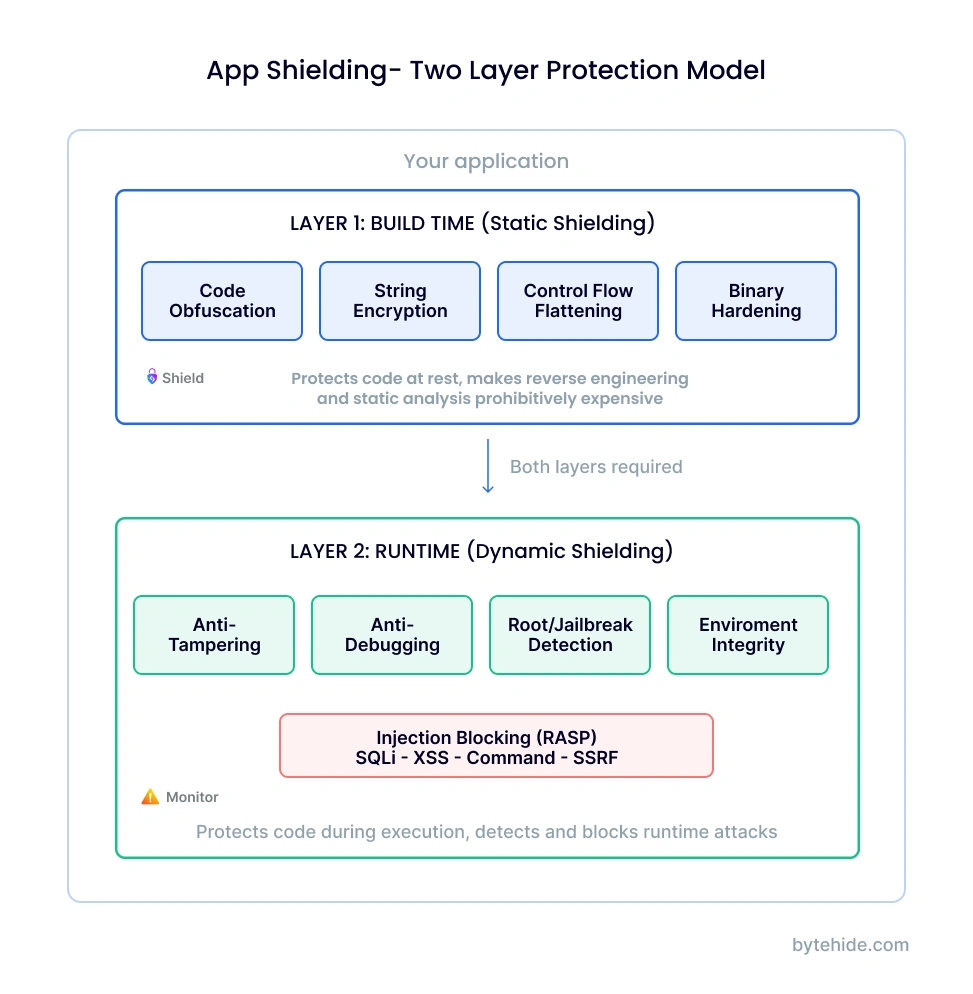
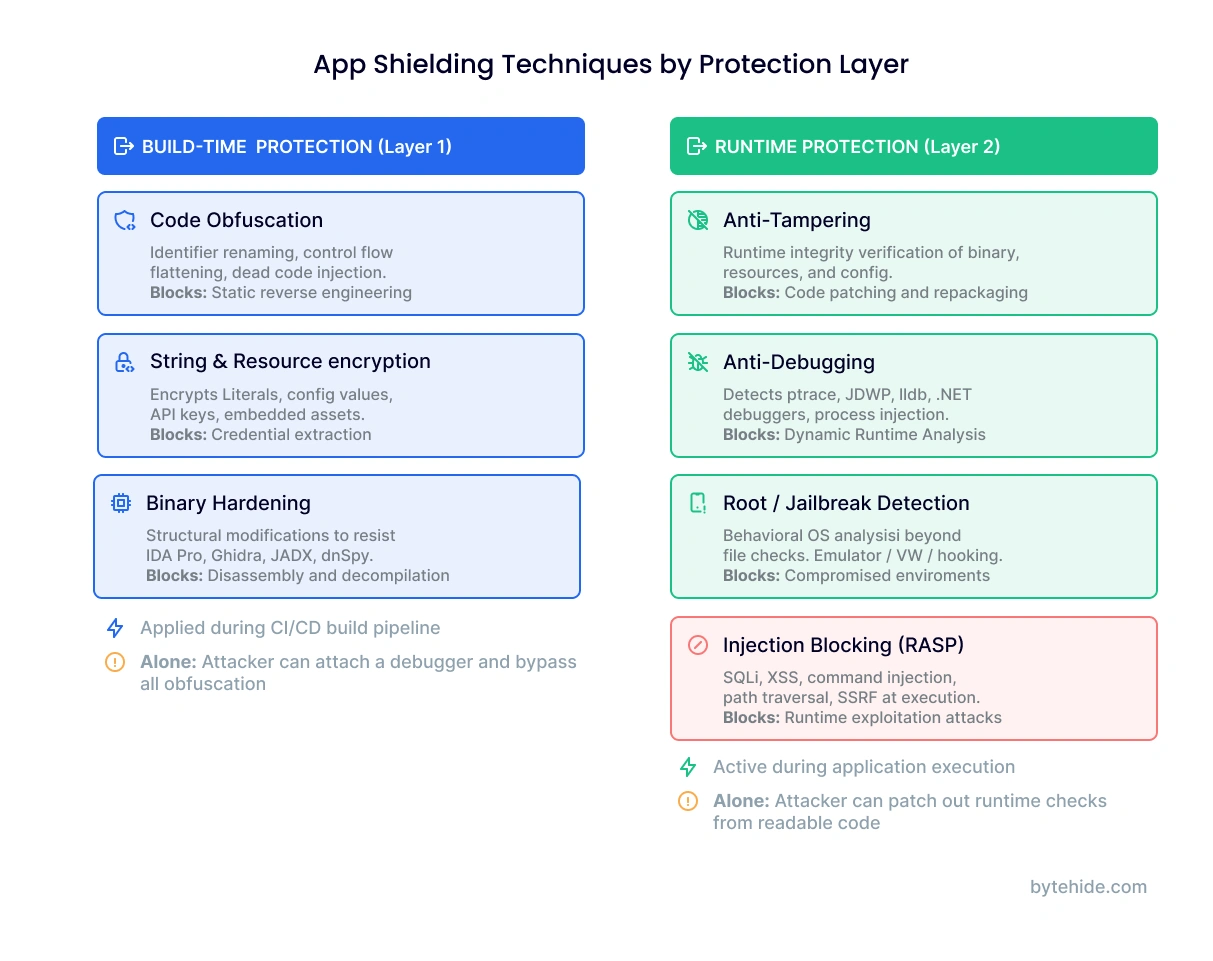
The protection works in two distinct layers. The first layer applies at build time: transforming source code into something that resists static analysis through obfuscation, encryption, and structural modification. The second layer activates at runtime: monitoring the execution environment for tampering attempts, debugger attachment, compromised devices, and injection attacks. Neither layer alone provides complete protection. Obfuscation without runtime checks can be defeated through dynamic analysis. Runtime checks without obfuscation can be patched out of the binary. Effective app shielding requires both.
How Does App Shielding Work?
App shielding operates through two complementary protection layers that address different threat categories. Understanding each layer, and why both are necessary, is essential to implementing effective application protection.
Layer 1: Build-Time Protection (Static Shielding)
The first layer transforms your application during the build process, before it reaches any user or device. The goal is making the compiled output resistant to reverse engineering and static analysis.
Code obfuscation is the foundation of build-time protection. It transforms readable code into functionally equivalent but difficult-to-understand output. This includes identifier renaming (replacing meaningful variable and function names with random strings), control flow flattening (restructuring the logic flow to obscure the program’s actual execution path), dead code injection (adding non-functional code paths that confuse decompilers), and string encryption (encoding hardcoded strings like API endpoints, keys, and error messages so they are not visible in the binary).
Binary hardening goes beyond source-level obfuscation. It modifies the compiled binary to resist disassemblers and decompilation tools like IDA Pro, Ghidra, and JADX. Techniques include symbol stripping, metadata removal, and anti-disassembly patterns that cause analysis tools to produce incorrect output.
Resource encryption protects non-code assets: configuration files, embedded certificates, API keys, and other sensitive data that ships with the application. Without resource encryption, an attacker can extract these assets from the app package without any decompilation at all.
Build-time protection raises the cost of static analysis significantly. A determined attacker with unlimited time can eventually work through obfuscation, but the goal is making that process expensive enough to deter most threats and slow down the rest.
Layer 2: Runtime Protection (Dynamic Shielding)
The second layer activates when the application executes. It monitors the runtime environment and the application’s own integrity, detecting and responding to threats in real time.
Anti-tampering verifies that the application’s code and resources have not been modified since the build. When an attacker patches a binary to bypass license checks, disable security features, or inject malicious code, integrity verification detects the modification. The response can range from terminating the app to sending a silent alert to your backend, depending on your policy.
Anti-debugging detects when a debugger is attached to the running process. On Android, this means detecting ptrace hooks and JDWP connections. On iOS, detecting lldb attachment and sysctl-based debugger checks. On .NET desktop applications, detecting common debuggers and process injection tools. Debugger attachment is a prerequisite for most dynamic analysis attacks, so detecting it early disrupts the attacker’s workflow.
Root and jailbreak detection identifies when the application is running on a compromised operating system. Rooted Android devices and jailbroken iOS devices have weakened security guarantees: sandbox enforcement is bypassed, system libraries can be modified, and hooking frameworks like Frida and Xposed can intercept any function call. Detection goes beyond checking for known file paths (/bin/su, Cydia.app) to behavioral analysis of the OS environment.
Environment integrity checks expand detection beyond root/jailbreak to include emulators, simulators, virtual machines, and hooking frameworks. Attackers routinely use emulated environments to analyze apps without the constraints of physical devices.
Runtime injection blocking is where app shielding meets RASP security. This layer intercepts SQL injection, XSS, command injection, path traversal, SSRF, and other attacks at the exact point where they would cause damage, inside the application’s execution context. Rather than pattern-matching HTTP requests at the network edge, injection blocking confirms whether user input actually reaches a vulnerable code path.
Why Both Layers Are Necessary
Most app shielding vendors offer one layer or the other. Code obfuscation tools handle build-time protection. RASP solutions handle runtime protection. But deploying them separately creates a gap that attackers exploit.
Without runtime protection, an attacker can attach a debugger to the obfuscated app and trace execution paths dynamically, bypassing obfuscation entirely. Without build-time protection, an attacker can read the source code, locate the runtime checks, and patch them out of the binary before the app ever executes them.
Both layers working together look like this:
// Layer 1: Build-time protection (Shield)
// Configured in bytehide.json — runs automatically during build
{
  "obfuscation": true,
  "stringEncryption": true,
  "controlFlowFlattening": true
}

// Layer 2: Runtime protection (Monitor)
const monitor = require('@bytehide/monitor');
monitor.init({ projectToken: 'your-token' });
app.use(monitor.protect());With both layers active, obfuscation prevents the attacker from understanding the code statically, and runtime protection prevents them from analyzing or modifying it dynamically.
App Shielding Techniques
Each app shielding technique addresses a specific threat vector. Understanding what each technique does, and what it does not protect against, helps you build an effective protection strategy rather than relying on a single mechanism.
Code Obfuscation. Transforms readable source code into functionally equivalent but incomprehensible output. The techniques work together: identifier renaming removes semantic meaning, control flow flattening disguises execution paths, and string encryption hides sensitive literals. Obfuscation is effective against static reverse engineering but insufficient on its own because attackers can observe the code’s behavior at runtime regardless of how the source reads.
Anti-Tampering. Verifies application integrity during execution. The application checks its own code and resources against expected signatures, detecting modifications to the binary, injected code, or altered configuration files. When tampering is detected, the application can terminate execution, alert the backend server, degrade functionality, or wipe locally cached sensitive data. This goes well beyond simple checksum validation. Modern anti-tampering uses layered integrity checks that are themselves protected by obfuscation, making them difficult to locate and disable.
Anti-Debugging. Detects and responds to debugger attachment. On mobile platforms, this means monitoring for ptrace on Linux/Android, JDWP connections for Java debugging, and lldb on iOS. On desktop platforms, it detects common .NET debuggers, process injection tools, and memory inspection utilities. Anti-debugging is critical because debugger attachment is the first step in most dynamic analysis workflows.
Root and Jailbreak Detection. Identifies when the operating system itself has been compromised. Rooted and jailbroken devices offer attackers capabilities that break the security model apps depend on: they can modify system libraries, bypass sandbox restrictions, and install hooking frameworks that intercept function calls transparently. Detection methods range from checking for known root binaries and system modifications to behavioral analysis that identifies the side effects of privilege escalation.
Environment Integrity. Detects emulators, simulators, virtual machines, and hooking frameworks such as Frida, Xposed, and Magisk. Attackers use these tools to create controlled environments where they can observe, modify, and replay application behavior. Environment checks verify that the application runs on genuine hardware with an unmodified operating system.
Runtime Injection Blocking. Intercepts injection attacks at the execution point: SQL injection before the query reaches the database driver, XSS before malicious content reaches the template engine, command injection before the OS command executes. This is where application shielding overlaps with RASP, protecting not just the app’s code integrity but its data processing logic against external attack payloads.
App Shielding for Mobile vs Desktop vs Server
Most resources about app shielding treat it as a mobile-specific discipline. That is increasingly incomplete. The platforms are different, the specific threats vary, but the core principle is the same: if code executes in an environment you do not fully control, it needs protection.
Mobile (Android and iOS) is where app shielding originated and where the most mature tooling exists. Android APKs can be decompiled to near-source-code quality using JADX in minutes. iOS IPAs, while slightly harder to reverse, are still vulnerable to class-dump, Hopper, and runtime analysis through Frida. The threat landscape includes repackaging (modifying the app and redistributing it), method hooking (intercepting function calls to alter behavior), credential theft from memory, and execution on rooted or jailbroken devices where the OS security model is compromised.
Mobile app shielding is particularly important in regulated industries. PSD2 requires financial applications to implement tamper-resistant execution environments. OWASP MASVS Level 2 mandates runtime integrity checks and anti-reverse-engineering measures. Healthcare apps handling PHI under HIPAA benefit from shielding as a technical safeguard.
Desktop (.NET, Electron, C++) receives far less attention in security discussions but faces equivalent threats. .NET applications compiled to IL (Intermediate Language) can be decompiled to readable C# source code using ILSpy or dnSpy with a single click. Electron applications ship their source code as plain JavaScript inside an ASAR archive. Even compiled C++ applications can be analyzed with IDA Pro and Ghidra.
Desktop app shielding includes IL-level obfuscation for .NET, ASAR encryption for Electron, anti-debugging for Windows and macOS, license binding to prevent unauthorized redistribution, and process injection detection to block tools that modify the running application’s memory.
Server and Cloud (Node.js, .NET web, Java) is where the threat model shifts from reverse engineering to runtime exploitation. Server applications are not distributed to end users, so static analysis is less of a concern (unless source code leaks or dependencies are compromised). The primary threats are injection attacks: SQL injection, XSS, command injection, SSRF, and increasingly LLM prompt injection for applications that integrate language models.
Server-side app shielding is the runtime protection layer. It is what the industry calls RASP or In-App WAF: interception of attack payloads at execution points with full application context. This layer does not need build-time obfuscation (the code stays on your servers), but it absolutely needs runtime injection blocking and threat intelligence.
IoT and Embedded represents an emerging frontier. Connected devices run application code, often with limited update mechanisms and long deployment lifecycles. When a vulnerability is discovered in firmware that cannot be patched immediately, runtime shielding serves as a compensating control that blocks exploitation until a fix is deployed.
The platform changes. The principle does not. If code executes and processes data, it benefits from protection against both static analysis and runtime attacks.
App Shielding vs RASP vs Code Obfuscation
These three terms appear frequently in application security discussions, and the overlap between them causes genuine confusion.
| Criteria | Code Obfuscation | RASP | App Shielding |
|---|---|---|---|
| When it applies | Build-time only | Runtime only | Both build-time and runtime |
| Protects against | Reverse engineering, IP theft | Injection attacks, runtime exploitation | Full spectrum: RE + tampering + runtime attacks |
| Visibility | None (passive protection) | Full runtime context | Build audit + runtime telemetry |
| Typical platforms | Any compiled or interpreted code | Typically server-side | Mobile + Desktop + Server |
| Standalone sufficient? | No (attackers bypass via dynamic analysis) | No (does not protect code at rest) | Yes (covers full lifecycle) |
Code obfuscation is one component of app shielding. It handles the build-time layer: making code difficult to read and understand. But obfuscation alone does not detect tampering, block debuggers, or prevent injection attacks. An attacker who runs the app in a controlled environment can observe its behavior regardless of how the source code reads.
RASP (Runtime Application Self-Protection) is another component. It handles the runtime layer: detecting and blocking attacks during execution. But RASP alone does not protect code at rest. If an attacker can read the source code, they can identify the RASP checks and remove them before the application ever runs.
App shielding is the umbrella term that encompasses both. Build-time hardening makes the code resistant to static analysis. Runtime protection detects and blocks dynamic attacks. Together, they create a defense that addresses the full attack lifecycle: from the attacker’s initial reconnaissance (decompiling the binary) through exploitation attempts (injecting payloads or attaching debuggers).
For a deeper comparison of how runtime protection compares to perimeter defenses, see the RASP vs WAF analysis. For how testing approaches fit into the broader security picture, see SAST vs DAST vs IAST vs RASP.
Benefits of App Shielding
App shielding provides advantages that no single security tool replicates, specifically because it operates inside the application across both build and runtime phases.
The most immediate benefit is protection against reverse engineering. Obfuscation, string encryption, and control flow flattening make decompilation impractical for all but the most resourced attackers. This protects proprietary algorithms, business logic, and embedded credentials that would otherwise be exposed in the distributed binary.
Tampering prevention adds a dynamic layer that static obfuscation cannot provide on its own. Integrity verification detects when code has been modified, whether by an attacker injecting malicious logic, a pirate removing license checks, or malware hooking into the application’s execution. Detection triggers configurable responses from silent alerts to immediate termination.
Runtime attack blocking extends protection beyond the application’s own code to the data it processes. Injection attacks (SQL, XSS, command injection) are intercepted at execution points with full application context, producing fewer false positives than perimeter-based tools that guess from HTTP patterns.
Compliance enablement is increasingly driving adoption. PSD2 mandates tamper-resistant execution environments for financial apps. DORA requires digital operational resilience that includes application-level protection. OWASP MASVS Level 2 specifies anti-reverse-engineering and runtime integrity requirements. App shielding directly addresses these mandates.
Cross-environment consistency means the same protection model applies whether the application runs on a mobile device, a Windows desktop, a Linux server, or a containerized cloud deployment. Protection travels with the code, independent of network topology or infrastructure configuration.
App Shielding Challenges and Considerations
No security approach is without tradeoffs, and transparency about limitations builds more trust than marketing claims.
Performance overhead is the most common concern, and in my experience it is also the most overstated. Aggressive obfuscation can increase binary size and affect startup time, particularly for mobile applications where users expect instant launches. Runtime checks add processing time to each protected operation. But modern implementations minimize this through targeted interception (protecting specific critical paths rather than instrumenting everything), typically adding less than 1ms per check. The impact should always be measured in your specific environment.
Debugging complexity is a real operational cost. Obfuscated stack traces are difficult to interpret during production incident response. Source maps and deobfuscation tools help, but they add a step to the troubleshooting workflow that teams need to plan for. The best practice is maintaining mapping files that translate obfuscated symbols back to original names, stored securely and never shipped with the application.
App shielding is not a silver bullet. It raises the cost of attack substantially, but a sufficiently motivated attacker with enough time and resources can eventually work through any protection layer. The goal is making the attack economically unviable, not theoretically impossible. Shielding works best as part of a layered security strategy that includes secure coding practices, runtime security monitoring, and regular vulnerability assessment.
Maintenance requires integration into the build pipeline. Protection must be reapplied with every build, which means CI/CD integration is not optional but essential. Manual protection processes that run outside the build pipeline invariably fall behind as teams ship faster.
How to Implement App Shielding
Implementing app shielding follows a predictable pattern regardless of platform. The specifics change, but the sequence stays consistent.
Assess your threat model first. What are you protecting? If the primary concern is IP theft and code cloning, build-time obfuscation is the priority. If the concern is runtime exploitation (injection attacks, data theft during processing), runtime protection takes precedence. If you distribute applications to end users AND process sensitive data, you need both layers. Most applications fall into this third category.
Apply build-time protection through your CI/CD pipeline. Obfuscation and binary hardening should run as automated build steps, not manual post-build processes. This ensures every release is protected consistently. Configure protection levels based on the sensitivity of each component: maximum obfuscation for security-critical code, lighter protection for performance-sensitive hot paths.
Add runtime protection as an SDK. Deploy anti-tampering, anti-debugging, and environment checks. For server-side applications, add injection blocking. I have seen teams skip this step and go straight to blocking mode, only to discover that legitimate traffic triggers false positives. Always start in detection mode (logging without blocking) to establish a baseline of normal behavior before enabling active blocking.
Configure response policies. Not every detection warrants the same response. A debugger attached to a banking app in production should trigger immediate session termination. An emulator detection in a development build should log a warning. Root detection in a gaming app might degrade functionality rather than blocking entirely. Design your policies around your risk tolerance and user experience requirements.
Connect telemetry to your security stack. Shielding generates valuable signals: which attacks are being attempted, from which environments, against which application versions. Feed this data into your SIEM. If you run static analysis with tools like ByteHide Radar, connect runtime detection data to reprioritize static findings based on what attackers are actually targeting in production.
For a .NET application, both layers look like this:
// Step 1: Build-time protection (Shield) — add to .csproj
<PackageReference Include="ByteHide.Shield" Version="*" />
// Obfuscation, string encryption, and control flow
// flattening run automatically during each build

// Step 2: Runtime protection (Monitor) — in Program.cs
using ByteHide.Monitor;

var builder = WebApplication.CreateBuilder(args);
builder.Services.AddByteHideMonitor(options => {
    options.ProjectToken = "your-token";
});

var app = builder.Build();
app.UseByteHideMonitor(); // Anti-tampering, injection blocking, threat intelByteHide Shield handles Layer 1 and ByteHide Monitor handles Layer 2. Both are managed through the same platform, and the runtime data from Monitor feeds back into your security visibility alongside any static findings from Radar.
Frequently Asked Questions
What is app shielding?
App shielding is a security approach that combines build-time code hardening (obfuscation, string encryption, binary protection) with runtime defense mechanisms (anti-tampering, anti-debugging, injection blocking) to make applications resistant to reverse engineering, code modification, and runtime attacks. It applies across mobile, desktop, and server platforms.
What is the difference between app shielding and code obfuscation?
Code obfuscation is one component of app shielding. It protects code at rest by making it difficult to read and understand through techniques like identifier renaming and control flow flattening. App shielding goes further by adding runtime protection: anti-tampering detection, debugging prevention, environment integrity checks, and injection blocking. Obfuscation alone can be bypassed through dynamic analysis; app shielding addresses both static and dynamic attack vectors.
Is app shielding only for mobile apps?
No. While the term originated in mobile security, the principles apply to any platform where code executes outside a fully controlled environment. Desktop applications (.NET, Electron) face decompilation threats. Server applications face injection attacks and runtime exploitation. IoT devices face firmware tampering. App shielding covers all of these through platform-appropriate protection techniques.
How does app shielding differ from RASP?
RASP (Runtime Application Self-Protection) handles one half of app shielding: the runtime protection layer. It detects and blocks attacks during execution. App shielding adds the other half: build-time hardening that protects code at rest through obfuscation and binary protection. Full app shielding covers both static and dynamic security, while RASP alone leaves code vulnerable to reverse engineering and binary patching.
Does app shielding affect application performance?
Build-time protections (obfuscation, string encryption) can increase binary size slightly and affect startup time. Runtime protections (anti-tampering, injection blocking) add processing overhead per check. Modern SDK-based implementations target specific execution points rather than instrumenting the entire runtime, typically adding less than 1ms per operation. The impact varies by application and should be benchmarked in your specific environment before deploying to production.
Is app shielding required for regulatory compliance?
Several regulations reference application-level security controls that app shielding helps address. PSD2 requires strong customer authentication with tamper-resistant execution environments. DORA mandates digital operational resilience including application protection mechanisms. OWASP MASVS Level 2 requires anti-reverse-engineering measures and runtime integrity checks. While no regulation explicitly mandates “app shielding” by name, the technical controls it provides map directly to these compliance requirements.
The distinction between build-time protection and runtime security is blurring. Five years ago, obfuscation and RASP were separate product categories sold by different vendors to different teams. Today, the most effective approach treats them as two layers of a single discipline: making applications resistant to analysis, modification, and exploitation across their entire lifecycle. The tools are converging. The question is no longer whether to protect your applications at build time or at runtime. It is whether your current approach covers both.