Most security teams face the same dilemma: deploy a WAF to protect the perimeter, add RASP for deeper runtime visibility, or somehow juggle both. Every guide online walks you through the same comparison and arrives at the same conclusion: “use both together.”
But that framing might be wrong entirely.
This article covers how WAF and RASP actually work, where each excels, where each falls short, and why a third approach called the In-App WAF is gaining traction among teams that don’t want to manage two separate security stacks.
What Is a Web Application Firewall (WAF)?
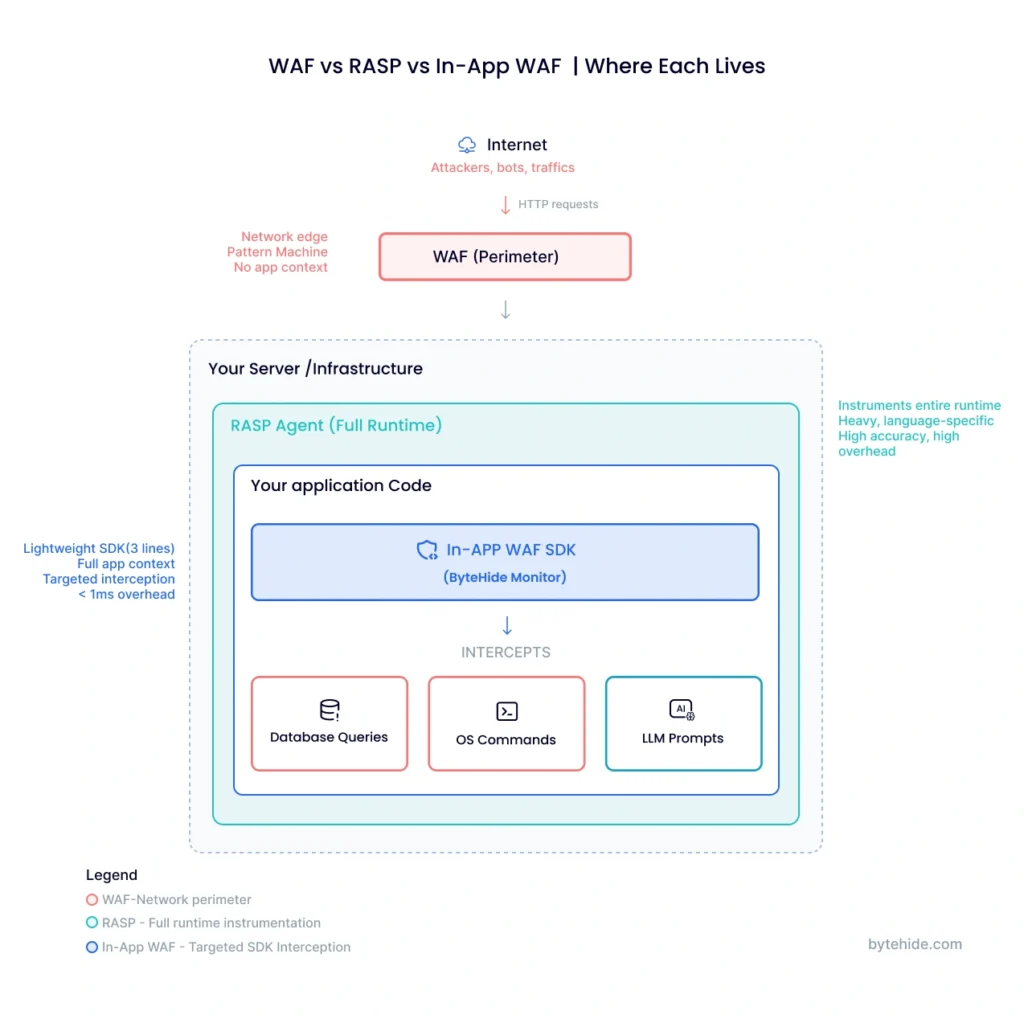
A Web Application Firewall (WAF) sits between the internet and your application, inspecting every incoming HTTP/HTTPS request before it reaches your server. It matches traffic against predefined rules based on known attack signatures, regex patterns, and protocol anomalies to detect and block common threats like SQL injection, cross-site scripting (XSS), and other OWASP Top 10 vulnerabilities.
WAFs are deployed at the perimeter of your infrastructure. Depending on the implementation, that means running as a reverse proxy, as part of a CDN, or integrated with a cloud load balancer like AWS ALB. This positioning makes WAFs effective at filtering large volumes of malicious traffic before it ever touches your application code.
The core strength of a WAF is that it requires zero changes to your application. You configure rules at the network layer, and your app remains untouched. This makes WAFs particularly useful for protecting legacy applications that can’t be easily modified.
However, this perimeter positioning is also the WAF’s fundamental limitation: it has no visibility into your application’s internal logic. A WAF sees HTTP parameters and headers, but it doesn’t know whether a suspicious-looking string will actually reach a vulnerable database query or simply be sanitized by your code. This blind spot leads to a high rate of false positives and, more critically, false negatives when attackers use encoding tricks, fragmented payloads, or application-specific bypasses.
What Is Runtime Application Self-Protection (RASP)?
Runtime Application Self-Protection (RASP) takes a fundamentally different approach. Instead of sitting outside the application, a RASP agent runs inside the application itself, either as a library linked into your code or as an agent that instruments the runtime environment.
Because RASP operates within the application context, it can observe how data actually flows through your code. When a user submits input, RASP doesn’t just inspect the raw HTTP request. It tracks that input as it moves through your application logic, watching whether it ends up in a database query, a system command, a file path, or an HTML template. This deep visibility means RASP security tools can distinguish between a genuinely dangerous SQL injection and a benign search query that just happens to contain special characters.
RASP interceptors typically hook into critical functions: database drivers, file system calls, network operations, and command execution. When they detect a real attack, confirmed by observing the actual impact point rather than a surface-level pattern, they block it immediately before any damage occurs.
The tradeoff is complexity. Traditional RASP solutions require instrumentation that can introduce performance overhead, add latency to request processing, and create dependency on specific runtime environments. Many RASP tools only support a single language or framework, meaning a team running both Java backend services and Node.js microservices may need two entirely different RASP solutions. Deployment can also be invasive, requiring code changes, agent installation, and careful configuration to avoid breaking existing functionality.
RASP vs WAF: Key Differences
When evaluating RASP vs WAF, the differences go far beyond deployment location. Here’s how they compare across the dimensions that matter most in practice:
| Criteria | WAF | RASP |
|---|---|---|
| Deployment | Network perimeter (proxy, CDN, load balancer) | Inside the application (library or agent) |
| Detection method | Pattern matching on HTTP requests | Behavioral analysis at execution points |
| Application context | None (sees only raw HTTP traffic) | Full (sees data flow through code) |
| False positive rate | High, since there’s no way to verify actual impact | Low, since it confirms real exploitation |
| Performance impact | Minimal on app (runs externally) | Can add latency due to instrumentation |
| Setup complexity | Low: DNS/proxy change, no code changes | High: agent installation, code instrumentation |
| Language dependency | None, operates at protocol level | Typically language and framework-specific |
| Coverage | Web traffic only | Application-level operations |
| Typical cost model | Per-request or bandwidth-based | Per-application or per-agent |
Whether you’re evaluating WAF vs RASP for a new project or reassessing your current stack, the most critical distinction comes down to precision vs. breadth. A WAF casts a wide net over all incoming traffic but can only make educated guesses about what’s actually dangerous. RASP sees exactly what’s happening inside the app but requires deeper integration to function. Neither approach alone covers the full picture.
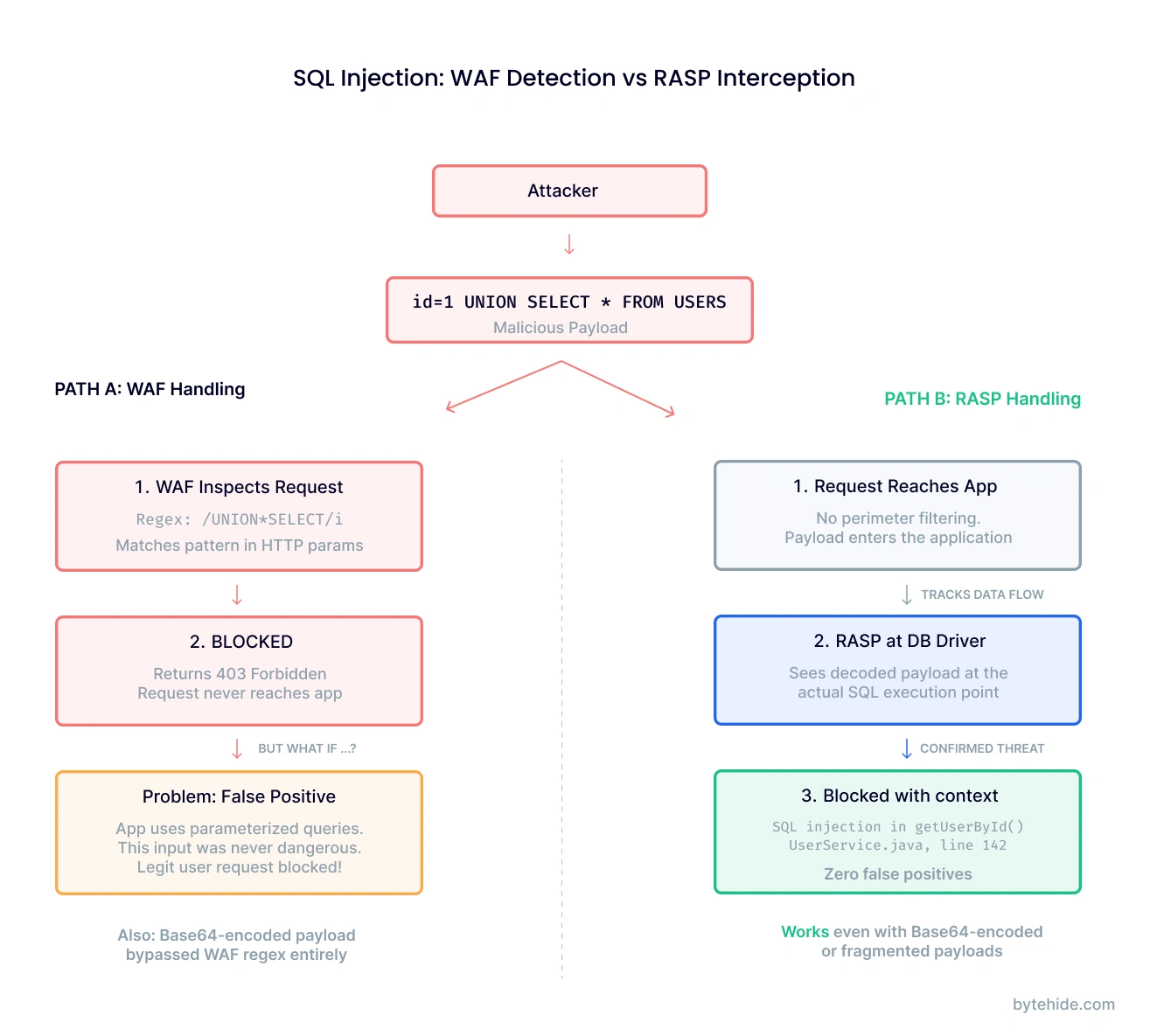
Consider a concrete example. An attacker sends a request with the parameter id=1 UNION SELECT * FROM users. A WAF detects the UNION SELECT pattern and blocks the request. But what if your application uses parameterized queries and this input would never actually reach a raw SQL statement? That’s a false positive. Now flip it: the same payload arrives Base64-encoded. The WAF doesn’t decode it, so it passes through. A RASP agent sitting inside the application would see the decoded payload arrive at the actual database driver call and block it there, regardless of how it was encoded in transit.
This difference in detection methodology has real operational consequences. In my experience, teams that rely only on WAF rules spend a disproportionate amount of time tuning and investigating false alerts. Teams using RASP alone get better accuracy but face challenges with performance monitoring and multi-language support.
And so most security guidance arrives at a predictable conclusion: deploy both. But that recommendation introduces its own problems.
Pros and Cons of Each Approach
WAF: Pros and Cons
On the positive side, WAFs are battle-tested. They’ve been a staple of web security for over two decades, and every major cloud provider offers a managed WAF service. Deployment is fast (often just a DNS change) and there’s no need to touch application code. WAFs also handle volume well, filtering out bot traffic, DDoS attempts, and known exploit patterns at scale.
The downsides are well-documented. Without application context, WAFs generate a steady stream of false positives that security teams either learn to ignore (dangerous) or spend time investigating (expensive). Sophisticated attackers routinely bypass WAF rules using payload encoding, request fragmentation, and protocol-level tricks. Every new application endpoint or API parameter potentially requires new WAF rules, and that maintenance scales linearly with your attack surface.
RASP: Pros and Cons
RASP’s strength lies in accuracy. Because it observes actual code execution, it produces far fewer false positives and can block attacks that WAFs miss entirely. RASP also generates richer forensic data. Instead of “suspicious request to /api/users,” you get “attempted SQL injection targeting the getUserById query in UserService.java, line 142.”
The challenges are practical. Traditional RASP agents can add measurable latency, enough to matter in high-throughput APIs. They’re typically tied to a specific language ecosystem, so polyglot environments need multiple solutions. Deployment requires more effort than a WAF, sometimes involving JVM flags, code annotations, or middleware configuration. And because RASP sits inside the app, a misconfiguration can affect application stability in ways a perimeter WAF never would.
Can You Use RASP and WAF Together?
Yes, and most security architects recommend exactly this. WAF filters out the high-volume, low-sophistication attacks at the perimeter. RASP catches what slips through by validating behavior at the application level. Together, they provide defense in depth.
The problem is what “together” means in practice: two vendors, two consoles, two sets of rules, two maintenance workflows, and roughly double the cost. For enterprise teams with dedicated security budgets, this is manageable. For startups, mid-market companies, and teams already stretched thin managing cloud infrastructure, running parallel security stacks is a significant burden.
There’s also the integration gap. Your WAF and RASP typically don’t share data. The WAF doesn’t know which vulnerabilities RASP has confirmed as real. RASP doesn’t know which threats the WAF already blocked. You end up with two partial views of your security posture instead of one complete picture.
A third approach addresses this directly.
Beyond RASP vs WAF: The In-App WAF Approach
The framing of “RASP vs WAF” assumes you have to choose between perimeter protection and runtime visibility, or pay for both. But a third category is emerging that challenges this assumption: the In-App WAF.
An In-App WAF is a lightweight SDK that embeds directly into your application, combining the rule-based threat detection of a traditional WAF with the application-context awareness of RASP. It intercepts threats at the point of execution through targeted interception of critical operations like database queries, system commands, and template rendering. Not at the network edge. Not through heavy runtime instrumentation.
Here’s what that looks like in practice. With ByteHide Monitor, adding In-App WAF protection to a Node.js application takes three lines:
const monitor = require('@bytehide/monitor');
monitor.init({ apiKey: 'your-api-key' });
app.use(monitor.protect());From that point, Monitor intercepts the exact SQL statement before it executes, the exact OS command before Process.Start() runs, and the exact template input before it renders. It doesn’t guess from HTTP patterns. It confirms the threat at the execution point, then blocks it.
How This Compares
vs. a traditional WAF: An In-App WAF has full application context. It knows whether a suspicious input actually reaches a vulnerable code path. This dramatically reduces false positives while catching encoded or fragmented attacks that perimeter WAFs miss.
vs. traditional RASP: An In-App WAF is lighter. Rather than instrumenting the entire runtime, it targets specific interception points (database drivers, process execution, file operations) with minimal overhead, under 1ms per check. It also works across multiple languages from the same SDK architecture rather than requiring language-specific agents.
vs. running WAF + RASP together: One tool, one vendor, one dashboard. No integration gap between perimeter and runtime data.
Capabilities That Neither WAF nor RASP Covers
The In-App WAF model also opens the door to protection categories that traditional tools simply weren’t designed for.
LLM Prompt Injection Detection. If your application integrates with LLMs (OpenAI, Claude, Gemini), an In-App WAF can inspect prompts before they reach the model, detecting jailbreak attempts, system prompt extraction, role manipulation, and encoded payloads. This is a threat class recognized by OWASP that didn’t exist when WAFs and RASP were originally designed, and neither handles it natively.
Bot and Threat Intelligence at the App Layer. Beyond request-level blocking, an In-App WAF can integrate threat intelligence feeds (600M+ known malicious IPs), bot detection (390+ known bot signatures), and geo-blocking, all enforced inside the application and independent of your infrastructure setup.
Runtime to SAST Correlation. When an In-App WAF confirms that a specific vulnerability is being actively exploited in production, it can feed that data back to your static analysis tools to automatically reprioritize that vulnerability from “medium” to “critical.” This closes the loop between what your scanner found and what attackers are actually targeting.
How to Choose the Right Application Security Approach
There’s no universal answer. The right approach depends on your team, your architecture, and your constraints.
| Scenario | Recommended Approach |
|---|---|
| Legacy applications you can’t modify | WAF: perimeter protection without code changes |
| Single-language app needing deep runtime visibility | RASP: maximum instrumentation and forensic data |
| Modern app wanting WAF + RASP benefits without complexity | In-App WAF: combined protection via lightweight SDK |
| Polyglot microservices across multiple runtimes | In-App WAF: one SDK architecture, multiple languages |
| Teams already using a CDN with built-in WAF | WAF + In-App WAF: perimeter for volume, in-app for precision |
| Applications integrating LLMs or AI services | In-App WAF: only approach covering prompt injection natively |
The key takeaway: RASP vs WAF doesn’t have to be an either/or decision. And “use both together” doesn’t have to mean double the tools and double the cost.
Frequently Asked Questions
What is the difference between RASP and WAF?
A WAF (Web Application Firewall) operates at the network perimeter, inspecting HTTP traffic using pattern-matching rules before requests reach your application. RASP (Runtime Application Self-Protection) runs inside the application itself, monitoring code execution to detect and block attacks based on actual behavior rather than traffic patterns. The fundamental difference is context: WAFs see raw requests, while RASP sees how data flows through application code.
Can RASP replace a WAF?
In most cases, RASP and WAF serve complementary purposes. A WAF is effective at filtering high-volume, low-sophistication attacks at the network edge, including DDoS protection and bot filtering, which RASP typically doesn’t handle. RASP excels at catching sophisticated attacks that bypass WAF rules. For teams that want consolidated protection, an In-App WAF approach can deliver both capabilities through a single integration.
What is an In-App WAF?
An In-App WAF is a security SDK that embeds directly into your application, combining WAF-style rule-based detection with RASP-level application context. Unlike perimeter WAFs, it intercepts threats at the execution point: database queries, system commands, template rendering. Unlike traditional RASP, it uses lightweight, targeted interception rather than full runtime instrumentation. The result is precise, low-overhead protection that runs independently of your infrastructure.
Is RASP better than WAF for API security?
For API-specific security, RASP generally provides more relevant protection because APIs often lack the traditional web UI context that WAFs were designed to protect. RASP can inspect API payloads at the application logic level, catching injection attacks that exploit API-specific input handling. That said, an In-App WAF covering both API interception and protections like bot blocking, threat intelligence, and LLM prompt injection detection provides more comprehensive API security than either approach alone.
What are the best RASP tools in 2026?
The leading RASP tools vary by platform and use case. For mobile applications, Guardsquare (DexGuard/iXGuard), AppDome, and Zimperium are widely recognized. For web and API protection, solutions range from traditional RASP agents to In-App WAF approaches like ByteHide Monitor, which combines runtime protection with WAF capabilities across .NET, JavaScript, Android, and iOS. When evaluating options, consider language support, performance overhead, deployment complexity, and whether the tool provides only detection or also includes active blocking and firewall features.
Application security doesn’t have to mean choosing between perimeter defense and runtime protection. If you’re building modern applications and want to see how the In-App WAF approach works in practice, explore ByteHide Monitor.