Node.js security has two layers, and most teams only build one of them. The first is pre-deployment hardening: input validation, dependency scanning, security headers, secrets management. The second is runtime defense: protecting the application while it runs in production, intercepting attacks as they happen inside the code. Most articles cover the first layer in depth. This one covers both, because npm audit finding a vulnerability and npm audit stopping an exploit are very different things.
Node.js powers a significant share of modern APIs, SaaS backends, and fintech systems. Its single-threaded event loop, massive npm ecosystem, and dynamic JavaScript nature create an attack surface that static analysis alone can’t fully cover. This guide walks through the complete picture of runtime security: hardening before deployment and protecting at runtime, with code examples for Express.js applications.
What Makes Node.js Applications Vulnerable
Node.js applications face security challenges that are partly architectural and partly ecosystem-driven.
The event loop model means a single blocking operation can degrade availability for all concurrent users. This isn’t just a performance concern it’s an attack surface for denial-of-service via regex backtracking (ReDoS), CPU-intensive operations, or maliciously crafted input that triggers expensive processing paths.
The npm ecosystem adds a different kind of risk. With over two million packages, most Node.js applications pull in hundreds of transitive dependencies. A vulnerability in a deeply nested dependency (one you didn’t choose directly) can expose your application. Supply chain attacks have grown significantly: malicious packages that mimic popular ones, packages that get compromised after legitimate adoption, and dependency confusion attacks targeting private registries.
JavaScript’s dynamic typing enables prototype pollution attacks, where an attacker manipulates Object.prototype to inject properties across all objects in the process. It also makes it easier to accidentally expose dangerous sinks like eval(), Function(), or child_process.exec() to user-controlled input.
Finally, Express.js itself ships with minimal defaults. Unlike frameworks that enforce security out of the box, Express trusts developers to add the security middleware they need. That’s a reasonable design choice, and a common source of misconfigured or missing protections.
| Vulnerability | Entry Point | Common Pattern |
|---|---|---|
| NoSQL Injection | MongoDB query builders | $where, $ne operators in user input |
| Command Injection | child_process.exec() | Unsanitized shell arguments |
| Prototype Pollution | Object merging libraries | Recursive merge of attacker-controlled JSON |
| ReDoS | Regex validation | Catastrophic backtracking on crafted input |
| XSS | Response rendering | Unsanitized output in server-side templates |
| SSRF | HTTP client calls | User-controlled URLs reaching internal services |
Node.js Security Best Practices Before Deployment
This is the layer most Node.js security guides cover. It matters — these practices reduce the exploitable attack surface before the application ever ships.
Set Security Headers with Helmet.js
Helmet.js is a collection of Express middleware that sets HTTP security headers. Installing it with defaults is better than nothing, but understanding what each header does helps you configure it properly for your application.
import express from 'express';
import helmet from 'helmet';

const app = express();

// Production-appropriate Helmet config
app.use(helmet({
  contentSecurityPolicy: {
    directives: {
      defaultSrc: ["'self'"],
      scriptSrc: ["'self'"],
      styleSrc: ["'self'", "'unsafe-inline'"],
      imgSrc: ["'self'", "data:", "https:"],
      connectSrc: ["'self'"],
      fontSrc: ["'self'"],
      objectSrc: ["'none'"],
      upgradeInsecureRequests: [],
    },
  },
  // Prevents MIME type sniffing
  noSniff: true,
  // Disables X-Powered-By: Express header
  hidePoweredBy: true,
  // Forces HTTPS for 1 year
  hsts: {
    maxAge: 31536000,
    includeSubDomains: true,
    preload: true,
  },
  // Blocks cross-origin iframe embedding
  frameguard: { action: 'deny' },
}));The Content-Security-Policy header is the most impactful for preventing XSS. The hsts config matters for any production app served over HTTPS. hidePoweredBy removes the X-Powered-By: Express header that fingerprints your stack for attackers.
Implement Rate Limiting
Rate limiting protects against brute-force authentication attacks, credential stuffing, and denial-of-service via API abuse. express-rate-limit handles the most common cases:
import rateLimit from 'express-rate-limit';

// General API rate limit
const apiLimiter = rateLimit({
  windowMs: 15 * 60 * 1000, // 15 minutes
  max: 100,                  // 100 requests per window
  standardHeaders: true,     // Return rate limit info in RateLimit-* headers
  legacyHeaders: false,
  message: {
    error: 'Too many requests. Please try again later.',
    retryAfter: 900,
  },
});

// Stricter limit for authentication endpoints
const authLimiter = rateLimit({
  windowMs: 15 * 60 * 1000,
  max: 10,
  skipSuccessfulRequests: true, // Only count failed attempts
});

app.use('/api/', apiLimiter);
app.use('/api/auth/', authLimiter);For distributed systems, replace the default in-memory store with Redis-backed storage so rate limits apply across all instances.
Validate and Sanitize Input
Input validation is your first line of defense against injection attacks. Libraries like zod or joi make schema-based validation readable and maintainable:
import { z } from 'zod';

const CreateUserSchema = z.object({
  email: z.string().email().max(255),
  username: z.string().min(3).max(50).regex(/^[a-zA-Z0-9_]+$/),
  age: z.number().int().min(18).max(120).optional(),
});

// Express middleware
function validateBody(schema) {
  return (req, res, next) => {
    const result = schema.safeParse(req.body);
    if (!result.success) {
      return res.status(400).json({
        error: 'Validation failed',
        details: result.error.flatten(),
      });
    }
    req.validatedBody = result.data;
    next();
  };
}

app.post('/users', validateBody(CreateUserSchema), createUserHandler);Strict schema validation rejects unexpected fields before they reach your database layer, which directly reduces injection attack surface.
Manage Dependencies and Secrets
Run npm audit as part of your CI pipeline, not just occasionally. For secrets, never commit them to source control use environment variables or a dedicated secrets manager.
// Load secrets at startup — fail fast if missing
const requiredEnvVars = ['DATABASE_URL', 'JWT_SECRET', 'API_KEY'];
for (const envVar of requiredEnvVars) {
  if (!process.env[envVar]) {
    throw new Error(`Missing required environment variable: ${envVar}`);
  }
}These practices headers, rate limiting, validation, dependency scanning, secrets hygiene form the hardening layer. They reduce the probability of a successful attack. They don’t eliminate it.
What npm audit and Static Analysis Can’t Do
Most Node.js security guides stop at pre-deployment tooling. There’s a layer missing from that picture.
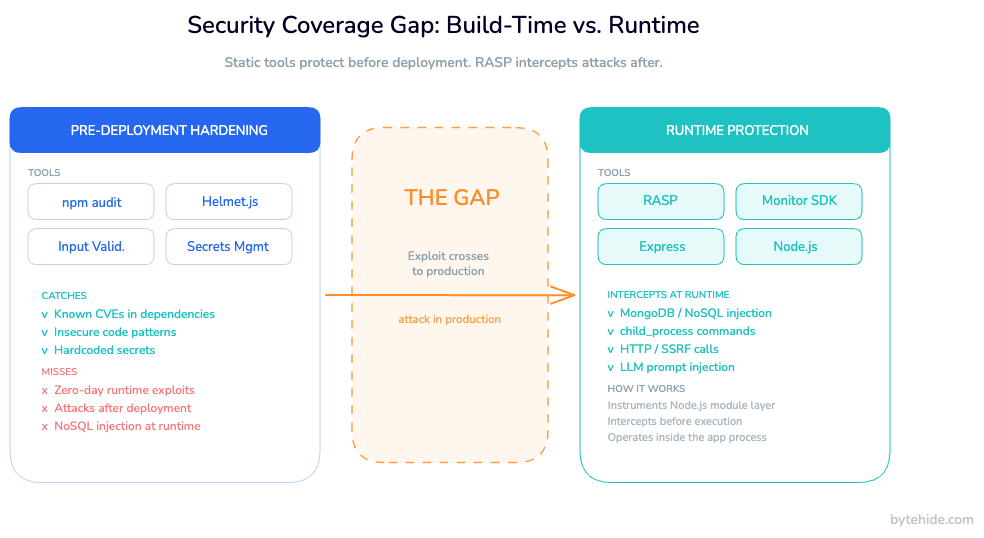
npm audit identifies known CVEs in your dependencies. It runs at build time. When an attacker sends a malicious MongoDB query to your production API at 2 AM on a Tuesday, npm audit is not involved. In my experience, the teams that discover this gap first are usually the ones responding to an incident.
Static analysis tools (eslint-plugin-security, semgrep) catch dangerous patterns in your code during development things like unvalidated regex patterns or raw string concatenation in queries. They operate on code. When your application is running in production and receives a request where an attacker bypasses your input validation through a type coercion edge case, the static analyzer has already done its job and moved on.
Security headers set by Helmet tell the browser how to behave. They don’t intercept a NoSQL injection payload before it reaches your MongoDB driver.
The table below makes the distinction concrete:
| Tool | When it runs | What it sees | What it misses |
|---|---|---|---|
npm audit | Build time | Dependency manifests | Exploits against known vulns in running code |
eslint-plugin-security | Development | Source code patterns | Runtime edge cases, dynamic code paths |
| Helmet.js | Request handling | HTTP headers | Database queries, OS commands, outbound calls |
| Input validation | Request handling | Request body/params | Type confusion, encoding bypasses reaching downstream sinks |
| RASP | Runtime (in-process) | Actual query/command/call about to execute | — |
The gap is the space between “a vulnerability exists” and “the vulnerable code executes.” Pre-deployment tools operate before that gap. Runtime protection operates inside it.
This matters because real-world applications ship with vulnerabilities. Some are in dependencies you haven’t updated yet. Some are logic errors that passed code review. Some are in third-party integrations you don’t fully control. The question is not only “how do we prevent vulnerabilities” but also “what happens when one gets exploited in production.”
Runtime Protection for Node.js: How RASP Works
Runtime application self-protection (RASP) is a security technology that operates inside the application process. Unlike perimeter defenses that inspect incoming HTTP requests, RASP instruments the application at the point where dangerous operations actually execute: the MongoDB driver, the child_process module, outbound HTTP clients, response serialization.
The key difference: a perimeter WAF sees {"username": {"$ne": null}} in the request body and may or may not flag it as a NoSQL injection attempt based on pattern matching. RASP sees the actual MongoDB query object after your application has processed it, parsed it, and is about to execute it. It knows exactly what’s happening, at the exact point it’s happening.
For a broader comparison of the tools available, the best RASP tools guide covers the ecosystem across multiple platforms.
For Node.js applications, runtime protection works by instrumenting modules at the point they’re loaded. The protection layer wraps the native MongoDB driver methods, intercepts calls to child_process.exec() and child_process.spawn(), monitors HTTP client requests for SSRF patterns, and validates output before response serialization for XSS.
What runtime protection intercepts in Node.js:
- NoSQL Injection — MongoDB
$wherequeries,$ne/$gtoperator injection, JavaScript injection in query builders - Command Injection — Calls to
child_process.exec(),execSync(), andspawn()with unsanitized arguments - SSRF — Outbound HTTP requests to private IP ranges, localhost, or cloud metadata endpoints (AWS
169.254.169.254, etc.) - XSS — Stored XSS patterns in response content before it reaches the client
- LLM Prompt Injection — Jailbreak attempts, system prompt leaks, and role manipulation in AI-powered Node.js applications
- Path Traversal — Filesystem operations attempting to escape the application’s working directory
The response is configurable: log the incident, block the operation and return a safe error, block the session, or trigger a webhook notification.
Setting Up Runtime Protection in Express
ByteHide Monitor ships a Node.js SDK that integrates with Express as middleware. Setup takes a few minutes.
Installation and Initialization
npm install @bytehide/monitorimport express from 'express';
import helmet from 'helmet';
import { ByteHideMonitor } from '@bytehide/monitor';
const app = express();
// Initialize Monitor before other middleware
// Token comes from your ByteHide dashboard
ByteHideMonitor.init({
projectToken: process.env.BYTEHIDE_TOKEN,
mode: 'cloud', // 'cloud' for web APIs
});
// Security middleware stack
app.use(ByteHideMonitor.express()); // Runtime protection layer
app.use(helmet());
app.use(express.json({ limit: '1mb' }));
// Your routes below
app.use('/api', apiRouter);
app.listen(3000);The ByteHideMonitor.express() call inserts the runtime protection layer into the Express middleware chain. From this point, all requests pass through it. But the protection operates at the module level, not the request level, so it also covers background jobs, scheduled tasks, and any database operations that happen outside the HTTP request cycle.
What Runtime Protection Looks Like in Practice
Consider a MongoDB query that processes user-supplied filter parameters:
// Vulnerable pattern — user controls the filter object
app.get('/api/products', async (req, res) => {
  const { category, minPrice } = req.query;

  // If minPrice is {"$gt": 0} (passed as JSON),
  // this becomes a NoSQL injection
  const products = await Product.find({
    category,
    price: { $gte: minPrice },
  });

  res.json(products);
});If an attacker sends minPrice={"$gt": 0} as a JSON object, the query becomes a $gt injection that can bypass price filters. Input validation catches this if you validate the type strictly — but if validation has a gap, or if the injection comes through a different path, the Monitor SDK intercepts the MongoDB operation before it executes and blocks it, logging the full query object, the request context, and the confidence level.
Protecting LLM-Powered Node.js Applications
If your Node.js API calls an LLM, prompt injection is now part of your attack surface. Monitor detects prompt injection attempts at runtime — before the manipulated prompt reaches the model:
import { ByteHideMonitor } from '@bytehide/monitor';
import OpenAI from 'openai';

const client = new OpenAI();

app.post('/api/chat', async (req, res) => {
  const { userMessage } = req.body;

  // Monitor evaluates userMessage before it's sent to the LLM
  // Detects: jailbreak patterns, system prompt leak attempts,
  // role manipulation, delimiter injection, encoded evasion
  const response = await client.chat.completions.create({
    model: 'gpt-4o',
    messages: [
      {
        role: 'system',
        content: 'You are a helpful assistant for our product catalog.',
      },
      {
        role: 'user',
        // [MONITOR_INSPECT: llm_prompt_injection]
        content: userMessage,
      },
    ],
  });

  res.json({ reply: response.choices[0].message.content });
});This is the only runtime protection layer for prompt injection available in the RASP category. Most solutions work at the request validation layer, which means they operate on pattern matching of raw strings. Monitor evaluates the semantic intent of the prompt in the context of your system prompt and application role, blocking injection attempts that would otherwise manipulate the model into leaking data or ignoring its instructions.
Configuring Detection and Response Actions
From the ByteHide dashboard, you configure detection types and response actions without redeploying:
// Code-based config (alternative to dashboard)
ByteHideMonitor.init({
  projectToken: process.env.BYTEHIDE_TOKEN,
  mode: 'cloud',
  detections: {
    sqlInjection: { enabled: true, action: 'block' },
    nosqlInjection: { enabled: true, action: 'block' },
    commandInjection: { enabled: true, action: 'block' },
    ssrf: { enabled: true, action: 'block' },
    xss: { enabled: true, action: 'log' }, // log-only while tuning
    llmPromptInjection: { enabled: true, action: 'block' },
  },
  notifications: {
    slack: process.env.SLACK_WEBHOOK_URL,
  },
});The action: 'log' mode is useful when first deploying — it lets you see what Monitor would block without affecting application behavior. Once you’ve reviewed the logs and confirmed there are no false positives for your traffic patterns, switch to 'block'.
Node.js Security Checklist for Production
The following checklist covers both layers — pre-deployment hardening and runtime defense. For Node.js security in production, you need both.
Pre-Deployment
- [ ]
npm auditintegrated into CI pipeline — blocks deployment on high-severity CVEs - [ ] Dependency lockfile (
package-lock.jsonoryarn.lock) committed and enforced - [ ] Input validation with typed schemas (zod, joi) on all external input
- [ ] Helmet.js configured with production-appropriate CSP and HSTS
- [ ] Rate limiting on all public endpoints, stricter on authentication routes
- [ ] Secrets in environment variables or a secrets manager (never in source code)
- [ ] Principle of least privilege on database connections (no admin credentials for application queries)
- [ ] Error messages that don’t leak stack traces or implementation details to clients
Runtime
- [ ] RASP/runtime protection middleware active and configured
- [ ] Detection types enabled: NoSQL injection, command injection, SSRF, XSS, LLM prompt injection (if applicable)
- [ ] Response actions configured per detection type (block vs. log)
- [ ] Real-time alert channel set up (Slack, webhook, or email)
- [ ] Incident log reviewed in first 48 hours post-deployment to catch false positives
Ongoing
- [ ] Weekly
npm auditrun on dependency graph - [ ] Runtime incident log reviewed monthly for emerging attack patterns
- [ ] Detection configuration updated when adding new features or integrations
- [ ] Node.js version kept current: LTS releases receive security patches, EOL versions do not
These two layers are complementary. Pre-deployment hardening reduces the probability of a successful attack. Runtime protection reduces the impact when one gets through.
Frequently Asked Questions
What is the most critical Node.js security risk in 2026?
Supply chain attacks against npm packages represent the fastest-growing threat vector for Node.js applications. Malicious packages, dependency confusion attacks, and compromised maintainer accounts can introduce vulnerabilities that no amount of code review catches because the malicious code lives in dependencies, not your codebase. Combine dependency scanning with runtime protection: scanning catches known vulnerabilities before deployment; runtime protection blocks exploitation of unknown or zero-day vulnerabilities in production.
Does npm audit protect against all Node.js vulnerabilities?
No. npm audit identifies packages with publicly disclosed CVEs. It does not detect unknown vulnerabilities, zero-day exploits, logic errors in your own code, misconfigured dependencies, or attacks against vulnerable code that you haven’t patched yet. It also runs at build time — it has no visibility into production requests or runtime behavior. For complete application security, treat npm audit as one tool in a layered approach that also includes input validation, runtime protection, and monitoring.
How do I secure an Express.js API?
Securing an Express.js API involves multiple layers: Helmet.js for security headers, express-rate-limit for abuse prevention, schema-based input validation (zod or joi) for all external input, parameterized queries or typed ODM methods to prevent injection, secrets in environment variables, and runtime protection middleware to intercept exploits during production traffic. The OWASP Node.js Security Cheat Sheet covers the full checklist. Express.js security is not a single library. It’s a stack.
What is RASP and how does it differ from a WAF for Node.js?
RASP (Runtime Application Self-Protection) operates inside the application process. A WAF operates at the perimeter, inspecting incoming HTTP requests based on pattern matching before they reach your application. RASP instruments the application itself: it intercepts MongoDB queries, OS commands, and outbound HTTP calls at the exact point they execute, with full context about what the application is actually doing. For Node.js, this means RASP sees the MongoDB query object about to be executed, not the raw HTTP request that triggered it, which gives it far more precision and far fewer false positives.
Can I protect AI-powered Node.js apps from prompt injection at runtime?
Yes. If your Node.js application sends user-supplied input to an LLM, that input is an attack surface for prompt injection. Attackers can craft inputs that override your system prompt, manipulate the model’s role, or extract confidential context from the conversation. Runtime protection with LLM prompt injection detection evaluates user messages before they reach the model, blocking jailbreak patterns, system prompt leak attempts, role manipulation, and encoded evasion techniques. This is the only runtime-layer defense for prompt injection available in the RASP category. See the full guide on preventing prompt injection attacks at runtime for implementation details.