
In this article· 27 sectionsJump to any section of the article
- 1Why Mobile App Security Matters in 2026
- 2OWASP Mobile Top 10 2024 Risk Scorecard
- 3Mobile App Security Best Practices by OWASP Category
- 3.1M1: Improper Credential Usage [Code + Backend]
- 3.2M2: Inadequate Supply Chain Security [Build-time]
- 3.3M3: Insecure Authentication/Authorization [Code + Backend]
- 3.4M4: Insufficient Input/Output Validation [Code]
- 3.5M5: Insecure Communication [Code + Runtime]
- 3.6M6: Inadequate Privacy Controls [Code]
- 3.7M7: Insufficient Binary Protections [Build-time + Runtime]
- 3.8M8: Security Misconfiguration [Runtime]
- 3.9M9: Insecure Data Storage [Code + Runtime]
- 3.10M10: Insufficient Cryptography [Code]
- 4Build-Time vs Runtime Protection: A Layered Approach
- 5Additional Mobile Security Best Practices Beyond OWASP
- 6Mobile App Security Checklist Summary
- 7Verifying Your Implementation
- 8Frequently Asked Questions
- 8.1What are the top 10 OWASP mobile risks?
- 8.2What are the top 3 mobile vulnerabilities according to OWASP?
- 8.3What is OWASP Mobile?
- 8.4What is the latest version of the OWASP Mobile Top 10?
- 8.5How is mobile app security different from web app security?
- 8.6Can I achieve OWASP Mobile Top 10 compliance with code changes alone?
- 8.7How often should mobile app security best practices be reviewed?
- 9Final Thoughts
Most guides on mobile app security best practices read like a pile of disconnected tips: encrypt data, use 2FA, keep dependencies updated. The problem with flat lists is that they tell you what to do but not where each control belongs. Is certificate pinning something you configure at build time, enforce at runtime, or handle in the backend? Where does jailbreak detection fit? What about code obfuscation, Keystore usage, or SBOMs?
This guide takes a different approach. Instead of another generic list, we map best practices to the OWASP Mobile Top 10 (2024) and tag each one with the layer that owns it: code, backend, build-time, or runtime. The framework for mobile is distinct from the OWASP Top 10 for web applications; the risks that matter on a device you do not control are different from the ones that matter on a server you do. This is also different from generic runtime security applied to cloud workloads. Mobile has its own threat surface.
You get a scorecard of the ten risks, three to five actionable practices per category, code examples in Kotlin and Swift where they help, a layered checklist organized by SDLC phase, and answers to the questions engineering teams actually ask during mobile security reviews.
Why Mobile App Security Matters in 2026
Mobile apps now handle banking, identity, healthcare, access control, and AI-powered workflows on devices their developers do not own or control. That asymmetry is the whole problem. A mobile binary sitting on a rooted Android phone, an iOS device with a jailbreak detection bypass, or an emulator running a tampered APK is an adversarial environment, and the app has to behave correctly there anyway.
The business consequences of getting this wrong in 2026 are measurable. Regulatory frameworks like GDPR, PSD2, HIPAA, and the EU Digital Markets Act now treat mobile data flows as first-class citizens for audit and enforcement. App store reviewers are stricter on security disclosures. Breach disclosure obligations are shorter. And the reputational hit from a compromised mobile app propagates through social media in hours, not weeks.
The threats have also evolved beyond the 2016 playbook. Reverse-engineering toolchains are commoditized. Dynamic instrumentation frameworks can hook any method at runtime. AI-generated code is being shipped into production without security review. LLM-powered apps expose new injection paths that the OWASP Mobile project explicitly flags.
Top Mobile App Security Threats in 2026
The current mobile app security threats engineering teams are dealing with cluster into five patterns: reverse engineering and intellectual property theft, runtime tampering through hooking frameworks and memory patching, API abuse via a compromised or cloned client, insecure local data storage exposed by device loss or malware, and prompt injection against embedded AI features. Every item in the OWASP Mobile Top 10 maps to one or more of these patterns.
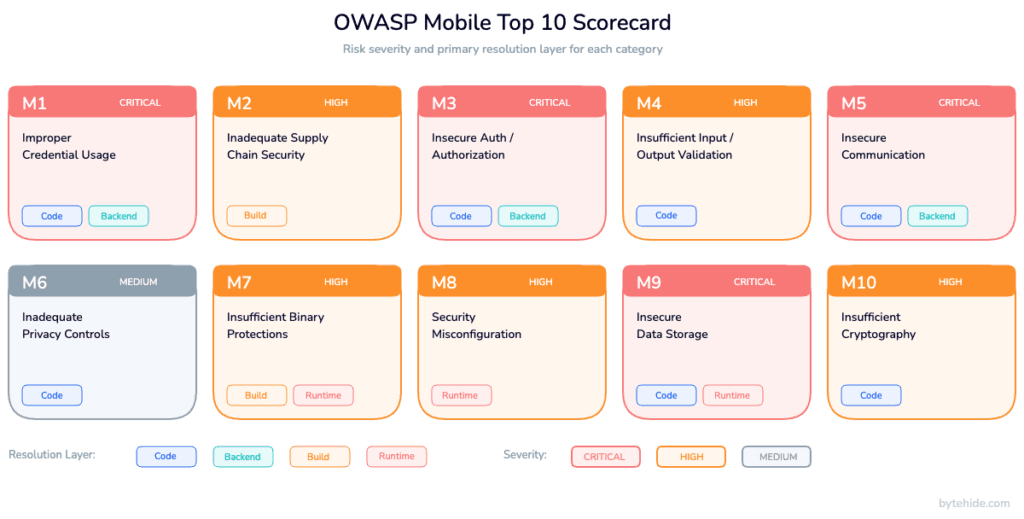
OWASP Mobile Top 10 2024 Risk Scorecard
The OWASP Mobile Top 10 is the reference framework for mobile application risk. The project was first published in 2014, refreshed in 2016, and substantially restructured in 2024. The 2024 version reorganizes categories to reflect the current threat landscape, adds supply chain and privacy as first-class risks, and better aligns with the MASVS (Mobile Application Security Verification Standard) and MASTG (Mobile Application Security Testing Guide). If you see older references to “M10 Lack of Binary Protections”, that is the 2016 list; the 2024 equivalent is M7 Insufficient Binary Protections.
Here is a scorecard of the ten risks with severity, typical fix effort, and the layer where the control actually lives.
| Risk | Description | Severity | Fix Effort | Resolved At |
|---|---|---|---|---|
| M1: Improper Credential Usage | Hardcoded or mishandled credentials | Critical | Medium | Code + Backend |
| M2: Inadequate Supply Chain Security | Compromised third-party libraries, CI/CD | High | Medium | Build-time |
| M3: Insecure Authentication/Authorization | Weak auth, broken session handling | Critical | Medium | Code + Backend |
| M4: Insufficient Input/Output Validation | Injection, deep link abuse, unsafe deserialization | High | Low | Code |
| M5: Insecure Communication | Missing TLS, no pinning, downgrade attacks | High | Low | Code + Runtime |
| M6: Inadequate Privacy Controls | Over-collection, weak consent, PII leakage | Medium | Medium | Code |
| M7: Insufficient Binary Protections | No obfuscation, no tampering detection | High | Medium | Build-time + Runtime |
| M8: Security Misconfiguration | Debug flags, verbose logs, exposed components | Medium | Low | Code + Runtime |
| M9: Insecure Data Storage | Plaintext local storage, leaky caches | Critical | Low | Code + Runtime |
| M10: Insufficient Cryptography | Weak algorithms, bad key management | High | Medium | Code |
The layer column is the most useful part. It tells you who on the team owns each fix. Code means application developers writing client logic. Backend is the API team. Build-time is DevOps and release engineering (obfuscation configuration, SBOM generation, code signing). Runtime is the defense that operates while the app is in the user’s hands: RASP, jailbreak and root detection, anti-debugging, hooking detection. Every risk needs at least two of these layers working together.
Mobile App Security Best Practices by OWASP Category
One H3 per category, each with the risk definition, a brief attack pattern where it helps, three to five actionable best practices, the layers involved, and code when it adds value.
M1: Improper Credential Usage
Improper credential usage covers hardcoded API keys, embedded OAuth client secrets, credentials stored in SharedPreferences or UserDefaults in plaintext, and long-lived tokens without rotation. These credentials end up in public repos, APK decompilations, and leaked datasets within hours of a breach.
A typical attack: an adversary decompiles a production APK with a standard reverse-engineering toolchain, greps the strings table for apikey or secret, finds a payment or cloud key scoped too broadly, and has billing-level access before the team notices.
Best practices:
- Never hardcode secrets in the mobile binary. If the key has to exist client-side, scope it to what a client can do without privilege escalation.
- Use short-lived, server-issued tokens (OAuth 2.0, OIDC) with refresh flows rather than static API keys.
- Rotate credentials automatically and revoke on suspicion of compromise. Build rotation before you ship, not after.
- Keep sensitive operations server-side. The client asks, the server decides.
- Scan every build artifact for embedded secrets as part of CI.
M2: Inadequate Supply Chain Security
Supply chain risk covers compromised third-party SDKs, malicious updates to open-source dependencies, unsigned or tampered build artifacts, and CI/CD pipelines with weak access controls. A single poisoned advertising SDK has historically leaked data from thousands of apps at once.
Best practices:
- Generate and track an SBOM (Software Bill of Materials) for every release. You cannot defend what you cannot enumerate.
- Pin dependency versions and review every update manually for high-risk SDKs: auth, payments, crypto, analytics.
- Require signed builds and reproducible build configurations. Anything unsigned does not reach production.
- Separate CI/CD credentials from developer credentials. Use short-lived OIDC tokens for build jobs.
- Scan dependencies continuously against vulnerability feeds and block releases on critical findings.
M3: Insecure Authentication/Authorization
M3 covers weak authentication flows (no MFA, predictable session identifiers, session fixation), broken authorization (client-side role checks the server trusts), missing re-authentication for sensitive actions, and tokens that never expire. It is distinct from M1: M1 is about storing credentials; M3 is about the logic of verifying identity and permissions.
Best practices:
- Perform authentication and authorization on the server. The client tells you who it thinks it is; the server decides what that identity can do.
- Enforce multi-factor authentication for account creation, high-value transactions, and credential changes. Biometrics are a good second factor, never the only factor.
- Use short session lifetimes with silent refresh. Fifteen minutes for high-risk apps, one hour for general use.
- Invalidate sessions on logout, password change, suspicious location, and device change.
- Require re-authentication before any action that moves money, changes identity, or exports data.
M4: Insufficient Input/Output Validation
Mobile apps accept input from users, push notifications, deep links, URL schemes, inter-process communication, clipboard, QR codes, and responses from servers that might themselves be compromised. Insufficient validation of any of these enables SQL injection in local databases, XSS in WebView contexts, command injection, path traversal, and deserialization attacks.
Best practices:
- Validate all input against an allowlist of expected formats. Reject by default.
- Sanitize outputs according to their rendering context: escape HTML for WebViews, shell metacharacters for native commands, SQL parameters for local databases.
- Treat deep links and URL scheme handlers as attacker-controlled input. Require explicit authorization before they can trigger sensitive actions.
- Validate server responses. A compromised or spoofed API can inject malicious payloads into your client.
- Prefer parameterized queries and typed APIs over string concatenation anywhere user-influenced data appears.
M5: Insecure Communication
Every byte a mobile app exchanges with a server crosses networks the developer does not control: corporate proxies, public Wi-Fi, mobile carriers with deep-packet inspection, adversarial routers. Without proper TLS and certificate pinning, man-in-the-middle tools can intercept, decrypt, modify, and replay traffic in minutes.
Best practices:
- Use TLS 1.3 for all traffic. Reject cleartext HTTP explicitly at the platform level (Android Network Security Config, iOS ATS).
- Pin certificates or public keys for APIs you own. Pinning stops self-signed MITM proxies that the device has otherwise been told to trust.
- Implement pin rotation carefully. A static pin without a rotation plan turns into an outage the day your certificate expires.
- Validate hostnames and reject invalid or expired certificates. Never disable validation, even for staging.
- At runtime, detect proxies and traffic interception tools and respond (log, degrade, block) rather than trusting the network.
A minimal certificate pinning pattern in Kotlin (Android) and Swift (iOS). Both enforce pinning for a specific API host and a known public-key hash.
Kotlin (OkHttp with CertificatePinner):
import okhttp3.CertificatePinnerimport okhttp3.OkHttpClient// Obtain the pin from your CI pipeline, not hardcoded at sourceval pinner = CertificatePinner.Builder() .add("api.example.com", "sha256/AAAAAAAAAAAAAAAAAAAAAAAAAAAAAAAAAAAAAAAAAAA=") .add("api.example.com", "sha256/BBBBBBBBBBBBBBBBBBBBBBBBBBBBBBBBBBBBBBBBBBB=") // backup .build()val client = OkHttpClient.Builder() .certificatePinner(pinner) .build()Swift (URLSessionDelegate):
import Foundationimport CryptoKitfinal class PinningDelegate: NSObject, URLSessionDelegate { private let expectedHashes: Set<String> = [ "AAAAAAAAAAAAAAAAAAAAAAAAAAAAAAAAAAAAAAAAAAA=", "BBBBBBBBBBBBBBBBBBBBBBBBBBBBBBBBBBBBBBBBBBB=" // backup ] func urlSession(_ session: URLSession, didReceive challenge: URLAuthenticationChallenge, completionHandler: @escaping (URLSession.AuthChallengeDisposition, URLCredential?) -> Void) { guard let trust = challenge.protectionSpace.serverTrust, let chain = SecTrustCopyCertificateChain(trust) as? [SecCertificate], let leaf = chain.first else { completionHandler(.cancelAuthenticationChallenge, nil) return } let data = SecCertificateCopyData(leaf) as Data let hash = Data(SHA256.hash(data: data)).base64EncodedString() if expectedHashes.contains(hash) { completionHandler(.useCredential, URLCredential(trust: trust)) } else { completionHandler(.cancelAuthenticationChallenge, nil) } }}Both examples ship the public-key hashes in the binary and fail the TLS handshake if the presented certificate chain does not match. Pair this with backup pins and a defined rotation plan before the first pin expires.
M6: Inadequate Privacy Controls
Privacy risk covers collecting more data than needed, exposing personally identifiable information in logs and crash reports, missing or dark-patterned consent flows, and sharing data with third-party SDKs without disclosure. Regulators treat these as security failures, not just legal ones.
Best practices:
- Collect the minimum data needed for the feature to function. Every extra field is a liability.
- Scrub PII from logs, crash reports, and analytics payloads before they leave the device.
- Implement clear, granular consent. Per-feature opt-in beats global accept-all.
- Honor user data rights: export, deletion, portability. Build the endpoints before regulators ask.
- Document what every third-party SDK collects and update privacy labels (App Store, Play Console) on every release.
M7: Insufficient Binary Protections
An unprotected mobile binary is a learning artifact for attackers. Symbol names leak architecture, decompiled bytecode reveals business logic, debuggers and hooking frameworks attach at runtime, and modified APKs get republished on third-party stores. M7 is where build-time hardening and runtime defenses meet. This is the home of app shielding, and for a practical walkthrough of how to combine obfuscation, anti-tampering, and runtime detection on Android and iOS, see mobile app shielding techniques.
Best practices:
- Apply code obfuscation and symbol stripping at build time for every release build. Debug builds can stay readable; release builds should not.
- Sign all builds and verify the signature at runtime. Detect repackaged apps and respond.
- Detect and respond to runtime hooking frameworks commonly used for dynamic instrumentation and reverse engineering.
- Check binary integrity on launch and at key business events. A hash over the binary plus a runtime-computed signature is harder to patch than either alone.
- Do not rely on a single check. Multiple, redundant checks raise the effort for an attacker beyond the value of the target.
A minimal runtime integrity check in Kotlin, verifying the signing certificate against an expected hash:
import android.content.Contextimport android.content.pm.PackageManagerimport java.security.MessageDigestfun verifySigningCertificate(context: Context, expectedSha256: String): Boolean { val pm = context.packageManager val info = pm.getPackageInfo( context.packageName, PackageManager.GET_SIGNING_CERTIFICATES ) val signers = info.signingInfo?.apkContentsSigners ?: return false val digest = MessageDigest.getInstance("SHA-256") return signers.any { sig -> val hash = digest.digest(sig.toByteArray()) .joinToString("") { "%02x".format(it) } hash.equals(expectedSha256, ignoreCase = true) }}Build-time obfuscation is configured separately in the build system. Commercial obfuscation tools, open-source shrinkers, and enterprise mobile hardening platforms all exist; configuration is specific to each. The important part: obfuscation alone stops casual reversing but not dynamic analysis. Pair it with runtime checks.
M8: Security Misconfiguration
Security misconfiguration is the umbrella risk for shipping debug flags enabled, verbose logging in production, exported components without permission guards, backups enabled for sensitive data, and missing hardening on exposed intents or URL schemes. It also covers running an otherwise-hardened app on a compromised operating system where the platform’s own guarantees no longer hold.
Best practices:
- Enforce release-only flags:
debuggable=false,allowBackup=falsefor sensitive apps, stripped logs. - Detect compromised devices at runtime and decide your response policy. A banking app blocks sensitive features on a rooted device; a casual app might warn.
- Detect emulator and instrumented environments and treat them as adversarial by default in production builds.
- Audit every exported component (activities, services, content providers, URL handlers) and require explicit permission or signature matching.
- Monitor runtime configuration on the backend: if a client identifier claims an unusual device profile, treat the session as higher risk.
Examples of minimal root and jailbreak indicators in Kotlin and Swift. These are starting points, not production-grade detection.
// Kotlin: basic root indicators (defense-in-depth, not a single-point check)import java.io.Filefun hasRootIndicators(): Boolean { val knownBinaries = listOf( "/system/xbin/su", "/system/bin/su", "/sbin/su", "/system/app/Superuser.apk" ) val binaryPresent = knownBinaries.any { File(it).exists() } val writableSystem = runCatching { File("/system").canWrite() }.getOrDefault(false) return binaryPresent || writableSystem}// Swift: basic jailbreak indicators for iOSimport Foundationfunc hasJailbreakIndicators() -> Bool { let suspiciousPaths = [ "/Applications/Cydia.app", "/Library/MobileSubstrate/MobileSubstrate.dylib", "/bin/bash", "/usr/sbin/sshd", "/etc/apt" ] if suspiciousPaths.contains(where: { FileManager.default.fileExists(atPath: $0) }) { return true } // Sandbox escape: writing outside the app sandbox should fail on non-jailbroken devices let testPath = "/private/jb_test.txt" do { try "test".write(toFile: testPath, atomically: true, encoding: .utf8) try? FileManager.default.removeItem(atPath: testPath) return true } catch { return false }}Serious root and jailbreak detection needs multiple signals, hook-resistant APIs, and continuous updates as bypass techniques evolve.
M9: Insecure Data Storage
Mobile apps cache credentials, auth tokens, downloaded content, form data, images, and structured data on the device. M9 covers anything stored insecurely: plaintext in SharedPreferences or UserDefaults, unencrypted SQLite databases, backups that include sensitive directories, screenshots in the app switcher showing the last sensitive screen, clipboard content that outlives the session.
Best practices:
- Use platform-backed secure storage for secrets: Android Keystore on Android, Keychain on iOS. Do not roll your own encryption wrapper around SharedPreferences.
- Encrypt local databases with a key stored in secure hardware (Keystore/Keychain), not a string baked into the binary.
- Disable screenshots on sensitive screens. Implement
FLAG_SECUREon Android and appropriate scene configuration on iOS. - Scrub clipboard content after sensitive copies. Clear caches on logout.
- Configure backup rules to exclude secure directories and audit what actually lands in iCloud or Google Drive backups.
Storing a secret using Android Keystore (Kotlin):
import android.security.keystore.KeyGenParameterSpecimport android.security.keystore.KeyPropertiesimport java.security.KeyStoreimport javax.crypto.Cipherimport javax.crypto.KeyGeneratorimport javax.crypto.SecretKeyobject SecureStore { private const val KEY_ALIAS = "app_master_key" private const val TRANSFORM = "AES/GCM/NoPadding" private fun getOrCreateKey(): SecretKey { val ks = KeyStore.getInstance("AndroidKeyStore").apply { load(null) } (ks.getKey(KEY_ALIAS, null) as? SecretKey)?.let { return it } val spec = KeyGenParameterSpec.Builder( KEY_ALIAS, KeyProperties.PURPOSE_ENCRYPT or KeyProperties.PURPOSE_DECRYPT ) .setBlockModes(KeyProperties.BLOCK_MODE_GCM) .setEncryptionPaddings(KeyProperties.ENCRYPTION_PADDING_NONE) .setUserAuthenticationRequired(false) // set true for biometric-gated secrets .build() return KeyGenerator.getInstance(KeyProperties.KEY_ALGORITHM_AES, "AndroidKeyStore") .apply { init(spec) } .generateKey() } fun encrypt(plaintext: ByteArray): Pair<ByteArray, ByteArray> { val cipher = Cipher.getInstance(TRANSFORM).apply { init(Cipher.ENCRYPT_MODE, getOrCreateKey()) } return cipher.iv to cipher.doFinal(plaintext) }}The iOS equivalent uses Keychain with kSecAttrAccessibleWhenUnlockedThisDeviceOnly and optional biometric protection through SecAccessControlCreateWithFlags. Both platforms offer hardware-backed keys on modern devices. For platform-specific deep dives see the Android security deep-dive and the iOS security deep-dive.
M10: Insufficient Cryptography
Insufficient cryptography covers weak algorithms (DES, MD5, SHA-1 for signatures), misused primitives (ECB mode, hardcoded IVs, deterministic nonces), bad key management (keys in source, keys shared across users, keys without rotation), and homemade cryptography in general. In my experience, cryptography is the area where teams most often lose to the “it works in tests” trap: a misconfigured cipher returns output, it just does not protect anything.
Best practices:
- Use modern algorithms: AES-256-GCM for symmetric encryption, ChaCha20-Poly1305 when hardware support is thin, Ed25519 or ECDSA-P256 for signatures, SHA-256 or SHA-3 for hashing. Follow NIST cryptographic standards guidance for any deviation.
- Never implement your own primitives. Use platform APIs (Android Keystore, iOS CryptoKit, CommonCrypto) or vetted libraries.
- Store keys in hardware-backed keystores, never in the binary, never in SharedPreferences or UserDefaults.
- Derive keys from passwords with PBKDF2 (≥310,000 iterations), Argon2id, or scrypt. No SHA-256-of-password shortcuts.
- Plan for crypto-agility. Protocols that cannot rotate algorithms end up frozen in time while attack techniques advance.
Build-Time vs Runtime Protection: A Layered Approach
Every best practice above lives in one of four layers: code, backend, build-time, or runtime. A common failure pattern is to pick one layer and assume it covers everything.
Build-time protections transform the binary before it ships. Obfuscation renames symbols so decompilation produces unreadable output. Control-flow flattening breaks the logical structure attackers rely on. String encryption hides hardcoded literals. Code signing binds the binary to a known publisher. SBOMs record every dependency for later audit. These protections are cheap to apply and hard to bypass with static analysis alone, but they do not help once the app is running on a rooted device with a dynamic instrumentation framework attached.
Runtime protections operate while the app is executing on a device the developer does not control. This is the domain of Runtime Application Self-Protection (RASP): jailbreak and root detection, anti-debugging, hooking framework detection, integrity checks that run on events rather than only at launch, and in-app interception of injection attacks against the application’s own APIs. Runtime defenses see what is actually happening in the process. They cannot undo a missing obfuscation pass, but they can detect when something tries to bypass it.
Neither layer alone is sufficient. Build-time hardening without runtime checks is like locking a door and leaving a window open: it raises the bar for static reverse engineering but loses against dynamic attacks. Runtime checks without build-time hardening leak the logic of the checks themselves, and attackers patch them out. The combination is what raises cost beyond what most attackers will spend on a target that is not uniquely valuable.
The contrast with a purely perimeter approach is worth stating explicitly: see RASP vs WAF for the full comparison. A traditional WAF sits outside the application and inspects HTTP traffic; a runtime self-protection layer sits inside the application and sees the actual methods being called, the actual SQL being executed, the actual input hitting the actual code path. For mobile apps, where there is no network perimeter between the attacker and the binary, runtime self-protection is the only place where the defense sees what the attacker sees.
A simplified view of which layer handles which risks:
| Defense | Build-time | Runtime | OWASP Mobile Top 10 coverage |
|---|---|---|---|
| Code obfuscation | ✅ | M7, indirectly M1, M10 | |
| Code signing | ✅ | M2, M7 | |
| SBOM + dependency scanning | ✅ | M2 | |
| String encryption | ✅ | M1, M7, M10 | |
| Symbol stripping | ✅ | M7 | |
| Jailbreak/root detection | ✅ | M8 | |
| Anti-debugging | ✅ | M7, M8 | |
| Hooking detection | ✅ | M7, M8 | |
| Runtime tampering detection | ✅ | M7 | |
| In-app WAF (API injection) | ✅ | M4, M5 | |
| Secure data storage (Keystore/Keychain) | ✅ config | ✅ enforcement | M9 |
| TLS + certificate pinning | ✅ config | ✅ enforcement | M5 |
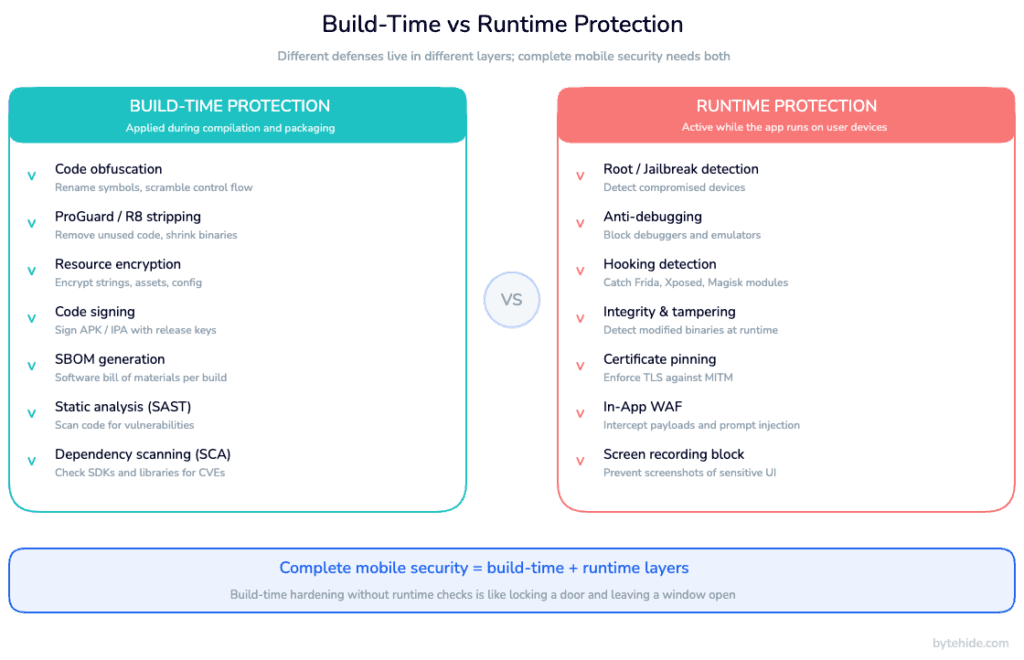
Mobile security platforms typically split along these lines. Build-time tooling focuses on obfuscation, hardening, and release signing. Runtime platforms focus on detection and response. A complete stack needs both, configured to share telemetry and fail in compatible ways. ByteHide Shield handles the build-time side (obfuscation and hardening for .NET, MAUI, Android, iOS, JavaScript) and ByteHide Monitor handles the runtime side (RASP including jailbreak/root, anti-debugging, tampering, in-app WAF), and the two feed each other signals. Whether you assemble the stack from our products or different ones, the principle is the same: two layers, configured together, or you have a gap.
Additional Mobile Security Best Practices Beyond OWASP
The OWASP Mobile Top 10 covers the risks that apply to the application itself. A complete program needs a few things that live outside the binary.
Developer training and secure coding culture matter more than any single tool. A team that understands why a defense exists configures it correctly; a team that sees security as someone else’s problem treats controls as boilerplate. Run internal threat modeling sessions on every major feature. Make security reviews part of the definition of done, not an end-of-cycle gate.
Penetration testing and red team exercises find what automated tooling misses. I’ve seen teams skip this step because they trusted their SAST pipeline, and the first real pen test always surfaces something the scanner never flagged. Annual testing is a compliance minimum; quarterly for high-risk apps is closer to what current threats require. Treat findings as bug backlog items with severity, not as a separate universe of “security issues”. Regulated verticals layer on industry-specific requirements; for example, mobile banking security requirements include PSD2 strong customer authentication and continuous fraud monitoring on top of the OWASP baseline.
An incident response plan specific to mobile is worth writing before you need it. What happens when a compromised app binary appears on a third-party store? When a mass credential-stuffing campaign targets your login endpoint? When a researcher publishes a jailbreak bypass for a defense you shipped? Written playbooks turn a crisis into an exercise in following a checklist.
OWASP MASVS and MASTG complement the Mobile Top 10. MASVS gives you a verification standard (levels L1, L2, and R for resilience) that maps compliance claims to concrete checks. MASTG is the testing methodology that produces the evidence. Use them together: the Top 10 is the risk list; MASVS and MASTG are how you prove you handled it.
Finally, observability. Security events need to be logged, streamed to a backend, and correlated with user sessions. An alert that root has been detected on a device running a banking app is useful only if someone sees it. An unexplained spike in tampered-binary events from a specific country is a leading indicator worth investigating.
Mobile App Security Checklist Summary
A condensed checklist organized by SDLC phase. Every item maps back to one or more OWASP Mobile Top 10 categories.
Design & Threat Modeling
- Threat model every new feature before code is written.
- Define the sensitivity tier of every data flow (public, internal, confidential, regulated).
- Decide the response policy for compromised devices (block, degrade, warn, allow) per feature.
- Document which defenses belong to which layer (code, backend, build, runtime).
- Align scope with OWASP MASVS L1 minimum; L2 for regulated apps.
Development
- No hardcoded credentials, secrets, or API keys (M1).
- Server-side authentication and authorization; clients assert, servers decide (M3).
- Input validated by allowlist; outputs escaped by rendering context (M4).
- TLS 1.3 enforced at platform level; cleartext disabled (M5).
- Consent per feature, PII scrubbed from logs and analytics (M6).
- Platform-backed secure storage (Keystore, Keychain) for all secrets (M9).
- Modern crypto primitives; no homemade algorithms (M10).
- Deep links and URL handlers treated as attacker-controlled (M4).
Build & Release
- Obfuscation, symbol stripping, string encryption for release builds (M7).
- Code signing mandatory; unsigned builds blocked (M2, M7).
- SBOM generated and archived per release (M2).
- Dependency vulnerability scanning in CI; critical findings block release (M2).
- Release flags enforced:
debuggable=false, verbose logs stripped, backup rules tightened (M8). - App store privacy labels updated every release (M6).
Runtime & Production
- Jailbreak and root detection with defined response policy (M8).
- Anti-debugging active in release builds (M7, M8).
- Hooking framework detection (M7, M8).
- Binary integrity checks on launch and at sensitive events (M7).
- Certificate pinning enforced with documented rotation plan (M5).
- In-app WAF on APIs: injection, XSS, SSRF, rate limiting (M4, M5).
- Security events streamed to backend with correlation by session (all).
- Screenshot and task-switcher protection on sensitive screens (M9).
Post-release
- Quarterly penetration testing for high-risk apps, annual minimum otherwise.
- Continuous monitoring for tampered or republished builds on third-party stores.
- Breach disclosure playbook rehearsed, owners identified, communication templates ready.
- Security KPIs reviewed monthly: tampered-build rate, rooted-device active sessions, failed-integrity events, credential rotation time.
Verifying Your Implementation
Implementation without verification is aspiration. Every control on the checklist needs an automated or manual test that proves it works on the version of the app that shipped.
Static analysis (SAST) and software composition analysis (SCA) tools find hardcoded credentials, known-vulnerable dependencies, and some classes of injection issues before the build completes. Dynamic analysis (DAST) and mobile-specific testing frameworks exercise the running binary against MASVS checks. Manual penetration testing, ideally by testers who did not build the app, finds what the tools miss: logic flaws, subtle authorization gaps, and creative combinations of small issues that compose into a real exploit.
For a deeper look at how to structure a testing program specifically for mobile, see mobile app security testing methodology.
Frequently Asked Questions
What are the top 10 OWASP mobile risks?
The OWASP Mobile Top 10 (2024) lists ten risk categories: M1 Improper Credential Usage, M2 Inadequate Supply Chain Security, M3 Insecure Authentication/Authorization, M4 Insufficient Input/Output Validation, M5 Insecure Communication, M6 Inadequate Privacy Controls, M7 Insufficient Binary Protections, M8 Security Misconfiguration, M9 Insecure Data Storage, and M10 Insufficient Cryptography. Each category is maintained by the OWASP Mobile project and maps to both MASVS (the verification standard) and MASTG (the testing guide).
What are the top 3 mobile vulnerabilities according to OWASP?
OWASP does not publish a strict 1-3 ranking, but M1 Improper Credential Usage, M9 Insecure Data Storage, and M5 Insecure Communication are consistently treated as the highest-severity categories because they map to direct compromise of user accounts and data. M3 Insecure Authentication/Authorization is a close fourth. In practice, most real-world breaches exploit combinations of these four categories.
What is OWASP Mobile?
OWASP Mobile is the umbrella for the Open Worldwide Application Security Project’s mobile-specific work. It includes the OWASP Mobile Top 10 (the risk list), MASVS (the Mobile Application Security Verification Standard, which defines security requirements), MASTG (the Mobile Application Security Testing Guide, which defines how to test against MASVS), and the Mobile Application Security Checklist derived from both. The project is community-maintained and vendor-neutral.
What is the latest version of the OWASP Mobile Top 10?
The current release is OWASP Mobile Top 10 (2024), which substantially restructured the 2016 version. The 2024 release added supply chain security (M2) and privacy controls (M6) as first-class categories, merged some older items, and aligned terminology with MASVS and MASTG. Older content referring to “M10 Lack of Binary Protections” is from the 2016 list; the equivalent in 2024 is M7 Insufficient Binary Protections.
How is mobile app security different from web app security?
Web apps run on servers the team controls; mobile apps run on devices the team does not control. That changes the threat model in three ways. First, the binary itself is attacker-accessible, which makes reverse engineering, tampering, and credential extraction from the package real risks that have no web equivalent. Second, there is no network perimeter in front of the client, so defenses that live at the edge (traditional WAFs, rate limiters at the load balancer) only cover API traffic, not the app itself. Third, the device operating system may be compromised (rooted, jailbroken, emulated), and the app has to behave correctly on hostile platforms. The OWASP Top 10 for web applications covers overlapping but distinct risks from the mobile list.
Can I achieve OWASP Mobile Top 10 compliance with code changes alone?
No. Roughly half of the categories require defenses that live outside application code: M2 needs build-time controls (SBOM, signed builds, CI/CD hardening), M7 needs both build-time (obfuscation, signing) and runtime (integrity, anti-debugging, tampering detection), and M8 is largely a runtime concern (detecting rooted devices, emulators, debuggers). Code-only fixes handle M1, M4, M6, and M10 effectively, cover M3 and M9 partially, and cannot address M2, M7, and M8 at all. A complete program needs code, build-time, and runtime layers working together.
How often should mobile app security best practices be reviewed?
Best practices should be reviewed at three cadences. Per release: every build passes the checklist (SAST, SCA, release flags, signing, SBOM). Quarterly: penetration test findings reviewed, threat model updated for major features, KPIs reported. Annually: full policy review against the current OWASP Mobile Top 10, MASVS level re-certified, incident response plan rehearsed. Trigger out-of-cycle reviews when a major vulnerability is disclosed in a shipped dependency, when a new OS version changes the security surface, or when an incident exposes a gap.
Final Thoughts
The OWASP Mobile Top 10 is not a checklist to run once. It is a map of where risk lives in mobile applications, and every category in it demands a control at the code, backend, build-time, or runtime layer. Flat lists of best practices fail because they leave teams guessing which layer owns what; the framework in this guide is designed to make that decision explicit.
Two takeaways worth keeping. First, no single layer is sufficient. Build-time hardening without runtime checks is locked-door-open-window; runtime checks without hardening leak their own logic. Second, verification matters as much as implementation. A control you did not test is a control you did not ship.
Ready to map OWASP Mobile Top 10 to a concrete implementation? ByteHide Shield and ByteHide Monitor together cover M1 through M10 across Android, iOS, .NET, JavaScript, and desktop targets: Shield handles the build-time hardening layer, Monitor handles the runtime self-protection layer, and they share signals so policy decisions happen with full context rather than partial visibility.

