Every guide on RASP vs WAF ends with the same conclusion: “use both together.” That advice is technically sound but practically incomplete. It assumes you only have two options.
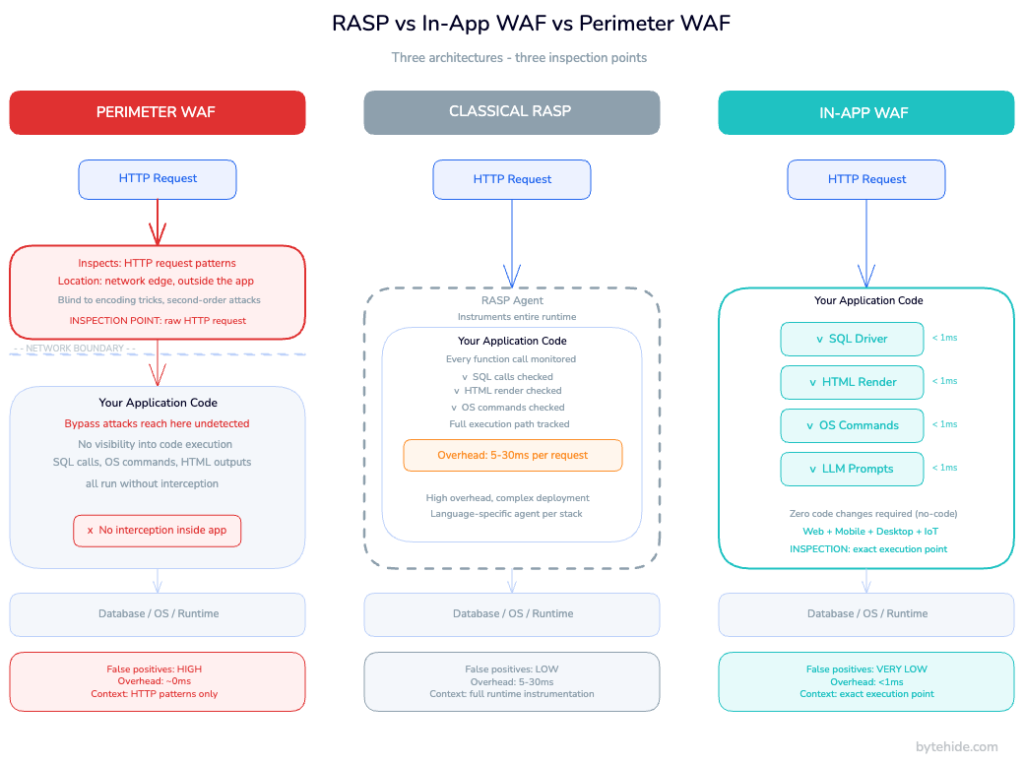
A third architecture exists that the industry has not cleanly categorized yet: the In-App WAF. It operates inside the application like RASP, intercepts at precise execution points like a WAF, and requires zero code changes. What follows covers what each architecture actually does, where each one fails, and how to choose between them based on your threat model, stack, and operational constraints.
How Application Protection Has Evolved
Application security has gone through three distinct architectural shifts, each one driven by the limitations of the previous approach.
Perimeter WAF (early 2000s). Web applications became targets, and the first instinct was to protect them from outside. A reverse proxy sits in front of the app, inspects HTTP traffic, and blocks requests that match known attack patterns. No code changes needed. One WAF covers every app behind it.
RASP (early 2010s). Attackers got smarter. Encoding tricks, fragmented payloads, and application-specific bypasses routinely slipped past perimeter rules. Security teams needed something that could see inside the application. RASP agents instrument the runtime environment, hooking into execution flow to detect attacks based on what the application is actually doing, not what the raw request looks like from outside.
In-App WAF (present). RASP improved precision but introduced operational complexity. Instrumenting an entire runtime adds latency, creates language-specific dependencies, and can affect application stability when misconfigured. The In-App WAF keeps the inside-the-application positioning of RASP but narrows its scope: instead of monitoring the full execution flow, it intercepts at specific high-risk execution points where attacks land. SQL driver calls. OS process spawning. HTML render output. LLM prompt construction. The result is RASP-level precision with sub-millisecond overhead and no code changes.
What Is a Perimeter WAF?
A perimeter WAF is a network-level security control that sits between the internet and your application servers. Every incoming HTTP/HTTPS request passes through it before reaching your app. The WAF inspects each request against a ruleset: regex patterns, OWASP Top 10 attack signatures, IP reputation lists, rate limits. Requests that match known-bad patterns are blocked or flagged. Clean requests are forwarded to the application.
Perimeter WAFs deploy as network appliances, host-based software, or cloud services. Cloud-based variants (routing traffic through a CDN or reverse proxy) are most common today because they handle infrastructure overhead on your behalf. The application does not know the WAF exists.
Where perimeter WAFs work well:
Blocking high-volume automated attacks at scale: scanners, credential stuffing campaigns, DDoS traffic at the HTTP layer. Protecting legacy applications where touching the code is not an option. Covering many applications simultaneously from a single control point. Meeting compliance requirements that mandate a WAF (PCI DSS Requirement 6.6 explicitly names WAF or equivalent code review as acceptable controls).
Where perimeter WAFs fall short.
The perimeter WAF’s fundamental limitation is the same as its advantage: it sits outside the application. It sees HTTP parameters and headers. It does not know what your code does with those parameters.
Consider a SQL injection payload like 1' OR '1'='11'+OR+'1'%3D'1
More critically, a perimeter WAF cannot distinguish between a suspicious-looking string that will reach a vulnerable SQL query and the same string that will be sanitized by your application code before it ever touches the database. Without that context, it must choose between blocking too much (false positives that break legitimate traffic) or blocking too little (false negatives that let attacks through). In practice, most teams tune WAFs toward false negatives to keep the application running.
Perimeter WAFs also provide no protection for desktop applications, mobile apps, or IoT devices. There is no HTTP edge to inspect.
What Is RASP (Runtime Application Self-Protection)?
RASP is a security technology that runs inside the application process. Instead of inspecting traffic from outside, a RASP agent instruments the runtime environment, hooking into system calls, language runtime APIs, or library functions to monitor the application’s behavior from within.
Because RASP operates with full application context, it knows what is actually happening. When a RASP agent detects that the application is about to execute a database query containing what looks like an injection payload, it can make an informed decision: is this a real attack or a legitimate query with unusual parameters? A perimeter WAF guesses based on the raw request pattern. RASP knows based on execution state.
This is why RASP excels at what RASP security is designed to do: detecting attacks that slip past perimeter controls, protecting against zero-day exploits where no signature exists yet, and providing forensic detail about how an attack was executing inside the code.
Where RASP works well:
Applications with high false-positive rates from WAF rules that cannot be easily tuned. Environments where perimeter controls are difficult to deploy (multi-cloud, on-premises, serverless). High-value applications that need forensic visibility into attack behavior at the execution level. Zero-day protection where behavioral analysis is more reliable than signature matching.
Where classical RASP falls short.
Instrumenting an entire runtime is expensive. Classical RASP agents can add 5 to 30 milliseconds of latency depending on application complexity, which matters in high-throughput APIs. Each supported language needs its own agent implementation, so polyglot environments require multiple tools with separate maintenance cycles. Deployment typically requires JVM flags, code annotations, or middleware configuration that creates operational risk. A RASP misconfiguration can affect application stability in ways a perimeter WAF never would.
Classical RASP also provides no protection at the network edge. DDoS traffic, large-scale bot attacks, and IP-based threats still reach the application server before RASP can act.
For a full breakdown of the binary case, our RASP vs WAF comparison covers it in depth. The rest of this article focuses on what changes when you introduce the third architecture.
What Is an In-App WAF?
An In-App WAF is an application-level security control that combines the inside-the-application positioning of RASP with the targeted, rule-based interception model of a WAF. It intercepts at specific execution points where attacks cause damage, rather than instrumenting the full runtime or inspecting traffic from the network edge.
The key architectural difference from classical RASP: a RASP agent instruments the full runtime to monitor all execution behavior. An In-App WAF intercepts at predefined execution points where attacks land. It hooks into the SQL driver before a query executes. It hooks into the HTML rendering pipeline before output reaches the browser. It hooks into process spawning before an OS command runs. It hooks into LLM API calls before a prompt is sent.
This targeted approach produces two important properties. First, overhead stays below 1 millisecond per interception because the agent only activates at specific points, not across the entire execution flow. Second, the agent sees the actual value being passed to the dangerous operation, not the original HTTP parameter. That means it knows whether the SQL query is actually injected, not whether the input looks suspicious. False positives drop significantly.
An In-App WAF also brings WAF-like configurability inside the application: firewall rules, bot blocking, IP threat intelligence, geo-blocking, and real-time rule updates without redeployment. These operate at the application layer rather than the network edge.
How In-App WAF interception works in practice
When an In-App WAF intercepts a SQL call, the flow looks like this:
- Application code constructs a database query
- The In-App WAF intercepts the call at the driver level, before execution
- It analyzes the final query value for injection patterns
- If the query is clean: execution proceeds with less than 1ms added
- If injection is detected: the call is blocked, the incident is logged with the exact query, method name, file, and confidence score, and the configured response action fires (block session, block IP, send webhook)
The agent has access to information a perimeter WAF can never see: the exact query string as it will be executed, the method that constructed it, the stack trace, and whether the suspicious fragment comes from user input or an internal application variable.
In my experience, this is the distinction that most convinces engineering teams who have been burned by WAF false positives. The signal quality difference between “a request parameter matched a regex” and “this exact SQL string is injected” is significant once you see it in a real incident log.
Implementation: .NET
Installing ByteHide Monitor in a .NET application requires one NuGet package and zero code changes:
dotnet add package ByteHide.MonitorAdd configuration to appsettings.json:
{
  "ByteHide": {
    "Monitor": {
      "SecretKey": "your-project-secret",
      "EnableSqlInjectionProtection": true,
      "EnableXssProtection": true,
      "EnableCommandInjectionProtection": true,
      "EnableLlmPromptInjectionDetection": true,
      "OnThreatDetected": "BlockRequest"
    }
  }
}Register in Program.cs:
var builder = WebApplication.CreateBuilder(args);

// Add ByteHide Monitor In-App WAF with zero code changes required
builder.Services.AddByteHideMonitor(builder.Configuration);

var app = builder.Build();

app.UseByteHideMonitor(); // Activates all WAF interceptors

app.MapControllers();
app.Run();From this point, every SQL query executed through Entity Framework Core, Dapper, or ADO.NET is intercepted before it reaches the database. An injection attempt like the following is caught at the driver level, not at the HTTP edge:
// Attack arrives in HTTP request: id = "1; DR0P TABLE users--"
// Reaches the controller parameter after passing any perimeter WAF

var user = await db.Users
    .Where(u => u.Id == request.Id)  // EF Core query
    .FirstOrDefaultAsync();

// ByteHide Monitor intercepts the generated SQL BEFORE execution:
// "SELECT * FROM Users WHERE Id = '1; DR0P TABLE users--'"
// Detects injection → blocks execution → logs with method name + stack trace
// Returns 400 to client, sends webhook to SlackNo regex patterns on the HTTP layer. The agent sees the SQL as it will be executed and determines whether it is injected or legitimate.
Implementation: Node.js
npm install @bytehide/monitorconst express = require('express');
const { ByteHideMonitor } = require('@bytehide/monitor');
const app = express();
// Initialize In-App WAF intercepts SQL, XSS, command injection, LLM prompt injection
ByteHideMonitor.initialize({
secretKey: process.env.BYTEHIDE_SECRET,
protections: {
sqlInjection: true,
xss: true,
pathTraversal: true,
commandInjection: true,
llmPromptInjection: true
},
onThreatDetected: 'blockRequest'
});
app.use(ByteHideMonitor.middleware());
app.get('/users', async (req, res) => {
// Attack: req.query.name = "admin' OR '1'='1"
// Monitor intercepts the database call below before execution
const users = await db.query(
`SELECT * FROM users WHERE name = '${req.query.name}'`
);
// If injection detected: query never executes, incident logged, 400 returned
res.json(users);
});The same interceptor model covers NoSQL injection (MongoDB operator injection), XSS (output rendering), SSRF (outbound HTTP calls to private IPs), and LLM prompt injection (prompts sent to AI APIs) all at the execution point, not the request level.
RASP vs In-App WAF vs Perimeter WAF: Head-to-Head Comparison
| Dimension | Perimeter WAF | Classical RASP | In-App WAF |
|---|---|---|---|
| Where it operates | Network edge (outside app) | Inside full runtime | Inside app at specific execution points |
| What it inspects | HTTP request patterns | Full execution flow | Exact value at the execution point (SQL, OS cmd, HTML output) |
| Detection basis | Signature matching on raw request | Behavioral analysis | Execution-context analysis at impact point |
| Overhead | ~0ms | 5-30ms per request | <1ms per interceptor |
| False positives | High (no code context) | Low | Very low |
| False negatives | High (encoding bypasses) | Low | Low |
| Zero-day protection | No | Yes | Yes |
| Infrastructure dependency | Yes (DNS, proxy, CDN) | No | No |
| Code changes required | No | Yes (agents, flags, annotations) | No (no-code) |
| DDoS protection | Yes (layer 7) | No | Partial (threat intel + bot blocking) |
| Bot protection | Yes | No | Yes (390+ user agent categories) |
| Mobile / Desktop / IoT | No | Partial | Yes |
| Forensic data | URL, IP, headers | Execution context | Line of code, method, exact payload, confidence score |
| Feeds SAST prioritization | No | No | Yes (runtime data repriorizes static findings) |
| LLM prompt injection | No | No | Yes (runtime interception before API call) |
| Deployment complexity | Low | High | Very low |
| Multi-platform support | Web only | Language-specific | Web + mobile + desktop + IoT |
The critical distinction is what each tool actually inspects. A perimeter WAF sees the HTTP request before the application processes it. Classical RASP sees everything happening inside the application. An In-App WAF sees the exact value at the exact moment it becomes dangerous: the SQL query at the driver, the OS command at process spawn, the user-controlled string at the HTML renderer.
When to Use Each Approach
These three architectures are not mutually exclusive, but they do serve different primary roles.
Perimeter WAF as primary control. Use this when you need to protect multiple applications without touching their code, when you are dealing with high-volume automated attacks that benefit from edge-level filtering, or when compliance requirements explicitly mandate a WAF deployment. The operational simplicity is real: one control point covers everything behind it. But the coverage depth is limited.
Classical RASP as primary control. This makes sense for legacy applications with complex execution environments where the perimeter is already tightly controlled, or when you need deep execution-level forensics for security research and incident response. The investment in deployment complexity is justified when you need visibility that no other tool provides.
In-App WAF as the default for modern applications. It provides the execution-context precision of RASP without the instrumentation overhead or deployment complexity, adds WAF-level firewall capabilities (bot blocking, threat intelligence, geo-blocking) that classical RASP lacks, and works across web, mobile, desktop, and IoT without changing the architecture for each platform. The web application firewall comparison shows where this fits into the broader WAF landscape.
The practical layered setup. The most common production configuration pairs a perimeter WAF handling volumetric attacks at the edge (DDoS, large-scale credential stuffing, bot farms at scale) with an In-App WAF providing precise interception inside the application. This combination eliminates the need for classical RASP as a separate tool. The perimeter layer handles volume. The in-application layer handles precision. For how this maps to firewall types across your infrastructure, the In-App Firewall guide covers the network layer perspective.
What Most Security Teams Miss
The reason perimeter WAFs generate high false-positive rates is not that regex matching is inherently flawed. It is that matching happens against the raw HTTP request, before the application has processed the input. A string that looks like SQL injection in the query parameter might be transformed, escaped, or discarded before it ever reaches a database call. The WAF cannot know that. So it blocks or it doesn’t, because teams have learned to loosen rules to avoid blocking legitimate traffic.
The reason classical RASP can add significant latency is not that application-level security is inherently expensive. It is that instrumenting the entire runtime creates overhead across every function call, including the vast majority that have no security relevance.
In-App WAF sidesteps both problems by shifting the inspection point. Instead of inspecting at the HTTP edge or across the full runtime, it inspects at the moment the application passes data to a dangerous operation. At that point, it knows everything: what the data is, where it came from, what operation it is feeding, and whether the combination is dangerous. That is why false-positive rates drop. That is why overhead stays below 1ms. The inspection is cheap because it is targeted. The decision is accurate because it has full context.
But it is worth being direct about what an In-App WAF does not do particularly well. Volumetric DDoS at network layer is better handled at the edge. Covering dozens of applications from a single point is simpler with a perimeter WAF. Neither architecture replaces the other entirely they cover different threat surfaces.
Frequently Asked Questions
What is the difference between RASP and an In-App WAF?
Classical RASP instruments the full application runtime to monitor all execution behavior, which provides comprehensive visibility but adds latency and deployment complexity. An In-App WAF intercepts at specific high-risk execution points (SQL calls, OS commands, HTML output, LLM prompts) rather than monitoring the entire runtime. The result is comparable detection accuracy at a fraction of the overhead, with no code changes required. An In-App WAF also adds WAF-like capabilities (bot blocking, IP threat intelligence, firewall rules) that classical RASP does not provide.
Can an In-App WAF replace a perimeter WAF?
For most application-layer attacks (SQL injection, XSS, command injection, SSRF, path traversal), an In-App WAF provides better precision than a perimeter WAF because it inspects at the execution point rather than the HTTP edge. For high-volume volumetric attacks (DDoS, large-scale bot traffic, IP reputation filtering at scale), a perimeter WAF at the edge is more efficient because it filters before traffic reaches application servers. The strongest posture combines both: perimeter for volume, In-App WAF for precision. Neither fully replaces the other.
Does an In-App WAF add latency to my application?
An In-App WAF that intercepts at specific execution points rather than instrumenting the full runtime adds less than 1 millisecond per intercepted operation under normal conditions. This is measurably lower than classical RASP implementations, which typically add 5 to 30 milliseconds per request across the full execution flow. For most applications, In-App WAF overhead is not detectable under production load.
What attacks does an In-App WAF catch that a perimeter WAF misses?
Perimeter WAFs are bypassed by encoding variants (URL encoding, Unicode normalization, double encoding), fragmented payloads, second-order attacks where the injection is stored and executed later, application logic manipulation that does not produce recognizable patterns in the raw request, and any attack where the malicious payload looks legitimate at the HTTP layer. An In-App WAF catches these because it inspects the final value at the execution point, after encoding has been resolved and application logic has run.
Is an In-App WAF the same as WAAP?
No. WAAP (Web Application and API Protection) is a market category describing cloud-delivered services that combine a WAF, API protection, bot management, and DDoS mitigation in a single managed platform. These remain perimeter-based they operate outside the application at the network edge. An In-App WAF operates inside the application process, giving it execution context that perimeter-based WAAP platforms cannot access. The categories solve different parts of the problem and are not interchangeable.
Conclusion
The architecture that protects an application best is the one that sees the most relevant signal at the moment it matters. A perimeter WAF sees the HTTP request. Classical RASP sees the full execution environment. An In-App WAF sees what the application actually does with the input at the moment it becomes a threat.
That shift in inspection point is not a minor optimization. It changes the false-positive rate, the overhead profile, the deployment model, and the range of platforms a single tool can cover. For teams building on web, mobile, and desktop simultaneously, it means not fragmenting your security stack across three separate architectures for three separate contexts.
The RASP vs WAF debate has been framed as a binary choice for years. The more accurate frame is: which layer or combination of layers gives you the best signal-to-noise ratio for your specific threat surface? In most cases, the answer includes an In-App WAF at the center.
If you want to see how this works in practice for your stack, ByteHide Monitor supports .NET, JavaScript/Node.js, Android, and iOS with no-code integration and real-time rule updates from a central dashboard.