Most DDoS protection guides stop at the network layer. Block the traffic before it reaches your servers, absorb the volumetric flood with a CDN, done. But Layer 7 DDoS attacks don’t work that way. They look like normal web traffic because, technically, they are. The requests complete the TCP handshake, follow HTTP correctly, and often come from legitimate IP ranges. What makes them malicious is volume, pattern, and intent.
Web application firewalls are a key part of the response here, and the story gets more nuanced than most articles let on. A WAF operating at the edge of your infrastructure sees requests differently than a WAF running inside your application. Both matter, but they protect against different things. Understanding that distinction is what separates a DDoS defense strategy that holds under pressure from one that fails exactly when you need it.
In this guide, you’ll learn how Layer 7 DDoS attacks work at a technical level, what WAFs can realistically detect and block, where perimeter WAFs fall short, and how In-App WAFs fill the gaps that infrastructure-level tools can’t reach.
What Is a Layer 7 DDoS Attack?
A Layer 7 DDoS attack targets the application layer of the OSI model: HTTP, HTTPS, DNS. Unlike volumetric attacks at Layers 3 and 4, which flood your network with UDP packets or TCP SYN requests until bandwidth runs out, Layer 7 attacks overwhelm your application servers by making them do expensive work.
A single legitimate API call to /api/search?q=complex+query might hit your database, run a full-text search, aggregate results, and serialize a response. Under normal load that’s fine. Under a coordinated Layer 7 flood, your server spends 100% of its CPU processing requests designed to be computationally expensive. The pipes are fine. The application is dying.
Types of Layer 7 DDoS Attacks
HTTP Flood is the most common variant. Attackers send a high volume of HTTP GET or POST requests to your endpoints. Basic floods are easy to detect because they come from a small number of IPs with identical user agents. Sophisticated floods distribute requests across thousands of IPs, rotate user agents, and randomize request timing to mimic human traffic patterns.
Slowloris takes the opposite approach. Rather than sending many requests fast, it opens many HTTP connections and sends partial requests slowly, keeping each connection open without completing it. Your server holds all those connections open waiting for completion, gradually exhausting its connection pool. The attack uses minimal bandwidth and looks like very slow, legitimate traffic.
POST Flood and Form Submission Attacks target endpoints that process data: login pages, search forms, file uploads, API write endpoints. The computational cost of validating input, running queries, or handling file parsing amplifies the impact of each request. A single malicious POST to a file upload endpoint can consume far more server resources than a GET request to a static page.
Cache-Busting Attacks deliberately generate unique request parameters (?nocache=rand(), ?id=random_string) to prevent CDN caching. Every request passes through to your origin server, bypassing the one layer most organizations rely on to absorb web traffic load.
Credential Stuffing as DDoS uses automated login attempts as a secondary attack vector. The primary goal may be account compromise, but the volume of requests to your authentication endpoints simultaneously constitutes a Layer 7 DDoS against your login infrastructure.
Why Layer 7 Is Harder to Block
Network-layer DDoS attacks have a relatively clear signal: traffic volume that’s orders of magnitude above your baseline. Layer 7 attacks often stay under the “obviously malicious” threshold. Cloudflare’s Q4 2024 DDoS Threat Intelligence Report documented that HTTP DDoS attacks increased 61% year-over-year, with attackers specifically tuning their rates to avoid triggering volumetric thresholds.
The hard problem is distinguishing malicious requests from legitimate traffic when they’re structurally identical. A bot sending POST requests to your API looks exactly like a user doing the same thing, unless you can analyze the full request context, session history, and behavioral patterns that a perimeter WAF may not have visibility into.
How Web Application Firewalls Detect Layer 7 Attacks
A perimeter WAF, whether CDN-integrated, a cloud provider solution, or an on-premises appliance, has several mechanisms for detecting Layer 7 DDoS. Each handles a different slice of the threat.
Rate Limiting is the first line. The WAF tracks request rates per IP address, per IP range, per geographic region, and per endpoint. When a threshold is crossed (say, more than 100 requests per minute from a single IP to /api/login), the WAF can challenge the client, throttle the connection, or block it outright.
The calibration problem is real though. Set limits too low and you block legitimate users during traffic spikes. Set them too high and attackers with distributed botnet infrastructure stay under your limits while still overwhelming your application.
Behavioral Analysis goes beyond raw rate limits. Modern WAFs analyze request patterns: the sequence of URLs a client visits, time between requests, whether they accept cookies and JavaScript, whether their browser fingerprint matches their declared user agent. Bots often fail at maintaining convincingly human-like behavior across all these dimensions simultaneously.
Bot Fingerprinting uses signature databases of known bot user agents, IP ranges associated with bot infrastructure, and behavioral signatures of automated tools. A comprehensive threat intelligence database can block traffic from known malicious sources before it even reaches your rate limiting rules.
IP Reputation Lists aggregate intelligence from across the internet about which IP addresses and ranges are associated with malicious activity, datacenter infrastructure used for botnets, Tor exit nodes, and known DDoS participants. Blocking traffic from IPs with poor reputation scores eliminates a significant portion of attack traffic automatically.
Challenge Mechanisms such as JavaScript challenges and CAPTCHA add a human verification step that most bots cannot complete. A JS challenge requires executing JavaScript and responding with a computed value, which automated HTTP request tools typically can’t do without a full browser engine.
What WAFs Can and Cannot Block at Layer 7
Understanding WAF capabilities honestly is important for building a defense strategy that actually works. Perimeter WAFs are powerful tools with real limitations.
What perimeter WAFs handle well:
- High-volume floods from a small number of IP addresses
- Requests from known malicious IPs in threat intelligence databases
- Traffic matching known bot signatures and user agents
- Requests from geographic regions you’ve explicitly blocked
- Rate abuse from identifiable sources that cross configured thresholds
Where perimeter WAFs struggle:
Distributed low-rate attacks. When attack traffic is spread across thousands of IPs and each individual IP stays under rate limiting thresholds, perimeter WAFs can’t distinguish the attack from legitimate distributed user traffic. The signal simply isn’t visible at the per-IP level.
Attacks targeting expensive-but-valid operations. If an attacker finds that POST /api/reports/generate takes 5 seconds to process, they can send 20 requests per second from a distributed botnet. Each request is valid, each is expensive, and collectively they exhaust your server capacity. The perimeter WAF sees nothing abnormal because every individual request passes its checks.
Encrypted payload complexity. Perimeter WAFs see HTTP headers and URL parameters cleanly, but the encrypted request body requires SSL termination and inspection. Some WAFs handle this, but it adds latency and operational complexity, and not all deployments have it configured.
Application-specific context. A perimeter WAF doesn’t know that /api/admin/export is a high-cost operation that should be rate limited to 1 request per minute per authenticated user, while /api/posts can handle 100 requests per minute. It sees URLs, not the application logic behind them.
Session-level context. Detecting credential stuffing requires correlating failed authentication attempts across multiple IPs, identifying patterns in username selection, and understanding session behavior. That information lives in your application layer, not at the perimeter.
This is the architectural gap that In-App WAFs are built to address. For a deeper look at how RASP and WAF compare as protection approaches, the distinction carries through to DDoS scenarios as well.
Perimeter WAF vs In-App WAF: Different Layers of Defense
The fundamental distinction is where each type of WAF operates relative to your application code.
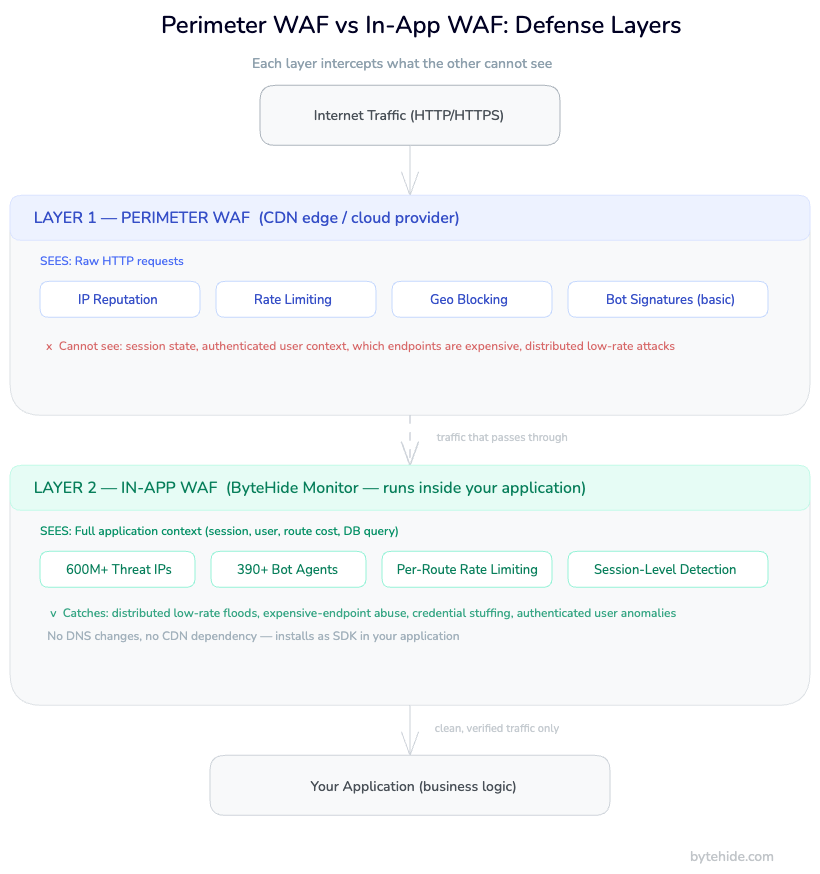
A perimeter WAF sits between the internet and your infrastructure, at the CDN edge, in front of your load balancer, or at a network gateway. It sees HTTP traffic as raw requests: headers, URLs, IP addresses, and (with SSL inspection) request bodies. It has no awareness of your application’s internal state, database queries, session management logic, or what any specific endpoint actually does.
An In-App WAF runs inside your application process. It hooks into your runtime, your HTTP middleware, your database driver, your file system operations. It intercepts requests not as raw HTTP traffic but as application events: this user session is about to execute this database query, from this IP address, after this many requests in the last 60 seconds.
| Capability | Perimeter WAF | In-App WAF (ByteHide Monitor) |
|---|---|---|
| Sees HTTP headers and IP | Yes | Yes |
| Sees request body | Yes (with SSL termination) | Yes |
| Knows which endpoint is expensive | No | Yes |
| Session-level rate limiting | Limited | Yes |
| Context of what code will execute | No | Yes |
| Rate limit per authenticated user | No | Yes |
| Block specific session IDs | No | Yes |
| Detect attacks inside encrypted traffic | No | Yes |
| Works without CDN/DNS changes | No | Yes |
| Feeds vulnerability scanner with runtime data | No | Yes (Monitor + Radar loop) |
The perimeter WAF is not replaceable. You still want IP reputation blocking, geographic filtering, and volumetric DDoS absorption at the edge. But against sophisticated Layer 7 attacks that understand WAF rule structures, the application layer is where you catch what slips through. This is also one of the core reasons WAF comparisons between cloud WAF and In-App WAF consistently land on different recommendations depending on threat model.
How ByteHide Monitor Handles Layer 7 DDoS
ByteHide Monitor operates as an In-App WAF with firewall capabilities designed for Layer 7 threat detection and mitigation. The protection runs inside your application: no infrastructure changes, no DNS rerouting, no dependency on a CDN provider.
Threat Intelligence: 600M+ IP Database
Monitor’s firewall includes seven threat intelligence lists covering over 600 million IP addresses associated with known attack infrastructure, botnet command and control, malicious datacenters, and DDoS participants. Requests from these IPs are evaluated before they touch your application logic.
This matters for Layer 7 DDoS because many attacks originate from cloud infrastructure, temporarily rented VMs used for attack campaigns. Threat intelligence that updates continuously catches these before they can establish attack patterns against your endpoints.
Bot Blocking: 390+ Agent Signatures
The bot blocking module identifies 390+ bot user agents across 21 categories: scrapers, vulnerability scanners, DDoS tools, credential stuffing frameworks, headless browsers used in automated attacks. This runs as a pre-filter before any request reaches your application handlers.
Blocking known attack tool signatures at the application layer provides a second detection layer after the perimeter WAF. Attackers who learned to rotate user agents and avoid CDN-level detection often still use consistent patterns at the application level that the in-process inspector catches. The bot detection techniques that work reliably at Layer 7 rely precisely on this kind of behavioral context that only an in-app position provides.
Rate Limiting with Route-Level Precision
The critical advantage for Layer 7 DDoS is that Monitor can implement rate limiting with context your perimeter WAF doesn’t have. You can define limits per endpoint, per authenticated user identity, per session, or per IP, with different thresholds for different route types.
Here’s how you’d configure Monitor in a .NET application to protect an expensive report generation endpoint:
using ByteHide.Monitor;

var builder = WebApplication.CreateBuilder(args);
builder.Services.AddByteHideMonitor(options =>
{
    options.ProjectToken = Environment.GetEnvironmentVariable("BYTEHIDE_TOKEN");
    // Firewall: block known threat IPs and bot agents automatically
    options.Firewall.EnableThreatIntelligence = true;
    options.Firewall.EnableBotBlocking = true;
});

var app = builder.Build();
app.UseByteHideMonitor();

// Monitor intercepts all requests and applies configured protections.
// Rate limiting, IP blocking, and session-level analysis run automatically.
// Custom rules sync from the ByteHide Dashboard without redeploy.
app.MapPost("/api/reports/generate", async (ReportRequest request) =>
{
    // If Monitor blocks a request, it returns 429 or 403 before this code runs.
    // Your business logic only executes for traffic that passed all filters.
    return await GenerateReport(request);
});In the ByteHide dashboard, you configure rate limits specific to this route: maximum 5 requests per minute per authenticated user identity, with automatic IP blocking for clients that trigger 10 rate limit violations within an hour. These rules sync to your running application in real time, without redeployment.
For Node.js applications, the integration follows the same pattern:
const { ByteHideMonitor } = require('@bytehide/monitor');
const express = require('express');

const app = express();

// Initialize Monitor middleware. Runs inside the app, not at the edge.
app.use(ByteHideMonitor({
  projectToken: process.env.BYTEHIDE_TOKEN,
  firewall: {
    threatIntelligence: true,  // 600M+ IP threat database
    botBlocking: true,          // 390+ agent signatures, 21 categories
    geoBlocking: ['CN', 'RU']  // Optional: country-level blocking
  }
}));

// All routes protected from this point forward.
app.post('/api/search', async (req, res) => {
  // Only executes for traffic that passed Monitor's layer 7 filters.
  const results = await performExpensiveSearch(req.body.query);
  res.json(results);
});Response Actions
When Monitor detects DDoS patterns, it takes graduated response actions, all configurable from the dashboard without touching your code:
- Block the request and return a 429 or 403 to the client
- Block the session ID, preventing further requests from that authenticated session
- Block the IP address, either temporarily (15 minutes, 1 hour) or permanently
- Send a notification to your Slack channel or webhook with the attack details, IP, request pattern, and detection confidence score
The combination of real-time detection and configurable response actions means your team gets notified and can adjust thresholds while the attack is ongoing, without infrastructure-level changes.
The Monitor and Radar Feedback Loop
When Monitor detects attack patterns targeting specific API endpoints, that data flows into ByteHide Radar’s vulnerability prioritization engine. If your /api/search endpoint is consistently being targeted, Radar elevates any code-level vulnerabilities in that endpoint’s execution path to critical, because production attack evidence confirms those vulnerabilities are live targets. This is context no perimeter WAF can provide: runtime attack data correlated with static analysis results.
Building a Complete DDoS Defense Stack
No single tool covers all DDoS scenarios. A complete defense strategy uses multiple layers that each handle what they’re best suited for.
Layer 3/4: Network-Level Protection. Volumetric attacks that flood your network pipes need to be absorbed before they reach your infrastructure. Services like Cloudflare Magic Transit, AWS Shield Advanced, or Imperva DDoS Protection scrub multi-Gbps floods at the network level. This isn’t what WAFs do. These are separate scrubbing services operating on entirely different traffic signals.
Layer 7 Perimeter: CDN WAF. Your CDN-integrated WAF handles the first pass at HTTP traffic: IP reputation, geographic blocking, known bot signatures, and basic rate limiting. This eliminates a large percentage of attack traffic before it reaches your origin servers. For a thorough breakdown of web application firewall best practices at this layer, rate limiting rules and IP reputation blocking are where most teams should start.
Layer 7 In-App: ByteHide Monitor. The third layer runs inside your application and catches what the perimeter misses: distributed low-rate attacks, application-specific expensive operations being abused, session-level patterns that indicate credential stuffing, and route-specific rate limiting that requires application context to implement.
The combination isn’t redundant. Each layer does something the others can’t. Perimeter WAFs block before traffic reaches your origin. In-App WAFs apply application context to what gets through. The result is defense that’s hard to bypass at either layer.
For most web applications, the practical setup is: DNS pointed through a CDN provider for perimeter WAF and volumetric protection, ByteHide Monitor integrated in your application for Layer 7 in-app detection, threat intelligence and bot blocking enabled in both layers (they use different databases and different signal sources), and alert channels configured so your team knows when an attack is in progress.
In my experience, the teams that get surprised by Layer 7 DDoS are usually the ones who assumed their CDN was the whole story. It handles a lot. But the requests that make it through specifically the ones crafted to stay under perimeter thresholds are exactly what in-app protection is designed for.
FAQ
Does a WAF protect against DDoS?
A WAF protects against Layer 7 (application layer) DDoS attacks: HTTP floods, Slowloris, POST floods, and cache-busting attacks. It does not protect against volumetric Layer 3/4 attacks that overwhelm your network bandwidth. For complete DDoS protection you need both a network-layer scrubbing service and a WAF for application-layer attack traffic.
What is the difference between a DDoS attack and a WAF?
A DDoS (Distributed Denial of Service) attack is a type of cyberattack where an attacker floods a target with traffic to make it unavailable. A WAF (Web Application Firewall) is a defensive tool that inspects HTTP traffic and blocks malicious requests, including certain categories of DDoS traffic. They’re an attack type and a defense tool, not comparable categories.
Can a WAF stop Layer 7 DDoS attacks?
A WAF can significantly reduce the impact of Layer 7 DDoS attacks through rate limiting, IP reputation blocking, bot detection, and behavioral analysis. However, no WAF stops all Layer 7 DDoS scenarios, particularly sophisticated distributed attacks that keep per-IP request rates below threshold limits. A layered approach using both a perimeter WAF and an In-App WAF provides the broadest coverage.
What is an HTTP flood attack?
An HTTP flood is a Layer 7 DDoS attack where an attacker sends a high volume of HTTP GET or POST requests to a target web server or application. Unlike volumetric attacks, HTTP floods use valid HTTP requests that complete the TCP handshake and follow protocol correctly. The goal is to exhaust the server’s processing capacity with legitimate-looking requests. Modern HTTP floods distribute traffic across many IPs and rotate user agents to evade basic detection.
How does an In-App WAF differ from a perimeter WAF for DDoS protection?
A perimeter WAF sits at the network edge and sees HTTP traffic as raw requests: headers, IPs, and URLs. It’s effective at blocking known bad IPs and high-volume floods from identifiable sources. An In-App WAF runs inside your application and has access to application context: which endpoint is computationally expensive, what the authenticated user’s session history looks like, what database query is about to execute. This application-layer context enables rate limiting and anomaly detection that perimeter WAFs structurally can’t implement, and it’s what makes the difference between RASP security and traditional WAF approaches meaningful in practice.
Defense in depth isn’t just a security principle. For Layer 7 DDoS, it’s the only architecture that covers all the attack patterns that sophisticated attackers actually use in production. The WAF at your perimeter and the WAF inside your application see different things. Running both is what closes the gap.