According to the 2025 Verizon Data Breach Investigations Report, 42% of confirmed breaches involved the exploitation of web applications. Web application firewall best practices are supposed to prevent exactly this. But a WAF that’s deployed with default rules and never tuned is a checkbox, not a control.
The gap between “we have a WAF” and “our WAF actually stops attacks” is where most organizations get breached. Default configurations miss application-specific threats. Rules that are never tested create blind spots. Compliance audits pass on paper while real attacks slip through.
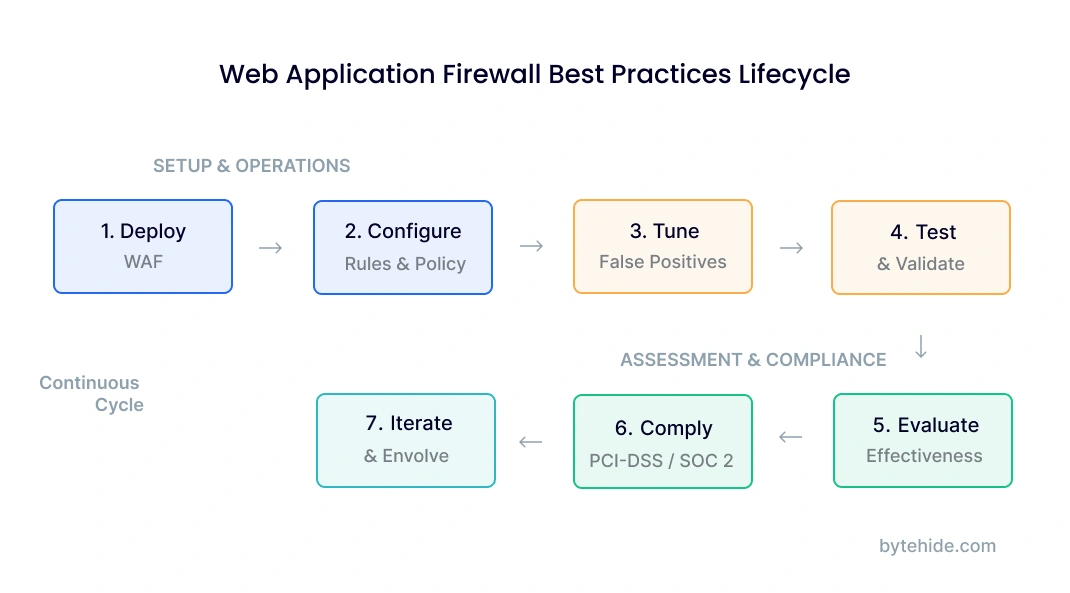
This guide covers the full WAF operational lifecycle: deployment, rule configuration, policy management, tuning, testing, evaluation criteria for selecting the right WAF, and compliance requirements including PCI-DSS. It also introduces an emerging best practice that most guides ignore entirely: the In-App WAF.
WAF Deployment Best Practices
Web application firewall deployment is the first decision that shapes everything else: rule effectiveness, performance impact, and what your WAF can actually see. Getting deployment wrong means tuning and testing won’t fix the underlying problem.
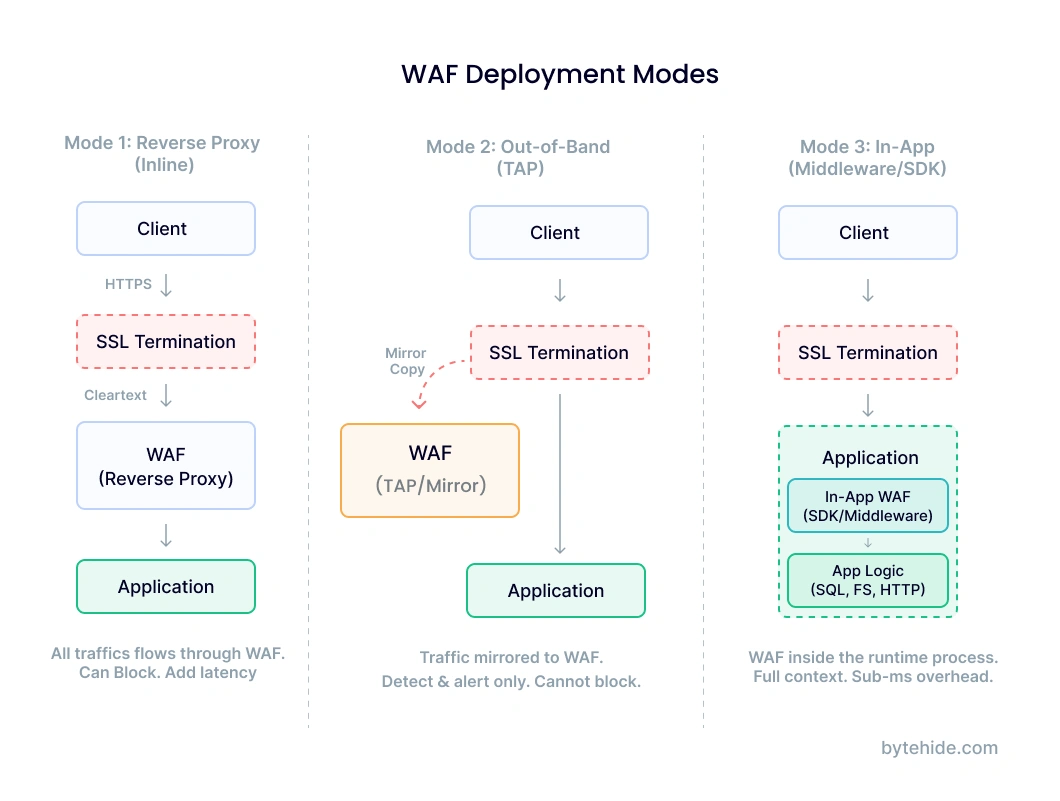
There are three primary deployment modes. Each has different tradeoffs, and the right choice depends on your architecture and operational maturity.
Reverse proxy (inline) is the most common approach for cloud WAFs. All traffic routes through the WAF before reaching your application. This gives the WAF full visibility into requests and responses, but adds a network hop and creates a single point of failure if the WAF goes down. Cloudflare, AWS WAF, and Azure WAF all use this model.
Out-of-band (TAP/mirror) deploys the WAF as a passive observer. Traffic is copied to the WAF for analysis, but the WAF doesn’t sit in the request path. This eliminates latency and availability risk, but the WAF can only detect and alert. It can’t block. This mode works well for initial deployment when you want to understand your traffic patterns before enforcing rules.
In-app (middleware/SDK) runs the WAF inside your application’s runtime process. Instead of inspecting traffic at the network layer, it intercepts function calls at execution time. This is the newest deployment model and the one most guides skip. More on this in the In-App WAF section.
Regardless of which mode you choose, follow these deployment principles:
Start in detection mode. Every WAF should run in logging-only mode for at least 7 to 14 days before switching to blocking. This baseline period lets you identify legitimate traffic that triggers rules before you accidentally block real users. I’ve seen production deployments break checkout flows because a WAF rule flagged a coupon code as a SQL injection pattern.
Deploy behind SSL termination. Your WAF needs to see decrypted traffic. If SSL terminates at a load balancer upstream of the WAF, the WAF inspects cleartext. If SSL terminates at the application, a perimeter WAF sees only encrypted bytes and misses everything. Verify your architecture before assuming the WAF has visibility.
Use separate policies for staging and production. Staging environments should run stricter rules in detection mode to catch issues before they reach production. Production policies should be conservative: only block what you’ve validated.
Document your deployment topology. Map where the WAF sits relative to load balancers, CDNs, API gateways, and application servers. When an incident happens, this diagram is the first thing your team will need. If you’re evaluating different types of WAFs, understanding where each type fits in your topology is critical.
WAF Rule Configuration and Management
Rules are what make a WAF useful. Without properly configured rules, a WAF is an expensive passthrough. Rule management is also where most teams introduce problems: too many rules cause false positives, too few leave gaps, and rules that aren’t updated become obsolete within months.
Managed Rules vs Custom Rules
Most WAFs ship with managed rule sets. The OWASP Core Rule Set (CRS) is the most widely used, covering SQL injection, XSS, remote code execution, and other common attack patterns. Cloud providers like AWS and Azure offer their own managed rule groups optimized for their platforms.
Managed rules provide baseline coverage. They’re maintained by security teams, updated when new vulnerabilities emerge, and tested against common attack patterns. Start with managed rules enabled. Don’t try to build your own rule set from scratch.
Custom rules fill the gaps that managed rules miss. These are application-specific: blocking requests to deprecated API endpoints, enforcing parameter validation on specific routes, or rate-limiting login attempts. The best web application firewall policy combines both: managed rules for broad coverage, custom rules for application-specific protection.
Rule Priority and Evaluation Order
WAF rules are evaluated in a specific order, and that order matters. Most WAFs follow this evaluation chain: allowlist rules first (if the request matches, skip remaining checks), then blocklist rules, then managed rule groups by priority, then default action.
Getting the order wrong causes two problems. If an allowlist is too broad, it bypasses security checks for traffic that should be inspected. If a blocklist rule runs before a relevant allowlist exception, legitimate traffic gets blocked.
Web Application Firewall Example: SQL Injection Rule
Here’s what a typical SQL injection detection rule does in practice. Consider a request to your search endpoint:
GET /api/products?search=laptop OR 1=1--A SQL injection rule inspects the query parameter and matches the pattern OR 1=1-- against known injection signatures. The WAF blocks the request and logs the event with the source IP, matched rule ID, and the offending parameter.
But consider this legitimate request:
POST /api/support/tickets
Body: {"description": "User reports error: SELECT dropdown OR radio button not working"}The word “SELECT” followed by “OR” in a text field triggers the same SQL injection rule, even though this is a support ticket description. This is why rule tuning (covered in the next section) is not optional.
WAF Policy Structure
A web application firewall policy is the complete configuration that defines how your WAF handles traffic for a specific application or scope. A policy typically includes:
Default action: What happens to requests that don’t match any rule. Best practice is “allow” for most WAFs (only block what rules identify), but some high-security environments use “deny” as default and explicitly allow known-good patterns.
Rule groups enabled: Which managed and custom rule groups are active. Not every rule group applies to every application. An API that only accepts JSON doesn’t need rules designed for HTML form submissions.
Exclusions: Specific parameters, paths, or request patterns exempted from certain rules. For example, a rich text editor endpoint might be excluded from XSS rules because it legitimately contains HTML.
Rate limits: Maximum requests per IP per time window, per endpoint. Login pages and API endpoints typically need tighter limits than static content.
Geo-blocking: Country-level restrictions if your application only serves specific regions.
Apply the principle of least privilege to WAF policies. Enable only the rule groups relevant to your application. Create per-application policies when possible rather than a single global policy that tries to cover everything.
Tuning and False Positive Management
False positives are the single biggest operational challenge in WAF management. A WAF that blocks legitimate traffic erodes trust with development teams, generates alert fatigue for security teams, and eventually gets switched off or set to detection-only mode permanently. None of those outcomes are acceptable.
Here is a tuning workflow that works in production environments:
Step 1: Deploy in detection mode. Log all rule triggers without blocking. Run for 7 to 14 days to capture a representative sample of traffic, including business peaks and edge cases like batch processing jobs or scheduled integrations.
Step 2: Analyze rule trigger logs. Group triggers by rule ID and look for patterns. Which rules fire most frequently? Which ones fire against known-good endpoints? Sort by frequency, and start investigating the top 10 most triggered rules.
Step 3: Classify each trigger. For each high-frequency rule, manually inspect a sample of flagged requests. Classify as true positive (actual attack), false positive (legitimate traffic), or suspicious (needs more context). In my experience, the first analysis pass usually shows that 60 to 70 percent of high-frequency triggers are false positives.
Step 4: Create targeted exceptions. For confirmed false positives, create narrow exclusions. Don’t disable the entire rule. Instead, exclude the specific parameter on the specific endpoint that triggers it. For the support ticket example above, exclude the description field on /api/support/tickets from SQL injection rules, but keep the rule active everywhere else.
Step 5: Switch to blocking mode. After resolving the highest-frequency false positives, enable blocking. Monitor closely for the first 48 to 72 hours and be ready to add exceptions quickly if legitimate traffic gets blocked.
Step 6: Continuous monitoring. Tuning is not a one-time event. New features, API changes, and traffic pattern shifts all create new false positives. Review WAF logs weekly for the first month, then at least monthly after that.
Common false positive triggers to watch for: file upload endpoints (binary content looks suspicious), rich text editors (HTML content triggers XSS rules), API endpoints that accept code snippets or configuration data, webhook receivers that process external payloads, and search endpoints with complex query syntax.
Track three metrics consistently: false positive rate (legitimate requests blocked divided by total blocked), true positive rate (real attacks blocked divided by total attacks), and rule trigger frequency by rule ID. A spike in any rule’s trigger frequency after an application deployment usually means a new false positive.
WAF Testing and Validation
A WAF you haven’t tested is a WAF you can’t trust. Testing validates that rules detect what they’re supposed to detect, that exceptions haven’t created blind spots, and that the WAF performs under load without degrading application response times.
Manual Testing with Known Payloads
Start with basic validation using common attack payloads. Send each payload to your application through the WAF and verify the expected response: blocked with the correct rule ID logged.
| Attack Type | Test Payload (Web Application Firewall Example) | Expected WAF Response |
|---|---|---|
| SQL Injection | /api/users?id=1' OR '1'='1 | Block (403) + log SQL injection rule ID |
| Cross-Site Scripting (XSS) | /search?q=<script>alert('xss')</script> | Block (403) + log XSS rule ID |
| Path Traversal | | Block (403) + log path traversal rule ID |
| Command Injection | /api/ping?host=127.0.0.1;cat /etc/passwd | Block (403) + log command injection rule ID |
| SSRF | /api/fetch?url=http://169.254.169.254/latest/meta-data/ | Block (403) + log SSRF rule ID |
If any of these basic payloads pass through without being blocked, your rule configuration has a problem. Go back to rule management before proceeding.
Automated Testing
For ongoing validation, integrate WAF testing into your CI/CD pipeline. Tools like OWASP ZAP and Nuclei can run automated attack simulations against staging environments. Run these after every WAF rule change, every application deployment, and on a weekly schedule as regression testing.
The testing sequence matters: test in staging first, validate results, then apply changes to production. Never test attack payloads directly against production without coordinating with your operations team.
Performance Testing
A WAF that adds 200ms of latency to every request is not a practical security control. Measure latency with and without the WAF under realistic load. Cloud WAFs typically add 1 to 10ms per request (one additional network hop). In-app WAFs add sub-millisecond overhead since they operate within the process. If latency exceeds your SLA, review rule complexity. Rules using regular expressions on large request bodies are the most common performance bottleneck.
WAF Evaluation Criteria
Web application firewall evaluation criteria should go beyond feature checklists. The OWASP Web Application Firewall Evaluation Criteria (WAFEC) project provides a starting framework, but practical evaluation requires assessing operational fit, not just detection capabilities.
Here are the criteria that matter in production, organized by priority:
| Evaluation Criteria | What to Measure | Why It Matters |
|---|---|---|
| Detection Accuracy | True positive rate across OWASP Top 10 attack categories; false positive rate on your actual traffic | A WAF that blocks attacks but also blocks 5% of legitimate traffic is operationally unusable |
| Performance Impact | Latency added per request at p50, p95, p99; throughput under load | Security that degrades user experience gets disabled |
| Deployment Complexity | Time from purchase to production blocking mode; infrastructure changes required | A WAF that takes 3 months to deploy leaves you exposed during the rollout |
| Rule Management Flexibility | Custom rule creation, exception granularity, rule testing capabilities | Every application has unique traffic patterns. Rigid rules mean more false positives |
| Logging and Visibility | Log detail level, SIEM integration, real-time alerting, forensic data retention | You can’t tune what you can’t see. Audit trails are required for compliance |
| API Protection | JSON/XML payload inspection depth, REST/GraphQL support, schema validation | Most modern applications are API-first. A WAF that only understands HTML forms is insufficient |
| Compliance Certifications | PCI-DSS attestation, SOC 2, HIPAA BAA availability | Without proper certification, the WAF may not satisfy audit requirements |
| Update Frequency | How quickly new vulnerability signatures are added after public disclosure | The window between CVE publication and rule update is your exposure window |
| Total Cost of Ownership | License cost + infrastructure cost + engineering time for management and tuning | A cheap WAF that requires a full-time engineer to manage is expensive |
When comparing WAF types against these criteria, the differences are structural. Cloud WAFs score high on deployment simplicity and DDoS protection but lower on detection accuracy for application-specific attacks. Network firewalls score high on throughput but low on API protection and rule flexibility. In-App WAFs score high on detection accuracy and performance but don’t provide perimeter-level DDoS protection.
The right evaluation approach is to weight criteria by your specific architecture. An API-first SaaS product should weight API protection and detection accuracy heavily. A content-heavy website should weight DDoS protection and deployment simplicity. Most production environments end up needing a combination.
Compliance Best Practices: PCI-DSS and Beyond
A PCI-DSS web application firewall requirement exists under Requirement 6.6, which mandates that organizations either deploy a WAF in front of public-facing web applications or conduct regular application code reviews. Most organizations choose the WAF route because ongoing code reviews at the required frequency are impractical.
What PCI-DSS auditors specifically look for in your WAF deployment:
Active blocking mode. A WAF in detection-only mode does not satisfy Requirement 6.6. The WAF must actively block identified threats in production. Auditors will ask for evidence of blocking mode configuration and logs showing blocked requests.
Rule currency. Rules must be updated within 30 days of new vulnerability disclosures relevant to your application. Auditors check rule update timestamps and compare against public CVE timelines. Managed rule subscriptions help here, but you still need to verify updates are being applied.
Comprehensive logging. All blocked and flagged requests must be logged with sufficient detail for forensic analysis: timestamp, source IP, matched rule, request details, and action taken. Log retention must meet PCI-DSS requirements (typically 12 months accessible, with a minimum of 3 months immediately available).
Regular testing evidence. Documentation showing that the WAF has been tested against known attack vectors. The testing section above covers what this looks like in practice.
Beyond PCI-DSS, SOC 2 Type II audits increasingly ask about WAF configuration as part of infrastructure security controls. HIPAA doesn’t mandate a WAF explicitly, but covered entities processing health data through web applications need to demonstrate technical safeguards, and a WAF is often part of that evidence.
One area where In-App WAFs provide a compliance advantage: they generate instrumentation-level evidence. Instead of showing that a request was blocked at the perimeter (which only proves the WAF saw something suspicious), an In-App WAF can show that a specific SQL injection attempt was intercepted at the database query layer, proving the threat was real and the protection was precise.
The Emerging Best Practice: In-App WAF
Traditional web application firewall best practices assume a perimeter model: the WAF sits at the network edge, inspecting traffic before it reaches your application. This model worked when applications were monoliths behind a single load balancer. It breaks down with modern architectures.
APIs don’t have a single entry point. Microservices communicate laterally across service meshes. Serverless functions execute without persistent infrastructure. Containerized applications scale across nodes dynamically. In all of these cases, there’s no single perimeter to put a WAF in front of.
An In-App WAF operates inside the application runtime as middleware or an SDK. Instead of inspecting HTTP requests at the network layer, it intercepts the actual operations your code performs: the SQL query about to execute, the system command about to run, the template about to render. Detection happens with full application context, which means the false positive rate drops significantly and attacks that perimeter WAFs structurally cannot see become detectable.
This includes prompt injection, which is arguably the fastest-growing attack vector in 2025 and 2026. Applications integrating LLMs face a threat that no perimeter WAF was designed to handle. A prompt injection attack arrives as a normal-looking text string in an HTTP request. There’s no SQL pattern to match, no script tag to flag. Only a security layer that understands the application’s AI pipeline can intercept malicious prompts before they reach the model.
Here’s what adding an In-App WAF looks like:
Node.js (Express):
const monitor = require('@bytehide/monitor');
app.use(monitor.protect({ projectToken: 'YOUR_TOKEN' }));
// Intercepts SQL injection, XSS, SSRF, command injection,
// path traversal, and prompt injection at execution layer.NET (ASP.NET Core):
builder.Services.AddByteHideMonitor("YOUR_TOKEN");
app.UseByteHideMonitor();
// Protection at ADO.NET/EF Core level for SQL,
// Razor rendering for XSS, HttpClient for SSRFTools like ByteHide Monitor implement this pattern. Two lines of code, no infrastructure changes, sub-millisecond overhead per request. The WAF travels with your code wherever it deploys.
Looking at the evaluation criteria above, an In-App WAF scores differently than perimeter options. Detection accuracy is higher because it sees the actual execution, not just the HTTP request. Performance impact is lower because there’s no additional network hop. Deployment is a package install rather than an infrastructure change. But it doesn’t replace perimeter DDoS protection. For most modern applications, the best practice is layering: a cloud WAF for volumetric attacks at the edge, and an In-App WAF for application-layer protection inside the runtime.
The shift toward runtime security reflects a broader trend in application security. Static analysis catches vulnerabilities in code. Perimeter WAFs catch known attack patterns in traffic. In-App WAFs catch actual exploitation attempts at the moment they happen. Each layer sees something the others miss, which is exactly why defense-in-depth comparisons keep pointing toward layered approaches.
Frequently Asked Questions
What are the most important web application firewall best practices?
The most critical WAF best practices are: deploy in detection mode first and analyze traffic for at least 7 to 14 days before blocking, tune rules to reduce false positives using targeted exceptions rather than broad allowlists, test the WAF regularly with known attack payloads and automated scanning tools, evaluate WAF effectiveness periodically against detection accuracy and performance metrics, and maintain compliance by keeping rules updated and logging all WAF actions. For modern API architectures, layering perimeter protection with an In-App WAF that operates inside the application runtime is increasingly considered essential.
How do I evaluate a web application firewall?
Evaluate a WAF across nine criteria: detection accuracy (true and false positive rates against your real traffic), performance impact (latency at p50/p95/p99), deployment complexity (time to production blocking mode), rule management flexibility (custom rules, exception granularity), logging quality (SIEM integration, forensic detail), API protection depth (JSON inspection, GraphQL support), compliance certifications (PCI-DSS, SOC 2), update frequency (time from CVE to rule update), and total cost of ownership (license plus engineering time for management). Weight these criteria based on your specific architecture and threat model.
What is a web application firewall policy?
A web application firewall policy is the complete security configuration applied to traffic for a specific application or scope. It defines the default action (allow or deny unmatched requests), which rule groups are active (managed rules plus custom rules), parameter and path exclusions for known false positives, rate limiting thresholds per endpoint, and geographic restrictions if applicable. Best practice is to create per-application policies rather than a single global policy, applying the principle of least privilege to minimize both false positives and attack surface.
Is a WAF required for PCI-DSS compliance?
PCI-DSS Requirement 6.6 mandates that organizations either deploy a web application firewall in front of public-facing web applications or conduct regular application security code reviews. Most organizations choose the WAF approach because ongoing code reviews at the required frequency are resource-intensive. The WAF must be in active blocking mode (not detection-only), rules must be updated within 30 days of relevant vulnerability disclosures, and all blocked requests must be logged with forensic detail and retained according to PCI-DSS retention requirements.
What is the difference between WAF rules and WAF policies?
WAF rules are individual detection patterns that identify specific attack types. A SQL injection rule, for example, matches known injection patterns in request parameters. WAF policies are the broader configuration containers that include multiple rule groups, their priority order, exceptions, rate limits, default actions, and scope definitions. A single policy might contain hundreds of rules organized into groups, plus application-specific exceptions and rate limits. Rules define what to detect. Policies define how to apply those rules to your traffic.
Conclusion
After working with WAF deployments across different architectures, the pattern I keep seeing is the same: the biggest risk isn’t choosing the wrong WAF. It’s never tuning the one you have.
Default configurations catch textbook attacks and miss everything else. Rules that were accurate six months ago drift as applications evolve. Testing that only happens during the initial setup means blind spots accumulate silently.
The organizations that get WAF right treat it as an operational practice, not a deployment event. They tune continuously. They test after every significant change. They evaluate whether their WAF still fits their architecture as that architecture evolves. And increasingly, they recognize that perimeter protection alone isn’t enough for applications built on APIs, microservices, and AI.
If you’re looking to go deeper on specific topics covered here, the WAF comparison guide breaks down deployment types in detail, and the SAST vs DAST vs IAST vs RASP comparison covers how WAF fits into the broader application security testing landscape.