Jailbreak and root detection is one of those topics that every mobile developer encounters eventually, but few truly understand in depth. You build your app, implement authentication, encrypt your data, and then someone installs it on a jailbroken iPhone or rooted Android device where none of those protections work as intended.
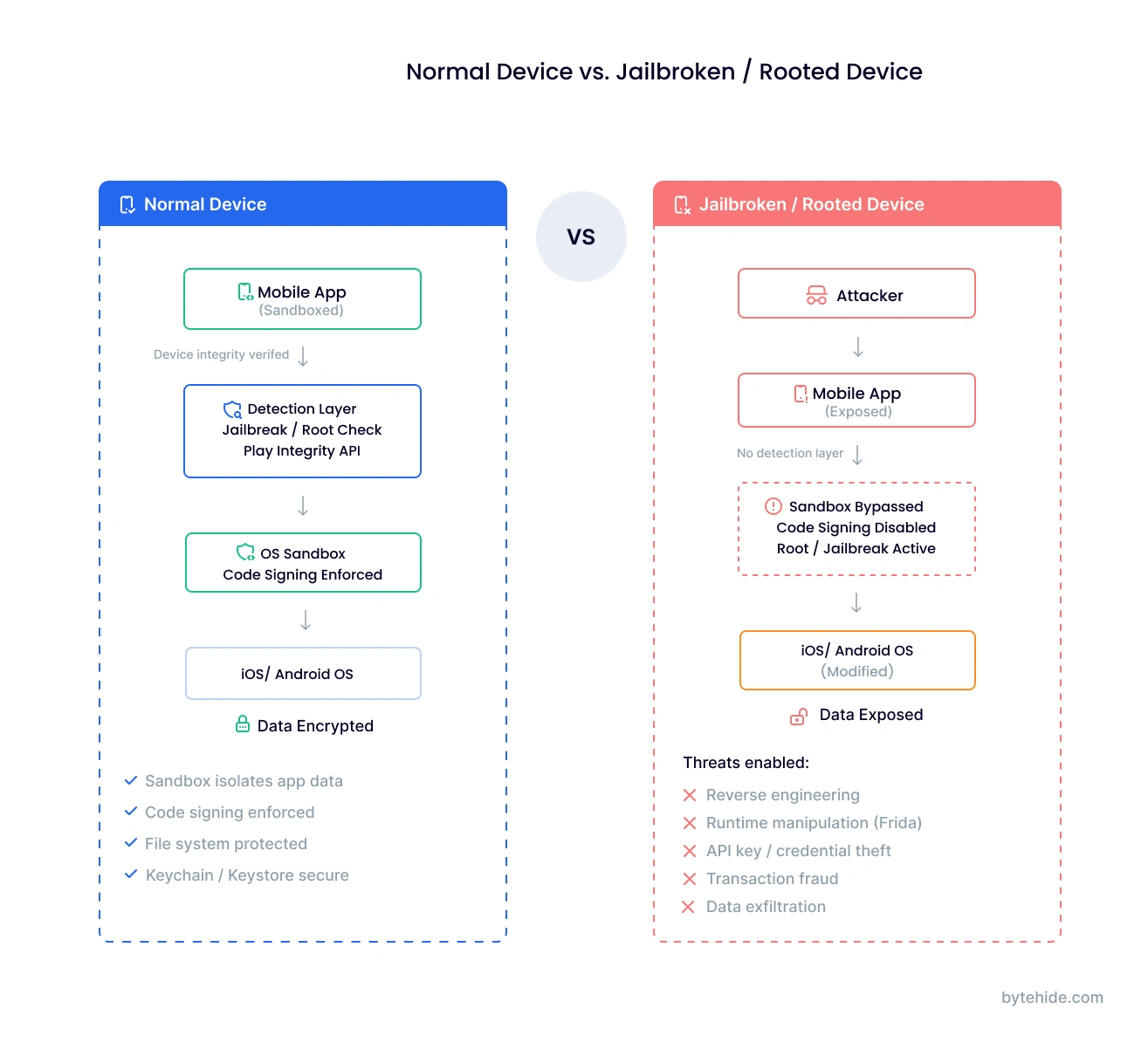
The problem is straightforward: jailbreaking and rooting remove the operating system restrictions that your app’s security depends on. Sandboxing, code signing, file system permissions, all of it can be bypassed on a compromised device. For apps handling financial transactions, health data, or enterprise credentials, running on a jailbroken or rooted device is not just a theoretical risk. It is an active threat vector.
This guide covers how jailbreak and root detection works on both iOS and Android, the specific techniques available for each platform, how attackers bypass detection (and how to counter those bypasses), the evolution from SafetyNet to Play Integrity API, implementation best practices, and what regulated industries require. Whether you are implementing detection from scratch or evaluating a runtime protection solution, this guide covers all of it.
What Is Jailbreak and Root Detection?
Jailbreak and root detection is the process of identifying whether a mobile application is running on a device where the operating system’s built-in security restrictions have been removed or bypassed. On iOS, this process is called jailbreaking. On Android, it is called rooting. Both achieve the same fundamental outcome: granting the user (or an attacker) elevated privileges that the operating system was designed to prevent.
When a device is jailbroken or rooted, applications lose the security guarantees they normally rely on. The operating system’s sandbox, which isolates each app’s data from every other app, can be circumvented. Code signing enforcement, which prevents unauthorized code from executing, can be disabled. File system protections, which keep sensitive app data encrypted and inaccessible, can be overridden.
For many apps, this does not matter much. A weather app or a calculator has little to lose from running on a compromised device. But for apps that handle sensitive data (banking, healthcare, enterprise), process financial transactions, enforce digital rights management, or implement security controls that depend on OS integrity, detecting a compromised device is a critical first line of defense.
The detection itself typically works by checking for artifacts that jailbreaking or rooting leaves behind: modified files, unauthorized applications, altered system properties, or failed integrity attestation checks. The challenge is that detection is a moving target. As detection methods improve, bypass tools evolve to counter them, creating a constant arms race between defenders and attackers.
Why Jailbreak and Root Detection Matters
The security risks of running on a compromised device go well beyond theoretical concerns. On a jailbroken or rooted device, attackers can:
Reverse engineering and code theft. With root access, attackers can extract your application binary, decompile it, and analyze your business logic, API endpoints, encryption keys, and authentication mechanisms. On a standard device, OS protections make this significantly harder.
Runtime manipulation. Tools like Frida, Xposed, and Cydia Substrate allow attackers to hook into your app’s functions at runtime, modifying behavior on the fly. They can bypass authentication checks, manipulate transaction amounts, or disable security controls entirely.
Data exfiltration. The sandbox that normally prevents other apps from reading your app’s data is ineffective on a compromised device. Keychain data on iOS and SharedPreferences on Android become accessible to any process with root privileges.
API key and credential theft. Hardcoded API keys, OAuth tokens, and certificates stored in the app bundle or secure storage can be extracted and reused, enabling impersonation attacks against your backend services.
Transaction fraud. In banking and payment apps, root access enables attackers to modify transaction parameters, bypass fraud detection, and manipulate the user interface to display different information than what is actually being processed.
These are real attack patterns, not edge cases. The OWASP Mobile Application Security Testing Guide (MASTG) explicitly addresses device integrity verification as a core security requirement. OWASP’s MASVS-RESILIENCE controls specify that apps handling sensitive operations should implement jailbreak and root detection as part of a defense-in-depth strategy.
In regulated industries, the stakes are even higher. PCI-DSS requires that payment applications implement device integrity checks. HIPAA’s security safeguards extend to mobile devices accessing protected health information. Financial regulators including the FFIEC have published guidance specifically addressing mobile banking security on compromised devices.
Jailbreak Detection for iOS
Jailbreaking an iOS device removes Apple’s restrictions on what software can be installed and what level of access applications have. Modern jailbreaks include tools like unc0ver, checkra1n, Taurine, Chimera, Palera1n, and Dopamine, each exploiting different vulnerabilities and supporting different iOS versions.
Jailbreaks fall into two main categories. Semi-tethered jailbreaks (like unc0ver) require re-running the jailbreak tool after every reboot, meaning the device returns to a non-jailbroken state when restarted. Semi-untethered jailbreaks persist across reboots without needing a computer. Understanding this distinction matters because some detection methods only catch artifacts that exist while the jailbreak is active.
Detection Techniques
File system checks are the most common approach. Jailbreaks install files in predictable locations. Checking for paths like /Applications/Cydia.app, /private/var/lib/apt, /usr/sbin/sshd, /usr/bin/ssh, /bin/bash, and /Library/MobileSubstrate/MobileSubstrate.dylib catches most standard jailbreaks. Package manager apps like Cydia, Sileo, and Zebra leave clear filesystem footprints.
URL scheme checks test whether the device can open URLs like cydia:// or sileo://. If UIApplication.shared.canOpenURL() returns true for these schemes, a jailbreak tool is installed.
Sandbox integrity testing attempts to write a file outside the app’s sandbox (for example, to /private/jailbreak_test). On a standard iOS device, this operation fails. On a jailbroken device, the expanded permissions allow it to succeed.
Dynamic library checks inspect the loaded libraries for known jailbreak-related dylibs. Checking the DYLD_INSERT_LIBRARIES environment variable and iterating through loaded images with _dyld_image_count() and _dyld_get_image_name() can reveal injected libraries like Substrate or Substitute.
Fork behavior differs between jailbroken and standard devices. On a non-jailbroken iOS device, the fork() system call fails because sandboxed apps cannot spawn child processes. On a jailbroken device, fork() succeeds.
Symbolic link checks detect jailbreaks that create symbolic links from system directories (like /Applications) to other locations, which is a common technique for installing unauthorized apps while preserving the directory structure.
A simplified example combining multiple checks in Swift:
// Simplified jailbreak detection — combine multiple signals
func isDeviceCompromised() -> Bool {
    // 1. Check known jailbreak file paths
    let suspiciousPaths = [
        "/Applications/Cydia.app",
        "/Library/MobileSubstrate/MobileSubstrate.dylib",
        "/usr/sbin/sshd",
        "/usr/bin/ssh",
        "/private/var/lib/apt",
        "/var/lib/cydia"
    ]
    for path in suspiciousPaths {
        if FileManager.default.fileExists(atPath: path) {
            return true
        }
    }

    // 2. Sandbox integrity — try writing outside sandbox
    let testPath = "/private/jailbreak_test"
    do {
        try "test".write(toFile: testPath, atomically: true,
                         encoding: .utf8)
        try FileManager.default.removeItem(atPath: testPath)
        return true // Write succeeded = sandbox compromised
    } catch {
        // Expected on non-jailbroken device
    }

    // 3. URL scheme check
    if let url = URL(string: "cydia://package/com.test") {
        if UIApplication.shared.canOpenURL(url) {
            return true
        }
    }

    return false
}This is a starting point, not production-ready code. A real implementation should use multiple detection layers, obfuscate the detection code itself to prevent easy hooking, and avoid string literals that attackers can search for in the binary. Libraries like iOS Security Suite provide more comprehensive checks out of the box.
For teams that prefer not to implement detection manually, ByteHide Monitor includes native iOS jailbreak detection that covers Cydia, Sileo, Zebra, unc0ver, checkra1n, Taurine, and Chimera. It runs checks at configurable intervals (default 30 seconds) and returns a confidence score from 0.0 to 1.0 for each detection, reducing false positives.
Root Detection for Android
Rooting an Android device grants superuser (root) access to the operating system, bypassing the permission model that normally restricts what apps can do. The rooting landscape has evolved significantly over the years.
Magisk is the dominant rooting method today. Unlike older tools that modified the system partition (“system root”), Magisk implements “systemless” rooting that patches the boot image instead. This is critical because it means traditional detection methods that check /system modifications will miss Magisk-rooted devices entirely. Magisk also includes built-in root hiding capabilities through its DenyList feature.
KernelSU is a newer alternative that implements root at the kernel level rather than through boot image patching, making it even harder to detect through conventional means.
SuperSU and KingRoot are older rooting methods that modify the system partition directly. They are easier to detect but still found on older devices.
Detection Techniques
su binary checks look for the superuser binary in common locations: /system/bin/su, /system/xbin/su, /sbin/su, /vendor/bin/su. This catches older root methods but Magisk’s systemless approach avoids placing su in these paths by default.
Build property checks inspect system properties like ro.build.tags. A value of test-keys instead of release-keys indicates the device is running a custom build, which often correlates with rooting. Properties like ro.debuggable=1 are also suspicious.
Package detection checks whether known root management apps are installed: com.topjohnwu.magisk, eu.chainfire.supersu, com.noshufou.android.su, com.koushikdutta.superuser. However, Magisk allows hiding its package name through the “Hide the Magisk app” feature.
Native checks via JNI perform detection at the native layer (C/C++) rather than in Java/Kotlin code. This is significantly harder for attackers to bypass because hooking native code requires more sophisticated techniques than hooking Java methods with frameworks like Xposed.
SELinux status is another signal. A standard Android device runs SELinux in enforcing mode. Rooted devices often set SELinux to permissive mode, which disables mandatory access controls. Checking getenforce() can reveal this.
Busybox detection checks for the Busybox binary, which provides Unix utilities commonly installed on rooted devices for shell scripting.
A simplified Kotlin example:
// Simplified root detection — combine multiple signals
fun isDeviceRooted(): Boolean {
    // 1. Check for su binary in common paths
    val suPaths = arrayOf(
        "/system/bin/su", "/system/xbin/su",
        "/sbin/su", "/vendor/bin/su",
        "/system/app/Superuser.apk"
    )
    for (path in suPaths) {
        if (File(path).exists()) return true
    }

    // 2. Check build tags
    val buildTags = android.os.Build.TAGS
    if (buildTags != null && buildTags.contains("test-keys")) {
        return true
    }

    // 3. Check for root management apps
    val rootPackages = arrayOf(
        "com.topjohnwu.magisk",
        "eu.chainfire.supersu",
        "com.noshufou.android.su"
    )
    val pm = context.packageManager
    for (pkg in rootPackages) {
        try {
            pm.getPackageInfo(pkg, 0)
            return true
        } catch (e: PackageManager.NameNotFoundException) {
            // Not installed — expected on non-rooted device
        }
    }

    return false
}As with iOS, this is a starting point. Libraries like RootBeer combine multiple checks but can still be bypassed with a single smali modification. For robust detection, pair client-side checks with server-side Play Integrity API verification.
ByteHide Monitor handles Android root detection natively, covering Magisk, SuperSU, and KingRoot with Play Integrity API integration for hardware-backed verification. Like the iOS counterpart, it runs at configurable intervals with confidence scoring.
SafetyNet vs Play Integrity API: The Evolution of Android Device Attestation
For years, Google’s SafetyNet Attestation API was the standard way for Android apps to verify device integrity server-side. Google introduced it in 2014, and it checked whether a device was rooted, running a custom ROM, or otherwise modified. In 2021, Google added hardware-backed key attestation, which made bypassing SafetyNet significantly harder.
However, Google deprecated SafetyNet in June 2024 and replaced it with the Play Integrity API, which provides a more structured and harder-to-bypass approach to device verification.
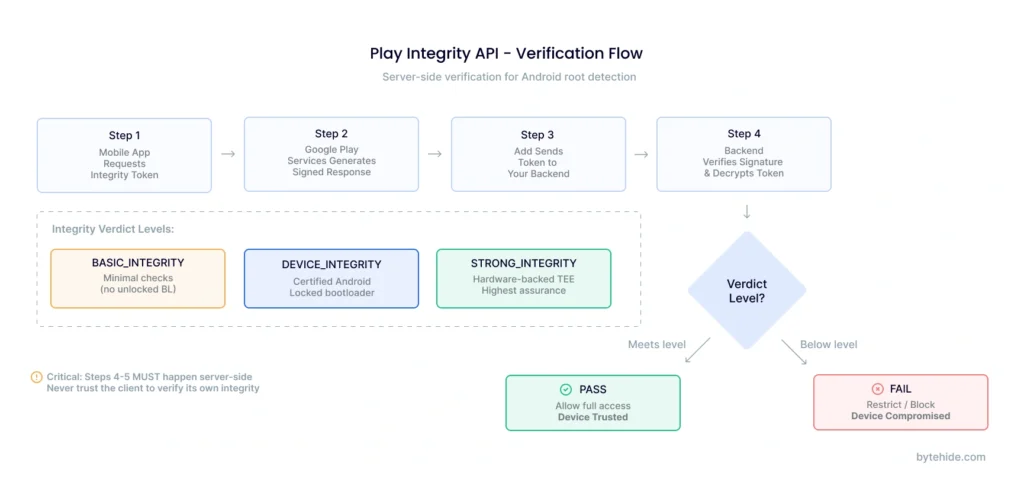
The Play Integrity API returns three integrity verdicts:
MEETS_BASIC_INTEGRITY indicates the device passes basic integrity checks. It may have an unlocked bootloader or run a custom ROM, but it is not actively being tampered with. Note: as of May 2025, Google changed this policy so that devices with unlocked bootloaders no longer meet basic integrity.
MEETS_DEVICE_INTEGRITY indicates the device is running a certified, unmodified version of Android with a locked bootloader. This is the standard level most apps should require.
MEETS_STRONG_INTEGRITY indicates the device passes hardware-backed integrity verification using the Trusted Execution Environment (TEE) or a dedicated security chip. This is the highest assurance level and is extremely difficult to spoof because it requires compromising hardware-level security.
| Feature | SafetyNet (Deprecated) | Play Integrity API |
|---|---|---|
| Status | Deprecated June 2024 | Active — current standard |
| Verdict levels | 2 (Basic + CTS) | 3 (Basic + Device + Strong) |
| Hardware attestation | Added 2021 (optional) | Built-in (Strong Integrity) |
| Bootloader check | Partial | Full (unlocked = fails Basic as of May 2025) |
| Play Store requirement | No | Google Play required for full verdicts |
| Bypass difficulty | Moderate (local spoofing possible) | Very high for Strong Integrity (requires TEE compromise) |
For high-risk applications like banking or cryptocurrency wallets, requiring MEETS_STRONG_INTEGRITY provides the strongest guarantee that the device has not been tampered with. For general-purpose apps, MEETS_DEVICE_INTEGRITY is typically sufficient. The key is to validate these verdicts server-side, never trust the client to verify its own integrity.
Jailbreak Detection Bypass: How Attackers Evade Detection
Understanding bypass techniques is essential for building resilient detection. In my experience working with mobile security teams, the ones who build the strongest detection are the ones who spend time studying how attackers break it. If you only check what current bypass tools cannot hide, your detection has a shelf life measured in weeks.
iOS Bypass Techniques
Tweak injection is the most common approach. Tools like Liberty Lite, A-Bypass, Shadow, and Hestia hook into your app’s process and intercept detection method calls, returning false values. They work by using Cydia Substrate or Substitute to swizzle methods before your detection code runs.
Frida-based hooks provide more targeted bypasses. Attackers can identify your jailbreak detection function (for example, amIJailbroken() from iOS Security Suite) and override its return value with a simple script. This requires minimal effort if the detection method names are not obfuscated.
Method swizzling replaces your detection function implementations at runtime with versions that always return “not jailbroken.” If your detection methods have discoverable names, this is trivially easy.
Android Bypass Techniques
Magisk DenyList (formerly MagiskHide) selectively hides root from specific applications. When your app is on the DenyList, Magisk unmounts its modifications from your app’s namespace, making root invisible to your standard checks.
Zygisk modules like Shamiko go further by hiding root at the Zygote process level, preventing detection even by apps that check early in the process lifecycle.
Tricky Store is a newer module that spoofs Play Integrity API responses, making rooted devices pass even device-level integrity checks by manipulating the attestation key chain.
LSPosed + Hide My Applist prevents your app from seeing root management packages in the installed app list, defeating package-based detection.
Frida and smali modification can bypass libraries like RootBeer with a single code change. If the detection logic is in Java/Kotlin bytecode, an attacker can decompile, modify the return value, and repackage the app.
The critical takeaway: detection alone is never enough. Every client-side check can eventually be bypassed by a sufficiently motivated attacker. The goal is to make bypassing expensive in time and effort, not impossible, and to layer detection with server-side verification and runtime security measures.
How to Build Resilient Jailbreak and Root Detection
Given that every detection method has a corresponding bypass, the question is not whether your checks can be defeated, but how expensive you make it for attackers. These practices make detection resilient rather than fragile:
Layer multiple detection methods. Never rely on a single check. Combine file system checks, API attestation, behavioral analysis, and native-level detection. An attacker who bypasses one method should still trigger another.
Implement detection in native code. Java/Kotlin detection on Android and Swift/Objective-C detection on iOS can be hooked relatively easily with Frida or Substrate. Moving critical checks to C/C++ via JNI (Android) or directly compiled code (iOS) makes hooking significantly harder.
Verify integrity server-side. Play Integrity API responses and any device attestation results should be validated on your backend, not on the client device. A rooted device can manipulate any local verification logic.
Obfuscate your detection code. If attackers can find your detection functions by searching for string literals like “Cydia” or “com.topjohnwu.magisk,” bypassing them is trivial. Encrypt strings, obfuscate method names, and use indirect references. ByteHide Shield can handle this obfuscation automatically for both iOS and Android binaries.
Check continuously, not just at launch. A sophisticated attacker might wait until after your initial check passes before activating root tools. Run detection at regular intervals throughout the app session. Monitor’s approach of configurable check intervals (default 30 seconds) addresses this by re-verifying device integrity continuously.
Implement graduated response actions. Not every detection event requires the same response. Consider a hierarchy: Log the event → Restrict sensitive features → Display a warning → Terminate the session → Erase cached sensitive data → Notify your backend. The appropriate response depends on your app’s risk profile and regulatory requirements.
Don’t just block, inform. If you detect a compromised device, tell the user why they are being blocked. A message like “This app requires an unmodified device to protect your financial data” is better than a silent crash. Some users genuinely do not realize their device is compromised, and a clear message builds trust rather than frustration.
For teams that want robust detection without the implementation complexity, ByteHide Monitor provides pre-built jailbreak and root detection for both iOS and Android with a no-code integration option. It handles the detection, confidence scoring, and response actions through a single SDK, eliminating the need to build and maintain detection logic manually.
Jailbreak and Root Detection in Regulated Industries
In certain industries, jailbreak and root detection is not optional. I have seen compliance audits flag mobile apps specifically for lacking device integrity checks, and the remediation timeline is never comfortable.
Banking and Fintech. PCI-DSS requirements for mobile payment applications include device integrity verification. Most major banking apps, including those from JPMorgan Chase, Bank of America, and Wells Fargo, refuse to operate on rooted or jailbroken devices. The FFIEC’s guidance on mobile banking security explicitly addresses the risks of compromised devices and recommends detection as a baseline control.
Healthcare. HIPAA’s Security Rule requires organizations to implement safeguards for protected health information (PHI) on mobile devices. An app that allows access to patient records on a jailbroken device, where other apps can read the data, may be in violation of the minimum necessary standard.
Enterprise and MDM. Corporate BYOD (Bring Your Own Device) policies typically require device compliance checks before granting access to enterprise resources. Mobile Device Management platforms like Microsoft Intune and VMware Workspace ONE include jailbreak and root detection as standard policy enforcement options.
Gaming. Rooted and jailbroken devices enable GPS spoofing, memory editing, and other cheating techniques. Games like Pokemon GO (Niantic) implement aggressive root detection to maintain fair gameplay and protect in-app purchase economies.
The common thread across all these industries is that jailbreak and root detection serves as a device trust signal. It does not replace other security measures, but it establishes a baseline: “Is the device’s operating system operating as expected?” If not, the app can adjust its behavior accordingly.
iOS vs Android: Jailbreak and Root Detection Compared
While jailbreaking and rooting solve the same fundamental problem (removing OS restrictions), the detection landscape differs significantly between platforms.
| Dimension | iOS (Jailbreak) | Android (Root) |
|---|---|---|
| Terminology | Jailbreaking | Rooting |
| Current tools | unc0ver, checkra1n, Palera1n, Dopamine | Magisk, KernelSU, SuperSU (legacy) |
| Prevalence | Low (closed ecosystem, harder to jailbreak) | Higher (open ecosystem, more methods) |
| Detection methods | File checks, URL schemes, sandbox testing, dyld inspection | su binary, build props, package detection, JNI checks |
| Platform attestation | Apple DeviceCheck / App Attest API | Play Integrity API (hardware-backed) |
| Best server-side check | App Attest API | Play Integrity MEETS_STRONG_INTEGRITY |
| Bypass difficulty | Moderate (Substrate/Frida hooks) | Easy to Moderate (Magisk DenyList, Zygisk) |
| Root hiding sophistication | Moderate (Liberty Lite, Shadow) | High (Shamiko, Tricky Store, Play Integrity Fix) |
The key insight is that iOS jailbreaks are less common because Apple’s closed ecosystem makes exploits harder to find and maintain across updates. However, when an iOS jailbreak exists, detection can be harder because Apple does not provide an attestation API as robust as Play Integrity’s STRONG_INTEGRITY verdict. On Android, rooting is more accessible, but Play Integrity’s hardware-backed verification offers the strongest available defense, provided you verify verdicts server-side.
Frequently Asked Questions
What is jailbreak detection?
Jailbreak detection is the process by which a mobile application identifies whether it is running on an iOS device where Apple’s security restrictions have been removed. It works by checking for artifacts that jailbreaking leaves behind, such as unauthorized files, modified system directories, and installed jailbreak tools like Cydia or Sileo. When detected, the app can restrict functionality, alert the user, or terminate the session depending on its security requirements.
What does jailbroken device detected mean?
When an app displays “jailbroken device detected,” it means the app’s security checks have identified that the device’s operating system has been modified to remove standard protections. This typically results in the app restricting access to sensitive features or refusing to operate entirely, because the security guarantees it depends on (sandboxing, code signing, encrypted storage) may no longer be reliable.
Can my phone be jailbroken without me knowing?
It is possible but uncommon. Most jailbreaks require deliberate action by the device owner, including connecting to a computer and running specialized tools. However, malware targeting unpatched vulnerabilities could theoretically achieve jailbreak-like access without user knowledge. Keeping your device updated to the latest OS version is the best defense, as updates patch the vulnerabilities that jailbreak tools exploit.
What is jailbreak risk detection?
Jailbreak risk detection is a broader assessment that evaluates not just whether a device is currently jailbroken, but whether it shows signs of being at risk of compromise. This includes detecting previously jailbroken devices that have been restored, devices running outdated OS versions with known jailbreak exploits, and devices with unusual configurations that suggest tampering attempts.
What is the difference between jailbreak detection and root detection?
Jailbreak detection applies to iOS devices where Apple’s restrictions have been removed, while root detection applies to Android devices where superuser access has been granted. The underlying concept is identical: both check whether the device’s OS integrity has been compromised. The specific detection techniques differ because the platforms use different architectures, file systems, and security models.
Can jailbreak detection be bypassed?
Yes. Every client-side detection method can eventually be bypassed by a sufficiently motivated attacker. iOS bypass tools like Liberty Lite and Frida hooks can intercept detection calls. Android tools like Magisk DenyList and Shamiko can hide root from specific apps. This is why robust implementations layer multiple detection methods, use native code, verify integrity server-side (Play Integrity API), and obfuscate detection logic.
Is jailbreak detection required for App Store or Google Play compliance?
Neither Apple nor Google explicitly requires jailbreak or root detection for general app submission. However, specific categories of apps face regulatory requirements: payment apps must comply with PCI-DSS device integrity checks, healthcare apps with HIPAA safeguards, and financial apps with banking regulator guidance. Additionally, Google requires apps using certain APIs to verify Play Integrity verdicts.
How does Play Integrity API improve root detection?
Play Integrity API improves root detection by providing hardware-backed device attestation that cannot be spoofed at the software level. Unlike client-side root checks that rely on file system inspection (which Magisk can hide), Play Integrity’s STRONG_INTEGRITY verdict is verified through the device’s Trusted Execution Environment (TEE). This means that even if an attacker has full root access to the operating system, they cannot forge a passing attestation without compromising the hardware security module itself.
Jailbreak and root detection is not a solve-everything security measure. It is one layer in a defense-in-depth strategy that includes code obfuscation, runtime protection, server-side verification, and secure coding practices. But it is a foundational layer. Without it, every other mobile security control you implement is built on assumptions about device integrity that may not hold. If you want to add jailbreak and root detection to your iOS and Android apps without building and maintaining detection logic yourself, explore ByteHide Monitor.