When you ship a mobile app, you’re distributing a binary to millions of devices you don’t control. Each one is a potential analysis target. Android APKs decompile in under five minutes with JADX. iOS IPA files are harder to work with, but Hopper Disassembler and Frida don’t care about your release build settings.
Most “mobile security” guides stop at SSL pinning and ProGuard. That’s a start, but it’s not shielding. An attacker who spends 30 minutes with Frida attached to your app will bypass those measures before your next standup. The gap between what developers typically implement and what a motivated attacker needs to exploit it is wider than most teams realize.
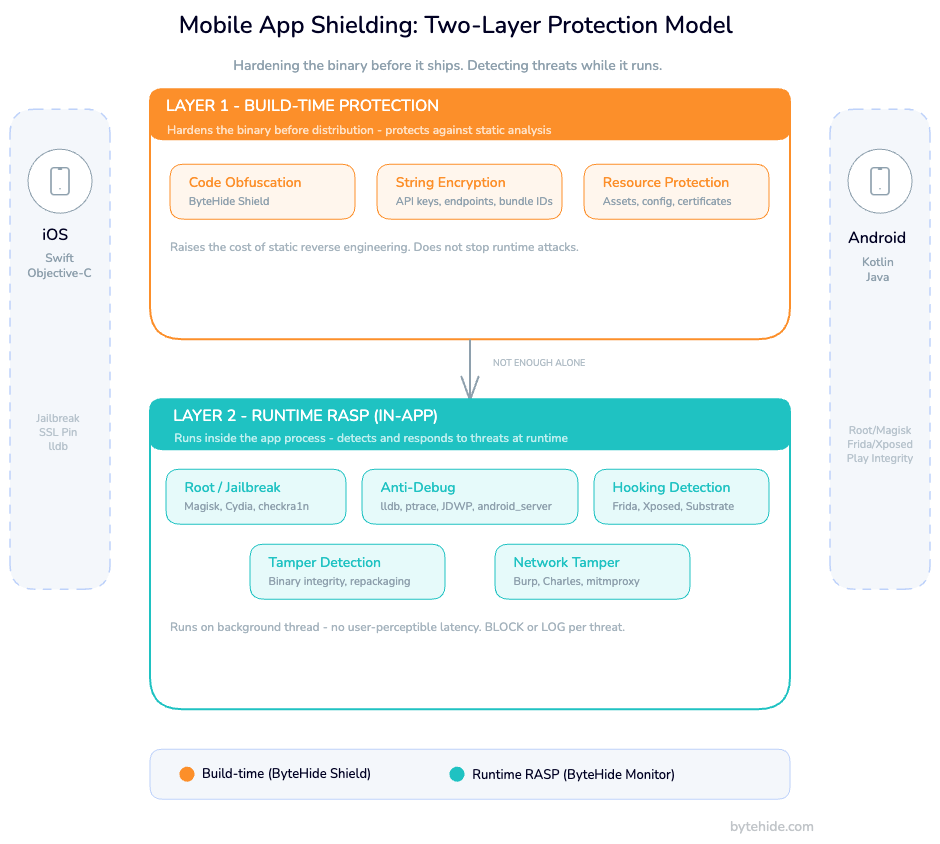
Mobile app shielding closes that gap through two distinct layers: build-time protection that hardens the binary before it ships, and runtime protection (RASP) that monitors and reacts to threats while the app is executing on the device. This guide covers both layers with real Swift, Kotlin, and Flutter code. The kind of implementation detail that’s conspicuously absent from every enterprise vendor page ranking for this term.
What Is Mobile App Shielding?
Mobile app shielding is a security discipline that protects iOS and Android applications from reverse engineering, tampering, and runtime manipulation at both the binary level and during execution on the target device.
The term “shielding” deliberately encompasses both static and dynamic protection. An app is shielded when it resists static analysis (decompilation, string extraction, API endpoint discovery) and when it detects and responds to dynamic threats: debuggers, hooking frameworks, tampered environments, MITM interception.
This is categorically different from server-side security. Backend defenses protect your infrastructure. Mobile app shielding protects the client, the binary running inside an environment you have no direct control over. If the client is compromised, an attacker controls what reaches your backend and what signals your app sends back. Backend-only security assumes a trusted client. Mobile shielding doesn’t make that assumption.
The Mobile Threat Landscape: Why Apps Get Compromised
The threat model for mobile is fundamentally different from web. Attackers have physical or logical access to the client binary. Five categories account for the overwhelming majority of mobile app compromises.
Static reverse engineering. JADX converts an APK to readable Java in seconds. Class-dump and Hopper work on iOS binaries. Attackers extract API keys hardcoded in strings, map backend endpoints, understand business logic, and identify the specific code paths that enforce licensing, subscriptions, or feature flags.
Dynamic analysis and method hooking. Frida is the dominant tool on both platforms. An attacker attaches Frida to your running process and hooks individual methods, observing return values, modifying parameters, bypassing authentication checks. On Android, Xposed Framework and Magisk modules enable persistent hooks. On iOS, Substrate and Cycript serve the same purpose. No static protection survives a well-placed Frida hook.
Repackaging. An attacker decompiles your APK, modifies it (removes paywalls, injects ads, adds analytics exfiltration), re-signs it with their own certificate, and distributes the modified version. This is the most common attack vector in mobile gaming and subscription apps. Re-signing bypasses your certificate pinning because the attacker controls the modified binary entirely.
Tampered execution environments. Rooted Android devices and jailbroken iOS devices have a compromised OS security model. Filesystem restrictions are gone. App sandboxing is weakened or bypassed. An attacker running your app on a rooted device can access your app’s private data directory, intercept inter-process communication, and observe system calls your app makes.
MITM interception. Burp Suite and Charles Proxy running on the same network as a test device capture your app’s traffic trivially, even with HTTPS, unless you implement certificate pinning correctly. SSL stripping, custom CA installation, and Frida-based SSL unpinning bypass most naive implementations.
All five succeed for the same reason: apps ship with trust assumptions that attackers invalidate in the first 30 minutes.
Layer 1 — Build-Time Protection for Mobile Apps
Build-time protection hardens the binary before distribution. It raises the cost of static analysis without affecting user experience. No code runs differently; the binary is simply harder to read.
Code Obfuscation for Android
Android compiles Kotlin and Java to Dalvik bytecode, which decompiles to near-original source with JADX. ByteHide Shield integrates at the Gradle build phase and handles obfuscation, string encryption, and resource protection in a single pass — no manual ProGuard rule management required:
// shield.json — placed at project root
{
  "obfuscation": true,
  "stringEncryption": true,
  "symbolRenaming": true,
  "resourceEncryption": true,
  "antiTampering": true
}
# build.gradle (app) — Shield Gradle plugin
plugins {
    id 'com.bytehide.shield'
}

bytehideShield {
    configFile = 'shield.json'
    projectToken = 'your-project-token'
}Shield handles symbol renaming, control flow flattening, and string encryption as a single build step. The result is a binary where API keys, endpoint URLs, and logic identifiers are opaque to static analysis tools.
String encryption protects the most common low-hanging fruit: API keys, endpoints, bundle identifiers, and feature flag names hardcoded in string literals. These appear in plaintext in unprotected binaries. Shield encrypts them at build time and replaces them with runtime decryption calls that are invisible to JADX and similar tools.
Code Obfuscation for iOS
Swift compiles to native ARM code, which makes automated decompilation less complete than JADX on Android. That said, Hopper Disassembler still reconstructs pseudo-Swift from the binary, and Objective-C runtime metadata is readable in the __DATA segment. Xcode provides no built-in obfuscation. ByteHide Shield integrates at the Xcode build phase: “Harder” is not “impossible,” though. Hopper Disassembler reconstructs control flow and identifies Objective-C runtime calls. class-dump extracts Objective-C interfaces. The Swift ABI exposes class names and method signatures.
Xcode provides no built-in obfuscation equivalent to ProGuard. Build-time protection for iOS requires third-party tooling. ByteHide Shield integrates at the Xcode build phase via a Run Script:
// shield.json — placed at project root
{
  "obfuscation": true,
  "stringEncryption": true,
  "symbolRenaming": true,
  "controlFlowFlattening": true,
  "antiTampering": true
}# Xcode Build Phase -> Run Script
"${SRCROOT}/shield.sh" --config shield.json --target "${BUILT_PRODUCTS_DIR}/${EXECUTABLE_PATH}"Control flow flattening transforms straightforward conditional branches into state machine dispatch tables. It’s particularly effective against tools that analyze function structure to identify licensing or authentication logic.
Build-time protections protect the static binary. The moment the app executes on a device with Frida attached, or on a jailbroken device where filesystem restrictions are lifted, these protections degrade rapidly without a runtime layer behind them.
Layer 2 — Runtime Protection (RASP) for iOS and Android
Runtime Application Self-Protection embedded in a mobile app detects attacks as they happen and responds without requiring a network call. The detections run inside the app process: no cloud dependency, no latency penalty for the user.
Android Integration (Kotlin)
ByteHide Monitor’s Android SDK initializes in your Application class. Detection policies are configured per-threat: BLOCK terminates the session or closes the app, LOG records the event to the ByteHide dashboard without user impact, NOTIFY triggers a webhook or Slack alert.
// build.gradle (app)
dependencies {
    implementation("com.bytehide:monitor-android:latest.release")
}
// MyApplication.kt
class MyApplication : Application() {
override fun onCreate() {
super.onCreate()
ByteHideMonitor.init(this) {
projectToken = "your-project-token"
detections {
// Root detection: Magisk, SuperSU, KingRoot + Play Integrity API
rootDetection = DetectionPolicy.BLOCK
// Emulator: Android Studio, Genymotion, BlueStacks, NoxPlayer
emulatorDetection = DetectionPolicy.LOG
// Debugger: JDWP, ptrace, android_server (IDA)
debuggerDetection = DetectionPolicy.BLOCK
// Binary and resource integrity
tamperingDetection = DetectionPolicy.BLOCK
// Hooking frameworks: Frida, Xposed, Substrate, Magisk modules
hookingDetection = DetectionPolicy.BLOCK
usbDebuggingDetection = DetectionPolicy.LOG
developerOptionsDetection = DetectionPolicy.LOG
overlayDetection = DetectionPolicy.LOG
}
onThreatDetected { threat ->
analytics.track("SecurityThreat", mapOf(
"type" to threat.type.name,
"confidence" to threat.confidence,
"deviceId" to threat.deviceId
))
if (threat.confidence > 0.85 && threat.type == ThreatType.HOOKING) {
clearSensitiveDataFromMemory()
}
}
}
}
}Each detection runs independently. Root detection cross-references known root management binary locations (Magisk, SuperSU, KingRoot), the test-keys build tag (indicates unofficial firmware), writable /system access, and Play Integrity API attestation results. Hooking detection checks for Frida’s agent libraries in loaded modules, scans for inline hooks in critical function prologues, monitors the method dispatch table for Xposed modifications, and looks for frida-agent exports in memory.
iOS Integration (Swift)
The iOS SDK initializes in AppDelegate or, for SwiftUI apps, in the App struct’s initializer:
// AppDelegate.swift
import ByteHideMonitor

@UIApplicationMain
class AppDelegate: UIResponder, UIApplicationDelegate {

    func application(
        _ application: UIApplication,
        didFinishLaunchingWithOptions launchOptions: [UIApplication.LaunchOptionsKey: Any]?
    ) -> Bool {

        ByteHideMonitor.configure(projectToken: "your-project-token") { config in
            // Jailbreak: Cydia, Sileo, Zebra, unc0ver, checkra1n, Taurine, Chimera
            config.jailbreakDetection = .block
            // Debugger: lldb, ptrace-based debuggers
            config.debuggerDetection = .block
            // Code integrity: binary hash validation
            config.tamperingDetection = .block
            // Network tampering: Burp Suite, Charles Proxy, Fiddler, mitmproxy
            config.networkTamperingDetection = .log

            config.onThreatDetected = { threat in
                if threat.type == .jailbreak {
                    NotificationCenter.default.post(
                        name: .securityThreatDetected,
                        object: threat
                    )
                }
            }
        }

        return true
    }
}
// SwiftUI App struct
import ByteHideMonitor
@main
struct MyApp: App {
init() {
ByteHideMonitor.configure(projectToken: "your-project-token") { config in
config.jailbreakDetection = .block
config.debuggerDetection = .block
config.tamperingDetection = .block
}
}
var body: some Scene {
WindowGroup { ContentView() }
}
}iOS jailbreak detection works through several independent signals: testing for Cydia.app, Sileo, Zebra, and Substitute at known filesystem paths; attempting to write to /private (fails on non-jailbroken devices); calling fork() (sandboxed iOS apps cannot fork); checking for Substrate’s MobileLoader in loaded libraries; and inspecting the dynamic linker’s image list for jailbreak-related frameworks.
Debugger detection uses sysctl with the P_TRACED flag and attempts ptrace(PT_DENY_ATTACH, 0, 0, 0) to prevent debugger attachment. These implementations pass App Store Review. They don’t use private APIs.
iOS App Shielding: Platform-Specific Considerations
iOS has a smaller attack surface than Android by design, but not a zero one. Understanding the platform-specific constraints shapes how you approach shielding.
The closed ecosystem trade-off. The App Store’s review process filters out some trivially malicious apps. But it doesn’t prevent jailbreaking, Frida-based dynamic analysis on test devices, or distribution of modified IPAs via AltStore, enterprise certificates, or TrollStore on vulnerable firmware. The closed ecosystem reduces the casual attacker pool. Serious attackers aren’t deterred by it.
Swift binary decompilation. Swift compiles to native ARM code without an intermediate bytecode layer, which makes automated decompilation less complete than JADX on Android. Hopper Disassembler still reconstructs pseudo-Swift from the binary, though, and Objective-C runtime metadata is readable in the binary’s __DATA segment. Swift apps that use @objc or inherit from NSObject expose more surface than pure Swift classes.
App Store Review constraints. Some runtime protection techniques trigger App Review flags: calling dlopen on private frameworks, using private API symbols, and certain ptrace usages. ByteHide Monitor’s iOS implementation stays within App Review guidelines. Jailbreak and debugger detection methods are based on documented behaviors and filesystem access patterns, not private API calls.
SSL pinning and network tamper detection. Certificate pinning on iOS is implemented via URLSessionDelegate. Monitor’s network tamper detection adds a second layer, detecting when a proxy has been inserted by checking for unexpected certificate chains and monitoring for interception patterns characteristic of Burp Suite and Charles Proxy:
// SSL pinning with Monitor integration
class SecureURLSessionDelegate: NSObject, URLSessionDelegate {
    private let pinnedPublicKeyHash = "your-base64-sha256-public-key-hash"

    func urlSession(
        _ session: URLSession,
        didReceive challenge: URLAuthenticationChallenge,
        completionHandler: @escaping (URLSession.AuthChallengeDisposition, URLCredential?) -> Void
    ) {
        guard challenge.protectionSpace.authenticationMethod == NSURLAuthenticationMethodServerTrust,
              let serverTrust = challenge.protectionSpace.serverTrust,
              let certificate = SecTrustGetCertificateAtIndex(serverTrust, 0) else {
            completionHandler(.cancelAuthenticationChallenge, nil)
            ByteHideMonitor.reportThreat(type: .networkTampering, detail: "No server trust")
            return
        }

        let publicKey = SecCertificateCopyKey(certificate)
        let publicKeyData = SecKeyCopyExternalRepresentation(publicKey!, nil)! as Data
        let keyHash = Data(SHA256.hash(data: publicKeyData)).base64EncodedString()

        if keyHash == pinnedPublicKeyHash {
            completionHandler(.useCredential, URLCredential(trust: serverTrust))
        } else {
            completionHandler(.cancelAuthenticationChallenge, nil)
            ByteHideMonitor.reportThreat(type: .networkTampering, detail: "Certificate mismatch")
        }
    }
}Android App Shielding: Platform-Specific Considerations
Android’s open ecosystem is both its strength and its attack surface. APKs are ZIP files containing Dalvik bytecode. The format is documented, tooling is mature, and decompilation is trivial.
APK decompilation depth. JADX produces near-source-quality Java from Kotlin-compiled APKs. apktool disassembles to Smali bytecode for fine-grained modification. An attacker can locate the exact method that validates a license, change a conditional branch in Smali, recompile, and redistribute. R8 obfuscation raises the cost of this, but only for attackers who don’t know where to look. Behavioral analysis (watching API calls in the network tab) often bypasses static obfuscation entirely.
Play Integrity API. SafetyNet is deprecated as of 2024. Play Integrity API is the current standard for device attestation. It validates whether the app binary is recognized by Google Play, whether the device has passed Android compatibility testing, and whether Google Play is the original installer. Always verify the integrity token server-side:
// Play Integrity API check
val integrityManager = IntegrityManagerFactory.create(context)

val nonce = Base64.encodeToString(
    generateSecureNonce(),
    Base64.URL_SAFE or Base64.NO_PADDING or Base64.NO_WRAP
)

integrityManager.requestIntegrityToken(
    IntegrityTokenRequest.builder()
        .setNonce(nonce)
        .build()
).addOnSuccessListener { response ->
    val token = response.token()
    // Send to backend — never evaluate the token client-side
    apiService.verifyIntegrity(token)
}.addOnFailureListener { exception ->
    ByteHideMonitor.reportThreat(
        type = ThreatType.INTEGRITY_FAILURE,
        detail = exception.message
    )
}Magisk and Zygisk detection. Monitor’s Android root detection cross-references: root management binary locations, the ro.build.tags property, writable /system access, Play Integrity API results, and behavioral anomalies in the kernel process table. Zygisk can hide individual paths and properties. Hiding all signals simultaneously is harder.
Anti-repackaging. After modifying an APK, an attacker must re-sign it with their own certificate. Validate your app’s signing certificate at runtime:
// Signature validation at runtime
fun validateAppSignature(context: Context): Boolean {
    val packageInfo = if (Build.VERSION.SDK_INT >= Build.VERSION_CODES.P) {
        context.packageManager.getPackageInfo(
            context.packageName,
            PackageManager.GET_SIGNING_CERTIFICATES
        )
    } else {
        @Suppress("DEPRECATION")
        context.packageManager.getPackageInfo(
            context.packageName,
            PackageManager.GET_SIGNATURES
        )
    }

    val signatures = if (Build.VERSION.SDK_INT >= Build.VERSION_CODES.P) {
        packageInfo.signingInfo.apkContentsSigners
    } else {
        @Suppress("DEPRECATION")
        packageInfo.signatures
    }

    val expectedHash = "your-sha256-certificate-hash-here"

    return signatures.any { signature ->
        val sha256 = MessageDigest.getInstance("SHA-256")
            .digest(signature.toByteArray())
        Base64.encodeToString(sha256, Base64.NO_WRAP) == expectedHash
    }
}ByteHide Monitor’s tampering detection handles this automatically. It validates binary integrity against the hash recorded at registration time and flags any divergence.
Shielding for Cross-Platform Apps: React Native and Flutter
Many mobile teams ship React Native or Flutter apps, but shielding documentation assumes native development exclusively. This gap is surprisingly consistent across vendor guides. Here’s what actually applies.
React Native
React Native ships your JavaScript bundle as an asset file (index.android.bundle or main.jsbundle). Readable plaintext by default. An attacker extracts the APK or IPA, locates the bundle, and reads your business logic with zero decompilation required.
Hermes compiles to Hermes bytecode, which is harder to read than raw JS, but hermes-parser can decompile it and the semantics are preserved. Enable Hermes, use a JS obfuscator as a build step, and split sensitive logic to native modules where possible.
For runtime protection, ByteHide Monitor’s React Native bridge exposes the same detection capabilities as the native SDKs:
// Monitor integration for React Native
import { ByteHideMonitor } from '@bytehide/monitor-rn';

ByteHideMonitor.initialize({
  projectToken: 'your-project-token',
  detections: {
    rootDetection: 'block',
    debuggerDetection: 'log',
    tamperingDetection: 'block',
    hookingDetection: 'block',
  },
  onThreatDetected: (threat) => {
    console.warn('Security threat detected:', threat.type);
  },
});Flutter
Flutter compiles Dart to native ARM via AOT compilation. The libapp.so file is harder to reverse than a JS bundle, but an attacker familiar with Dart object layout can reconstruct much of the application structure.
Flutter’s --obfuscate flag renames symbols in the compiled binary. Keep the split-debug-info directory; you’ll need it for crash symbolication in production:
# Build with obfuscation
flutter build apk --obfuscate --split-debug-info=./debug-info
flutter build ipa --obfuscate --split-debug-info=./debug-infoByteHide Monitor integrates via the Flutter SDK:
// main.dart
import 'package:bytehide_monitor/bytehide_monitor.dart';

void main() async {
  WidgetsFlutterBinding.ensureInitialized();

  await ByteHideMonitor.initialize(
    projectToken: 'your-project-token',
    config: DetectionConfig(
      rootDetection: DetectionPolicy.block,
      jailbreakDetection: DetectionPolicy.block,
      debuggerDetection: DetectionPolicy.log,
      tamperingDetection: DetectionPolicy.block,
      hookingDetection: DetectionPolicy.block,
    ),
    onThreatDetected: (ThreatEvent threat) {
      debugPrint('Threat detected: ${threat.type} (confidence: ${threat.confidence})');
    },
  );

  runApp(const MyApp());
}The detection capabilities on Flutter are the same as native. The SDK calls native Android and iOS APIs under the hood, and the Dart FFI layer adds negligible overhead.
Mobile App Shielding vs Traditional Mobile Security Approaches
Mobile security covers a wide spectrum of approaches. Understanding where shielding fits prevents over-reliance on a single layer.
| Approach | Protects binary at rest | Detects runtime threats | Requires infrastructure | Mobile-native |
|---|---|---|---|---|
| Code obfuscation only | ✅ | ❌ | ❌ | ✅ |
| SSL pinning | ❌ | Partial (network only) | ❌ | ✅ |
| Perimeter WAF | ❌ | Partial (server-side only) | ✅ | ❌ |
| MDM / EMM | ❌ | ❌ (device management only) | ✅ | ✅ |
| Mobile app shielding (RASP) | ✅ | ✅ | ❌ | ✅ |
| Shielding + build-time obfuscation | ✅✅ | ✅ | ❌ | ✅ |
MDM is not shielding. Mobile Device Management manages which apps can be installed and enforces device-level policies. It has no insight into what happens inside a specific app’s process on a device that meets MDM policy but has been subsequently compromised at the OS level.
Perimeter WAF protects your servers, not your app. A WAF at the network edge blocks malicious requests from reaching your APIs. It does nothing to stop an attacker who has instrumented the mobile client to understand what valid requests look like, then replays or manipulates them from an apparently legitimate client.
SSL pinning without RASP is bypassed routinely. TrustKit, OkHttp’s CertificatePinner, and URLSession delegate-based pinning are all well-documented bypass targets. Frida has published hooks for all of them. Pinning is still worth doing; it raises the cost. But it shouldn’t be the only runtime protection in place.
Compliance Requirements for Mobile App Shielding
Regulatory frameworks increasingly specify runtime protection requirements explicitly, not just data-at-rest and transit encryption.
PSD2 / RTS on Strong Customer Authentication. The European Banking Authority’s RTS for SCA under PSD2 require that payment apps run in “tamper-resistant execution environments.” Article 9 specifically references software-based approaches to achieving this. Mobile app shielding satisfies this requirement for apps that implement in-app RASP as a compensating control.
DORA (Digital Operational Resilience Act). Effective January 2025 for EU financial entities, DORA’s technical standards include requirements for the resilience of ICT systems against runtime attacks. Mobile applications handling financial data fall within scope.
OWASP MASVS L2. The Mobile Application Security Verification Standard Level 2 applies to apps handling sensitive data (banking, health, payments). The RESILIENCE category maps directly to shielding requirements:
| MASVS Requirement | Shielding Technique | Monitor Coverage |
|---|---|---|
| MASVS-RESILIENCE-1: Anti-tampering | Binary integrity validation | ✅ Tampering Detection |
| MASVS-RESILIENCE-2: Anti-debugging | ptrace denial, JDWP detection | ✅ Debugger Detection |
| MASVS-RESILIENCE-3: Anti-reverse engineering | Code obfuscation, string encryption | ✅ via Shield (build-time) |
| MASVS-RESILIENCE-4: Anti-emulation | Emulator fingerprinting | ✅ Emulator Detection |
GDPR and HIPAA. Neither regulation specifies mobile RASP by name, but both require “appropriate technical measures” for protecting personal and health data. In my experience reviewing security audits, documented runtime protection with threat detection logs and incident response procedures substantially strengthens the technical safeguards argument.
Choosing a Mobile App Shielding Solution
Not all shielding solutions are built on the same assumptions. The vendors in this space built their products for large dedicated security teams with enterprise procurement cycles. That’s their market. If your team ships iOS and Android alongside a web API and a desktop product, the question isn’t which mobile-only vendor to pick. It’s whether you want four separate tools, four separate dashboards, and four separate contracts, or one platform that covers the full application surface.
ByteHide Monitor is built on that second assumption. The same SDK that protects your Android app protects your .NET backend, your Node.js API, and your desktop client. Detections, alerts, and incident logs flow into a single dashboard regardless of where the threat originated. For teams that operate across platforms, that operational consolidation is the actual differentiator not a feature checkbox, but a fundamentally different architecture for how runtime protection fits into your stack.
Frequently Asked Questions
What is mobile app shielding?
Mobile app shielding is a security approach that protects iOS and Android applications from reverse engineering, tampering, and runtime attacks through two complementary layers: build-time protection (code obfuscation, string encryption, resource hardening) that hardens the binary before distribution, and runtime protection (RASP) that detects and responds to threats while the app is executing on a device.
Is mobile app shielding the same as RASP?
Not exactly. RASP security refers specifically to the runtime layer: detection and response to threats during app execution. Mobile app shielding is the broader discipline that includes both build-time static protection and runtime RASP. A shielded app implements both. An app with only RASP has no static protection and is more vulnerable to offline analysis.
Does app shielding work on jailbroken or rooted devices?
App shielding specifically detects jailbroken and rooted environments. A properly shielded app detects the compromised OS state via multiple independent signals and can respond with actions ranging from logging the event to terminating the session. It cannot prevent jailbreaking or rooting of the OS itself, but it prevents the app from running blind in a compromised environment.
How does mobile app shielding affect app performance?
Runtime protection overhead is typically under 2ms per detection cycle at the initialization check frequency, usually every 30 seconds rather than on every user interaction. ByteHide Monitor’s Android and iOS SDKs run detection logic on background threads. Build-time obfuscation adds no runtime overhead at all. Users experience no perceptible performance difference.
Is mobile app shielding required for App Store or Play Store submission?
Neither Apple nor Google requires RASP or shielding for standard app submissions. However, certain regulated categories such as banking, payments, and healthcare may be required to implement shielding by their compliance framework (PSD2 for European banking apps, for example). Both Apple and Google permit jailbreak/root detection and debugger detection techniques, provided they don’t use private APIs.
What is the difference between app shielding and Mobile Device Management (MDM)?
MDM manages devices at the organizational level: enforcing encryption, restricting app installation, wiping lost devices. It operates at the OS management layer and has no insight into what happens inside a specific app’s process. App shielding operates inside the app process and monitors for threats targeting that specific application. They address different threat models and are complementary, not alternatives.
Conclusion
Mobile app shielding entered the market as an antipiracy tool. Gaming studios protecting premium content from modification and redistribution. It’s now a compliance requirement in financial services and a baseline expectation in healthcare and government applications.
The next frontier is AI on-device. More apps are shipping embedded ML models for fraud scoring, biometric validation, and content moderation running client-side. Those models are intellectual property in the same way that licensing logic was in 2015 gaming. Extracting a trained model from a binary and using it outside the intended context follows the same attack pattern as APK repackaging. The extraction techniques (memory scanning, hooking the inference call) are ones that runtime security tools detect today.
Build-time hardening plus runtime detection reflects the two distinct ways attackers work: offline against the binary, and online against the running process. Covering both is the minimum viable posture for any app handling data worth protecting.
If you’re adding runtime protection to iOS and Android apps today, ByteHide Monitor provides RASP detections for both platforms alongside the WAF interceptors that protect your server-side APIs. One SDK across your entire application surface, rather than separate mobile-only vendors for each layer.